Persist and Resume Threads
A server-owned thread stores a conversation under an authenticated owner. Use it when history must survive a browser refresh, be available on another device, or participate in server-side access control. The thread ID identifies a record; loading and authorizing that record remain application operations.
Here, resuming means loading completed text and sending a follow-up. To resume a paused approval or recover native tool history, use Interrupt and resume and the durable recovery reference.
Let’s save completed text with an expected version. When two clients edit the same conversation, the version check preserves the unsaved conversation and exposes the conflict instead of silently overwriting another client’s work.
A version makes a competing save visible
Scroll horizontally to see the full diagram, or expand it.
Read the diagram
Two authenticated clients have loaded the same owner-scoped completed-text record at version 4. Client A saves with expected version 4 and the atomic repository returns version 5. Client B still submits expected version 4, so its save receives HTTP 409. Client B keeps its unsaved text and can explicitly reload version 5. The example repository is in process memory, not durable agent storage.
Save with an expected version
This application helper uses the same HTTP shape as the checked thread endpoint; it is not a Hashbrown storage API. It assumes an authenticated same-origin session, an owner-scoped server record, a bounded completed-text validator, and atomic compare-and-swap in the repository.
export type TextMessage = { role: 'user' | 'assistant'; content: string };

// Call from an explicit Save action after validating completed text.
export async function saveThread(
  id: string,
  expectedVersion: number,
  messages: readonly TextMessage[],
  signal: AbortSignal,
): Promise<unknown> {
  const response = await fetch(`/api/threads/${encodeURIComponent(id)}`, {
    method: 'PUT',
    credentials: 'same-origin',
    signal,
    headers: { 'Content-Type': 'application/json' },
    body: JSON.stringify({ expectedVersion, messages }),
  });
  if (response.status === 409)
    throw new Error(
      'The thread changed. Keep your draft and reload explicitly.',
    );
  if (!response.ok) throw new Error(`Save failed (${response.status})`);
  return response.json(); // Validate the response before adopting its version or messages.
}
Load the snapshot through an authenticated GET, validate its ID, nonnegative integer version, and bounded text messages, then create the chat with its thread ID and restore the validated assistant-ended history. See Message history for the actual framework setters. A threadId alone does not retrieve history. Guard asynchronous loads so a late response cannot replace a different selected conversation.
On Save, capture the loaded version and completed messages together. Adopt only a validated successful response. A 409 preserves the unsaved client conversation and offers explicit reload; do not automatically retry the old write. The server must repeat validation and authorize every read and atomic update using the verified owner. A browser refresh, text snapshot, and durable paused-agent checkpoint are different persistence requirements.
Explore it in the workbench
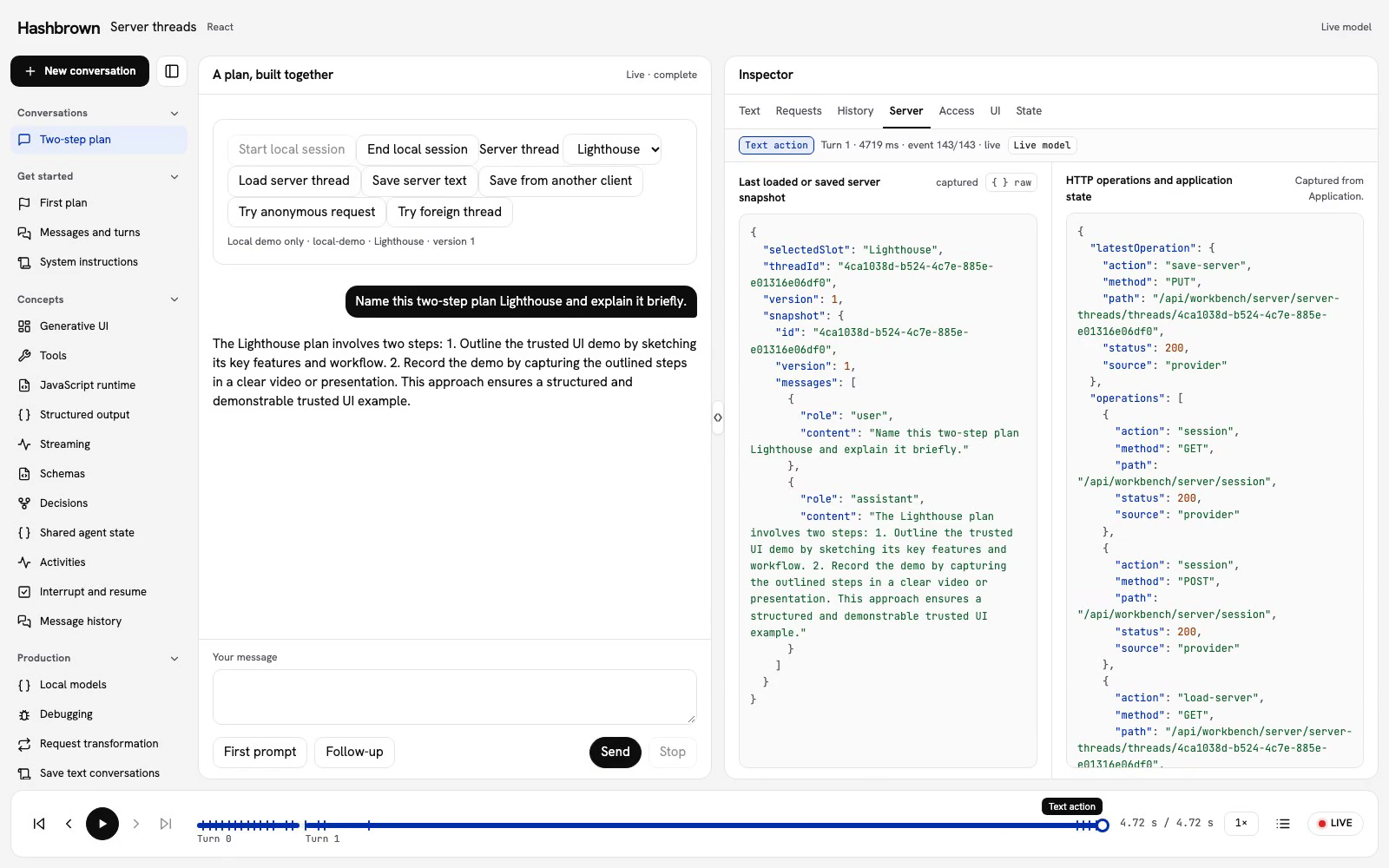
The workbench below replays a recorded run of this lesson.
Load and save completed text, refresh, and recover from a genuine version conflict.
Recorded in the real React workbench with OpenAI and actual Hashbrown text chat. Local demo sessions and process-memory thread storage demonstrate application boundaries; they are not production authentication or durable agent checkpoints. Saves and reloads are explicit. HTTP denials and version conflicts come from the checked server. Unchanged provider events are paced at 20 ms for filming; footage slowed to half speed for readability. Replay makes no requests or writes. No narration. Read the text walkthrough.
This lesson runs only on a local server. Run the example locally.
Let's move our conversation to the server. We'll save Lighthouse, refresh the browser, and ask a follow-up using the saved messages. Then we'll let another client save first and see why the version matters.
Before we start
Use the canonical workbench and run its checked React client. The server owns the session, thread records, and model configuration. The browser owns the visible chat and makes an explicit request to save it.
This example stores completed user and assistant text. A saved conversation does not contain tool calls, generated components, shared agent state, or a paused agent checkpoint. Choose a broader persistence contract when your agent needs those values.
Follow the conversation
- Start a local demo session. The server provisions Lighthouse and Harbor for that session.
- Load Lighthouse before sending the first prompt. The SDK uses the loaded thread ID.
- Ask the model to name the plan Lighthouse. Wait for successful completion, then save the text against the loaded version.
- Refresh the page and explicitly load Lighthouse again. Loading text does not start a model request.
- Ask the follow-up. Inspect the request: it includes the saved exchange and a new run ID.
- Use the competing-client action to make an independent HTTP save. Our browser still remembers the earlier version.
- Save from our browser. The server returns 409 and the unsaved conversation stays visible.
- Reload the server snapshot explicitly to adopt the newer saved version.
The replay uses real OpenAI responses. The demo server stores records in process memory: they survive a browser refresh, but not a server restart. Use database persistence for a deployed application.
Keep identity and history separate
A thread ID identifies the conversation. It does not fetch messages or grant access. Our application loads the snapshot through an owner-scoped route, validates the response, and replaces the actual SDK history before enabling Send.
Each generation gets a fresh run ID. The follow-up uses the same server thread, with the restored user and assistant text in its request. Message IDs are local SDK metadata; this text snapshot does not preserve them.
Loading ends on an assistant message, so it does not ask the SDK to generate another reply. An empty saved thread also loads without generation. A failed load preserves the current conversation and leaves Send unavailable for an unloaded selection.
Save against the version you loaded
The save request contains two application values:
const body = {
  expectedVersion: loaded.version,
  messages: completedText,
};
The repository checks the owner, thread ID, and version in one atomic update. A successful save returns the next version and its saved messages. Keep that returned snapshot only after validating it.
If another client saves first, the version no longer matches. A 409 is useful information: our browser has an older view. Keep the unsaved text, explain what happened, and let the user decide when to reload. Retrying the same write automatically would hide that decision.
The workbench's competing-client action makes an ordinary independent PUT using the last server snapshot. It advances the server version while leaving this browser's loaded version unchanged. The resulting conflict comes from the actual version check.
Save completed text deliberately
Save is enabled only after a fresh, successful generation. Being idle is not enough: an error, cancellation, interrupted run, or output limit must not turn partial text into a completed conversation.
The shared codec accepts at most 40 plain user/assistant messages, 2,000 characters per message, and a 64,000-byte serialized document. It rejects unsupported or oversized content rather than truncating it. Browser and server validate this contract independently.
Loading invalidates the previous generation's save eligibility. Complete another successful reply before saving again. There is no autosave in this example.
Inspect and replay
The Server view pairs the last successfully loaded or saved snapshot with actual HTTP operations. History shows the SDK transcript and lifecycle. Requests shows generation input and decoded events.
Replay follows captured operations and SDK messages without requests or writes. After a refresh, the timeline contains only events observed by the new page; it does not reconstruct the old stream from saved text.
Read the checked source
- React client binds the real SDK to explicit application controls.
- Text codec validates the narrow saved-text format.
- Shared server controller guards requests, versions, replacement, and stale responses.
- Demo server composition supplies the local session and isolated records.
- Application endpoint checks identity, Origin, input, ownership, and admission before streaming.
- Thread repository defines the owner-scoped atomic storage contract.
For deployment, supply your application's verified identity, durable repository, and shared admission policy. Continue with Securing a Public Endpoint.
For a runnable TypeScript/Postgres reference that survives a server restart, see Durable recovery with b4.run. It separates conversation checkpoints, native approval grants, and the application’s accepted plan.