Interrupt and Resume
An interrupt pauses an agent run so a person can supply information or make a decision. Resume returns those answers to the paused interaction. It continues the same user turn rather than inventing a new user message or replaying saved tool calls in the browser.
Use this for approval, missing input, or a choice the application must leave to the user. The server owns the checkpoint and checks what an answer permits. The client owns the form and submits every answer for the pending batch together. An approval permits the next step; it does not prove that step ran or succeeded.
Pause for a person, then resume the interaction
Scroll horizontally to see the full diagram, or expand it.
Read the diagram
An agent pauses an interaction at a checkpoint and sends pending interrupts. The client asks a person for answers, submits the complete batch, and receives the agent continuation after server checks. Approval alone does not establish execution or success.
Return an explicit answer for the whole batch
Use the endpoint and client configuration from the Quickstart. Render the component below inside the existing HashbrownProvider. Your endpoint must be an AG-UI agent that creates interrupts and validates resume decisions. A direct provider adapter does not add approval checkpoints.
This focused component supports one contract only: every interrupt asks for a boolean-object answer { approved: boolean }. Use it only with an agent that guarantees that contract. For mixed schemas, build a separate validated form for each question.
import { useState } from 'react';
import { useChat } from '@hashbrownai/react';

export function ReadingApproval() {
  const chat = useChat({
    system: 'Help with book requests through the agent workflow.',
  });
  const [localError, setLocalError] = useState('');
  const batch = chat.pendingInterrupts;
  function answer(approved: boolean) {
    if (!batch || chat.isResuming || chat.recovery.required) return;
    try {
      chat.resume({
        batchId: batch.id,
        entries: batch.interrupts.map(({ id }) => ({
          interruptId: id,
          status: 'resolved' as const,
          payload: { approved },
        })),
      });
      setLocalError('');
    } catch (error) {
      setLocalError(String(error));
    }
  }
  return (
    <main>
      <button
        type="button"
        disabled={chat.isLoading || !!batch || chat.recovery.required}
        onClick={() =>
          chat.sendMessage({ role: 'user', content: 'Help me request a book.' })
        }
      >
        Start request
      </button>
      {batch && (
        <section>
          {batch.interrupts.map((question) => (
            <p key={question.id}>{question.message}</p>
          ))}
          <button
            type="button"
            disabled={chat.isResuming || chat.recovery.required}
            onClick={() => answer(true)}
          >
            Approve all
          </button>
          <button
            type="button"
            disabled={chat.isResuming || chat.recovery.required}
            onClick={() => answer(false)}
          >
            Deny all
          </button>
        </section>
      )}
      {chat.isResuming && <p role="status">Continuing the same turn…</p>}
      {localError && <p role="alert">{localError}</p>}
      {chat.error && (
        <p role="alert">
          The continuation failed. Check recovery before retrying.
        </p>
      )}
      {chat.recovery.required && (
        <p role="alert">Server recovery or a new thread is required.</p>
      )}
    </main>
  );
}
The start button sends an ordinary request through this same chat instance. The approval controls appear only when the agent pauses that interaction. The displayed batch is the batch submitted by its controls. Never attach an old form’s answers to a newly arrived batch ID.
approved: false is a resolved denial. Cancellation instead uses status: 'cancelled' without a payload. Stopping a running request is different from either answer. For this ordinary resume flow, retry may be possible before acknowledgement; after acknowledgement, failure can require recovery or a new thread. Cold browser recovery has a stricter single-attempt rule. The server must handle duplicate delivery and enforce expiry and ownership independently.
Explore it in the workbench
The workbench below replays a recorded run of this lesson.
Answer a complete approval batch, resume the same turn, and inspect a fresh batch on the next turn.
Recorded in the real React workbench with OpenAI and the actual Hashbrown SDK. The local AG-UI agent maps shared state into instructions and authors state, activity and approval events around unchanged provider text. No browser tools, generated UI schema or executed plan steps. Approval permits another explanation only. The approval store is bounded, expiring and process-local. Unchanged provider events are paced at 20 ms for filming; the normal host adds no delay. Footage slowed to half speed for readability. Replay makes no requests or writes. No narration. Read the text walkthrough.
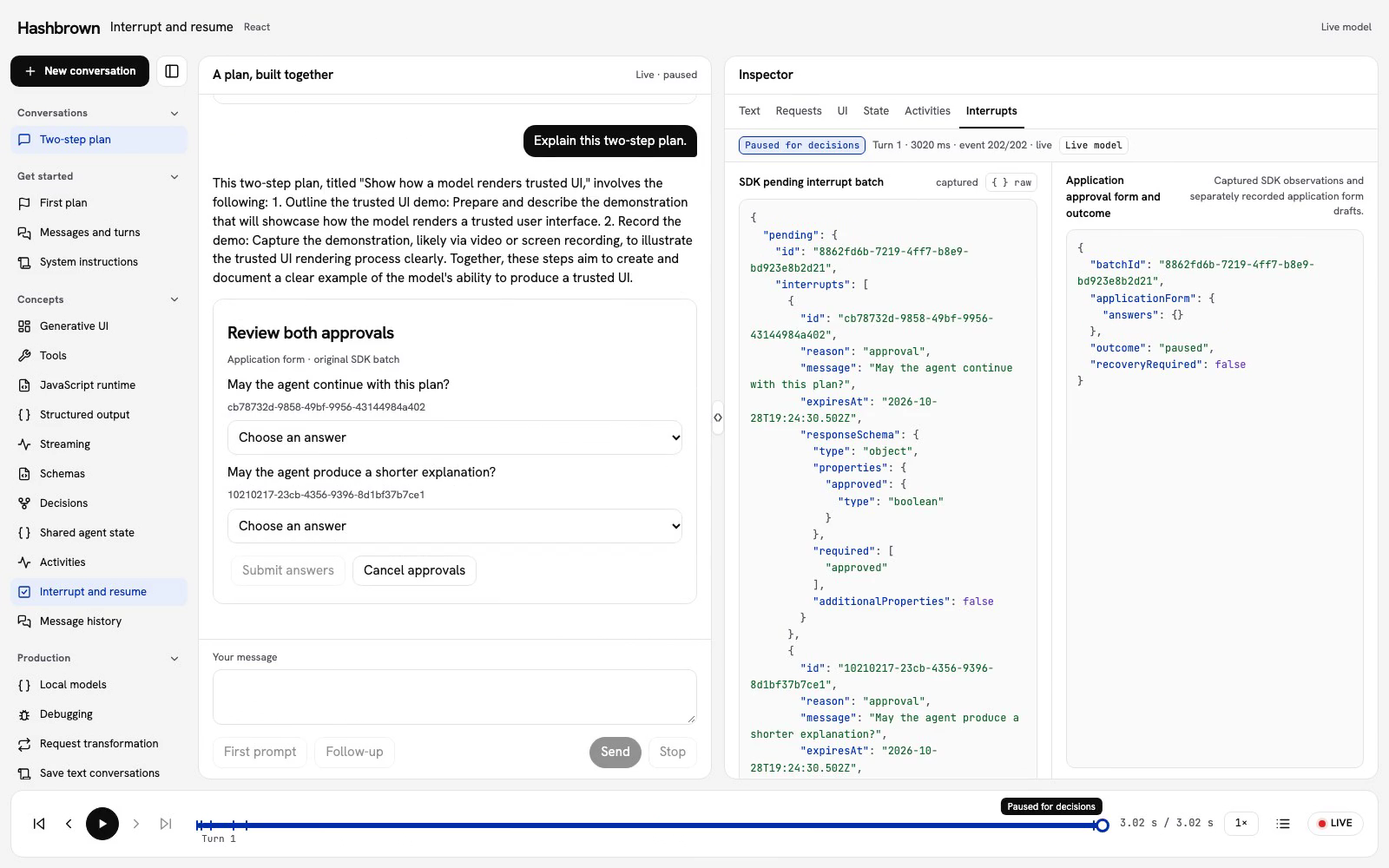
Let's explain the same two-step plan, pause for two approvals, and continue once both answers are ready. The chat keeps the original user turn. Resume sends decisions; it does not add a pretend user message.
Approval in this example permits another explanation. It does not execute either plan step, record a video, or write a file. A later user turn creates a fresh approval batch with fresh form choices.
Use the panel above, or run the workbench on your machine. The replay uses the checked React client and local agent.
The client makes real Hashbrown requests. The local AG-UI agent explicitly maps shared state into model instructions and wraps the provider's streamed text with workflow events. Direct provider adapters do not create these events or approval decisions automatically.
Read the Whole Pending Batch
The agent ends a run with an interrupt outcome. Hashbrown commits its message and state checkpoint, exposes pendingInterrupts, and stops automatic continuation. Read it from chat.pendingInterrupts. It is undefined when no batch is pending.
A pending batch has an opaque local id and an immutable interrupts array. Each interrupt preserves the server's ID, reason, message, responseSchema, expiry, and optional tool, metadata, and subagent fields. Our server asks two questions with the same boolean-object schema:
{
  "type": "object",
  "properties": { "approved": { "type": "boolean" } },
  "required": ["approved"],
  "additionalProperties": false
}
Hashbrown preserves responseSchema as data. Your form must validate answers; the server must validate them again. Hashbrown checks JSON compatibility and batch ownership rather than compiling a JSON Schema validator.
Submit Every Answer Together
The paired inspector shows the SDK batch beside the application form and request outcome. Raw retains the full selected SDK observation.
Keep form drafts attached to the original displayed batchId. Do not replace it with a newer batch ID when submitting an old form. One unanswered question holds up the whole batch.
The workbench builds a complete resume argument from the original batch:
  return {
    batchId,
    entries: batch.interrupts.map(({ id }) =>
      cancel
        ? { interruptId: id, status: 'cancelled' as const }
        : {
            interruptId: id,
            status: 'resolved' as const,
            payload: { approved: answers[id] === 'approve' },
          },
    ),
  };
}
A resolved answer with { approved: false } is a denial. A cancelled entry has status: 'cancelled' and no payload. Cancel approvals submits cancellation for the whole batch; Stop aborts a running request. They have different meanings.
The SDK rejects missing, partial, duplicate, stale, or foreign local batch entries synchronously. The local batch token is not sent over the wire: the endpoint receives the protocol interrupt IDs and decisions. The server independently checks IDs, expiry, payloads, and whether decisions were consumed.
Resume the Same Turn
Call resume once with the complete batch. The SDK claims it synchronously and locks state before scheduling the request. isResuming distinguishes this continuation from an ordinary send. The workbench records resume intent before invoking the SDK, so even an immediate request stays in the original turn.
Our server claims the decisions atomically before delegating. If both answers approve, it asks the model for another brief explanation. A denial or cancellation finishes without another provider call. A later ordinary user message starts a new run and creates a fresh approval batch.
Recover at the Acknowledgement Boundary
Before a matching RUN_STARTED acknowledges resume, a failed attempt can release its claim and leave the batch available to retry. A synchronous validation error also leaves the pending form intact.
After acknowledgement, an error or cancellation can require a new thread. Respect the SDK recovery state and offer New conversation. Clearing messages or reusing the same thread ID does not reset an acknowledged failure.
Pending batches and form drafts are local runtime state, not durable persisted checkpoints. The example's server approval store is bounded, expires after five minutes, and exists only in that process. Production agents need authenticated ownership, durable checkpoints, and their own policy for retries and protected work. This example does not promise exactly-once execution.
Replay Without Resubmitting
Select the paused frame to inspect its original batch and the form choices captured at that moment. The controls are disabled during replay. Return to Live to continue with the current batch; replay never submits another decision.
Continue with Shared Agent State and Message History.
Show Resume Progress
While awaiting answers, isLoading and isResuming are false. Calling resume claims the batch synchronously, sets both flags, and prevents duplicate submissions. The batch stays visible until the server's matching RUN_STARTED arrives.
After that event, the old batch disappears, while isResuming stays true through any new local tools and follow-up runs. Disable submission controls while resuming. A fresh interruption publishes a new batch ID, even if the server reuses its interrupt IDs.
The local batch ID belongs to the runtime. It is not part of shared AG-UI state and is not sent to the server.
State, Tools, and New Input
You may call setState() while awaiting answers. Resume captures the latest committed state and canonical history; state writes lock synchronously when the batch is claimed. State changes alone never resume a run.
While a batch is pending or claimed, ordinary sends, message replacement, and reload are rejected. Resume sends responses to the server; it does not execute saved tool calls locally. A subsequent server result can refer to the original tool-call ID. Only genuinely new eligible calls enter ordinary local execution after a successful run.
Completion hooks defer input changes during a pause or resumed interaction. If input changes from A to B to C, resume still answers A. After the whole interaction succeeds, only C starts a new completion. Another interrupt keeps C deferred; failure or stop does not automatically send C.
Retry, Stop, and Recovery
Before matching RUN_STARTED, configured retries reuse the captured checkpoint and answers. Failure or stop before that event releases the claim, so the same batch can be submitted again if it has not expired. A lost connection does not prove the server never received the request; the endpoint must handle identical resume decisions idempotently.
After matching RUN_STARTED, Hashbrown does not automatically replay the resume. Failure or stop requires a new thread before further requests. Later follow-up runs retain ordinary retries, but terminal failure anywhere in the resumed interaction still requires a new thread. Earlier committed checkpoints and tool effects are preserved.
Hashbrown checks expiration before claiming and immediately before each send. If any interrupt expires, the entire batch remains visible but cannot resume. Start a new thread to continue; this starts a new workflow rather than repairing the expired one.
Changing to a different threadId retires local batch ownership and late callbacks, preserving committed messages/state. Setting the same ID does not reset a pause or recovery requirement. Changing threads does not cancel work on the server.
Restore server-owned history
recovery exposes a local { revision, required } value (a signal in Angular). Capture its revision before an asynchronous authenticated lookup. getRecoveryConfiguration() synchronously returns owned current system text, native tool declarations and forwarded properties/schema without scheduling a run. Pass a compatible server-owned ConversationSnapshot to restoreConversation(snapshot, { expectedRevision }) while idle. Invalid/stale data leaves the runtime unchanged; successful restoration clears obsolete errors and creates fresh local interrupt ownership without network or tool execution. Historical browser tools remain history on restoration and subsequent sends.
Snapshots contain a stable thread ID, canonical native messages, optional shared state and complete interrupts, and configured-system provenance when applicable. Preserve the server's configuredSystemMessageId so the original trusted system overlay is adopted exactly once. Snapshots cannot install handlers, change schemas or replace trusted instructions. A saved local batch token is never authority.
Keep the server's operational disposition separate from this runtime API: installing available history does not authorize another send or decision while the effect is busy or unknown. Invalidate lookup guards on thread changes and disposal, reject unknown envelope versions/statuses, and offer explicit refresh or a deliberate new thread. See the authenticated .NET recovery recipe for retained-history limits, UI guards and protected operator reconciliation.
Native requests retain cancellation text but strip private runtime provenance. After a cold reload, structured/UI recovery cannot prove that this text is a runtime cancellation marker and rejects it if it does not match the configured response schema. Keep recovery blocked or deliberately start a new thread; do not remove messages, infer ownership from their text, or fabricate provenance. Plain-chat recovery retains this text visibly. In the same runtime and thread, exact echoes of locally owned cancellation markers preserve their private projection behavior.
Settle recovered browser work (unreleased)
Published npm SDKs 0.8.3 and NuGet 0.1.0-preview.1 do not contain this workflow. A compatible V2 native recovery read can provide an inert chat.pendingConversationRecovery batch. Its id is fresh local ownership; serverRevision is the durable revision captured by the lookup, separate from chat.recovery.revision used to guard restoration.
Collect one explicit known result or unavailable choice for every original browser call, plus one decision for every genuine protected interrupt. Submit them together through resumeConversationRecovery({ batchId, outcomes, entries }). Do not invoke original browser handlers or call ordinary resume to bypass this batch. Incomplete local input leaves the batch unchanged. Start new form choices when the local pending ID changes.
The first cold continuation has one logical transport attempt. Timeout, disconnect, cancellation, malformed acknowledgement, unknown network failure or a revision conflict requires an explicit authoritative refresh. Do not resend the old batch or generate a replacement request. The refreshed state may be Pending, Busy, Completed or UnknownEffect; a new thread is an explicit separate action.
An unavailable result records uncertainty: the operation may already have occurred. Render the persistent browser-result-unavailable diagnostic as escaped text, including after another reload. It is separate from unstructured-assistant-history and does not require structuredHistory: 'preserve-diagnostics'. See native browser recovery for negotiation, complete settlement and deployment boundaries.
For a runnable TypeScript/Postgres reference that survives a server restart, see Durable recovery with b4.run. It separates conversation checkpoints, native approval grants, and the application’s accepted plan.