Introduction
Hashbrown is an open source framework for building generative user interfaces in React. It connects a model response to the components and behavior your application already owns.
A model can help a user search, summarize, plan, or complete a form. The interface still needs a clear contract: what the model may return, how to display a response while it arrives, and which actions the application permits. Hashbrown gives us APIs for those boundaries.
Start with the result your interface needs
Use text for an answer the user will read. Use a schema when your application needs typed values. Use generative UI when the model should select from your own components and supply their props. Tools let the model request application data or actions through functions you explicitly expose.
For example, a support application might return a status summary, render an order card, and offer a separate Contact support action. The model supplies the response; your component supplies the markup and the action handler.
From a component contract to an interface
- Trusted catalog
Expose component names, descriptions and prop schemas.
- Model response
The model supplies a component selection and JSON values.
- Schema parsing
Hashbrown resolves supported values as they arrive.
- Your component
React or Angular renders the implementation you own.
Build an ordinary application first
The Quickstart walks through a complete small app: a server endpoint, one component, its prop schema, and a button that sends a message. The component is ordinary React code, and the provider credentials remain on the server. You do not need the workbench shell, inspector, or timeline in your product.
Keep rendering separate from applying a change. A generated card is a proposal. Saving data, changing an order, or running a workflow requires the checks and user interaction appropriate to your application.
Explore it in the workbench
The workbench below replays a recorded run of this lesson.
Follow one tool-free request as streamed props become a trusted two-step plan preview.
Recorded in the real React workbench with OpenAI and the actual Hashbrown SDK. The standalone Quickstart and workbench share PlanCard and its registration. No browser tools, acceptance action or application writes. Unchanged provider events are paced at 20 ms for filming; the normal host adds no delay. Footage slowed to half speed for readability. Replay makes no requests. No narration. Read the text walkthrough.
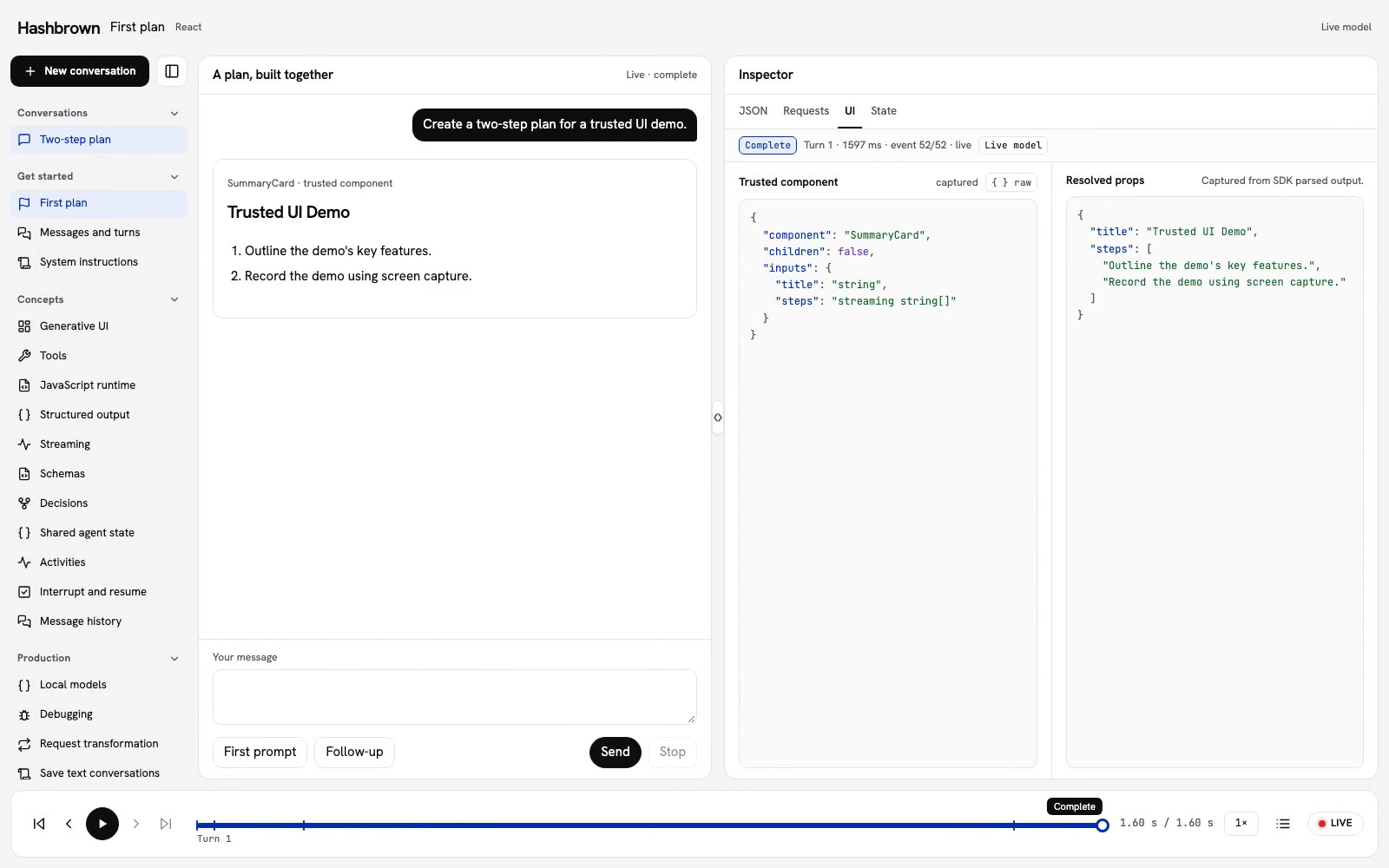
The workbench above uses a two-step plan to make those boundaries visible. Our SummaryCard displays the model's title and steps. In this first lesson, it has no acceptance action and changes no application state.
The conversation workbench surrounds the same implementation with an inspector and bottom timeline. Follow the request, JSON, and resolved component props at the same moment. The two framework versions use their own Hashbrown APIs and renderer.
Keep the same example as we learn
We'll keep the plan as we introduce each capability:
- Messages and turns follows a second request in the same conversation.
- System instructions separates the current user request from the policy our server owns.
- Exposing components adds an explicit Accept plan action.
- Tool calling lets the model read the plan's current application state.
- Structured output returns typed plan data for our own renderer.
Each lesson focuses on one change. We can inspect what the model returned, what Hashbrown rendered, and what our application actually changed.
Continue with the Quickstart, or read How Hashbrown works to follow the request from the browser to the provider and back.