Skillet schemas
A schema is a contract for values: which fields exist, what each field means, and which types are allowed. Hashbrown uses schemas for tool arguments, structured responses, and component inputs. Keeping that contract beside the feature makes the model’s options and the application’s expectations easier to compare.
Skillet is exported as s from @hashbrownai/core. Its schemas also infer TypeScript types, so you can describe a value once and reuse that description in your UI. Use descriptions to explain meaning, constraints to bound values, and ordinary application checks for facts a schema cannot establish, such as whether a delivery date is available.
One schema language, several contracts
Scroll horizontally to see the full diagram, or expand it.
Read the diagram
Skillet schemas describe tool arguments, structured response values, and exposed component inputs. The same definitions infer TypeScript types for application code; they do not establish domain facts.
Describe an application contract
Create reading-schema.ts in an application with @hashbrownai/core installed. This module has no provider or framework dependency.
import { s } from '@hashbrownai/core';

export const readingRequestSchema = s.object('A book request', {
  title: s.string('The requested book title'),
  copies: s.integer('Copies requested', { minimum: 1, maximum: 20 }),
  format: s.enumeration('Preferred edition', {
    paperback: 'A physical paperback edition',
    ebook: 'A digital edition',
  }),
});

export type ReadingRequest = s.Infer<typeof readingRequestSchema>;

export const exampleRequest: ReadingRequest = {
  title: 'Pride and Prejudice',
  copies: 2,
  format: 'paperback',
};
Pass readingRequestSchema as the schema option of useStructuredChat(). The structured output example supplies the complete framework component and Quickstart prerequisites. Use the inferred type for application code; a TypeScript annotation alone does not validate untrusted JSON at runtime.
The copy bound describes allowed values. It cannot tell us whether two copies exist or whether this user can reserve them. Check those facts at the action boundary. If a required field may be unknown, model that possibility explicitly rather than relying on an instruction to produce an invalid object.
Explore it in the workbench
The workbench below replays a recorded run of this lesson.
Inspect the shared plan contract, preview validation and explicit acceptance across two turns.
Recorded in the real React workbench with OpenAI streaming requests and the actual Hashbrown SDK. Unchanged provider events paced at 20 ms for filming. Footage slowed to half speed for readability. Replay reads captured frames and does not make requests or writes. No narration. Read the text walkthrough.
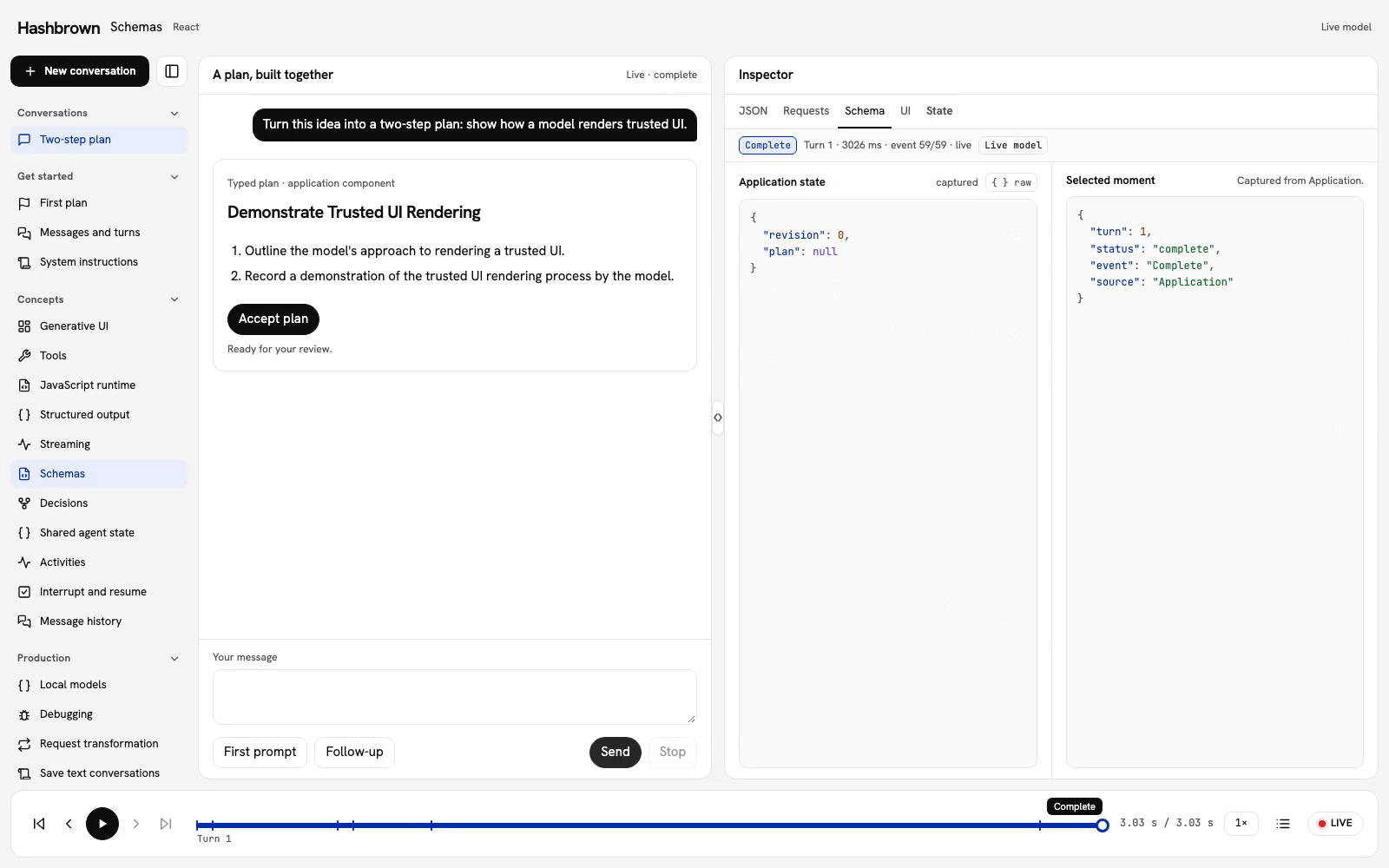
A schema describes the data our application expects. Let’s use the same two-step plan: a title and an array of steps. We can use this contract for typed model output and inspect it beside the values Hashbrown resolves.
Skillet is exported as s from @hashbrownai/core. Its TypeScript API describes response shapes, tool arguments, and trusted component props, including which values can appear while output streams.
Run the workbench
Use the panel above, or run the workbench on your machine.
Describe the plan
Both frameworks and the server use this shared schema:
export const workbenchPlanSchema = s.object('A two-step plan proposal', {
  title: s.string('A concise plan title'),
  steps: s.streaming.array(
    'Exactly two concise steps',
    s.string('A clear action'),
  ),
});
The descriptions tell the model what the fields mean. s.Infer<typeof workbenchPlanSchema> derives the TypeScript response type from this same schema.
The array is streaming, while its step strings are ordinary strings. Resolved items can appear before the response ends. The Streaming lesson also marks the title as a streaming string, so we can compare the boundaries.
Inspect the contract and the preview
The Schema view shows the response contract selected for this lesson. Beside it, Preview validation keeps the parsed preview, application-rule check, and response status separate. A preview can match the plan rules while the response is still in progress; Accept plan remains disabled.
Send the first prompt, review the completed plan, and accept it. Then send the follow-up. The response uses the same contract while the data changes. A schema describes fields; it does not grant permission to change application state.
Keep the complete example close
The checked React client selects the lesson schema and passes it to useStructuredChat(). Structured output explains the full request and explicit acceptance flow.
Choose the fields your interface needs
| Value | Skillet example |
|---|---|
| Text | s.string('The plan title') |
| Whole number | s.integer('The retry count') |
| Number with fractions | s.number('The measured weight') |
| True or false | s.boolean('Whether the item is checked') |
| One fixed value | s.literal('Draft') |
| One of several strings | s.enumeration('Priority', ['low', 'high']) |
| Named fields | s.object('A plan', { name: s.string('Name') }) |
| Repeated values | s.array('Tags', s.string('One tag')) |
An object describes the fields in its shape. If the interface supports different response kinds, give each kind an explicit literal tag:
const responseSchema = s.anyOf([
  s.object('A draft', {
    type: s.literal('Draft'),
    name: s.string('The proposed name'),
  }),
  s.object('A clarification request', {
    type: s.literal('Clarification'),
    question: s.string('What we need to ask the user'),
  }),
]);
Your interface can branch on type. This is useful when the model should ask for missing information instead of inventing a required value. Use s.nullish() as a branch when your contract explicitly permits a nullish value.
Add constraints deliberately
const quantity = s.integer('The retry count', { minimum: 1, maximum: 20 });
const tags = s.array('Tags', s.string('One tag'), { minItems: 1, maxItems: 5 });
const username = s.string('A handle', { pattern: '^@[a-z0-9_]+$' });
Numeric constraints include bounds and multipleOf. Arrays support minItems and maxItems. Strings support pattern and supported format hints. A string's format is forwarded to the provider but is not validated by Hashbrown on the client; validate it in your application when required.
Keep application checks close to the action they protect. The workbench separately validates a nonempty title of at most 120 characters and exactly two nonempty steps of at most 200 characters before Accept plan. That makes the difference between the model's response contract and the application's accepted values visible. A schema does not establish ownership, permission, inventory availability, or successful completion of a run.
Use another schema library
Hashbrown also accepts supported Standard JSON Schema objects through the ~standard specification. It normalizes those schemas to Skillet for parsing and validation. Unsupported keywords throw; a schema accepted by another library may use constructs outside that subset.
Use s.InferSchemaInput<T> and s.InferSchemaOutput<T> when a reusable type must support both Skillet and Standard JSON Schema. For explicit conversion, use s.fromStandardJsonSchema(schema, { mode: 'input' }) or output mode as appropriate. See the Skillet reference for supported constructs and signatures.
Next steps
Use Structured output to generate and review the two-step plan with this schema. Use Exposing components to validate generated component props, or Tool calling to describe arguments for an application function.