Streaming
Streaming lets an interface show useful output while the response is still arriving. There are two boundaries to think about: the provider sends text chunks, and Hashbrown resolves values from those chunks according to your schema. A network chunk is rarely a complete JSON document.
Use streaming strings for growing text and streaming arrays for lists whose completed items are useful early. Keep a stable layout for missing values and label the result as a preview. A visible field can still belong to a run that later fails, stops, or reaches an output limit; rendering it must not commit a business action.
A preview can arrive before a run succeeds
Scroll horizontally to see the full diagram, or expand it.
Read the diagram
Provider text chunks feed incremental parsing and typed previews. The run can later finish or fail. Successful completion still needs finish-reason and domain checks before application use; errors leave the previous application value in place.
Show a growing reading list
Use the endpoint and client configuration from the Quickstart. Render the component below inside the existing HashbrownProvider. The endpoint must preserve the client response schema and use a provider that supports it.
import { useStructuredChat } from '@hashbrownai/react';
import { s } from '@hashbrownai/core';

const readingSchema = s.object('A reading list', {
  introduction: s.streaming.string('A short explanation of this list'),
  titles: s.streaming.array(
    'Recommended book titles',
    s.string('One complete title'),
  ),
});

export function ReadingRequest() {
  const chat = useStructuredChat({
    system: 'Recommend three classic novels. Return the reading list schema.',
    schema: readingSchema,
  });
  return (
    <main>
      <button
        type="button"
        disabled={chat.isLoading}
        onClick={() =>
          chat.sendMessage({
            role: 'user',
            content: 'Suggest classics for a new book club.',
          })
        }
      >
        Generate
      </button>
      {chat.isLoading && <p role="status">Preview — still generating</p>}
      {chat.error && <p role="alert">The request failed.</p>}
      {chat.messages.map((message, index) =>
        message.role === 'assistant' ? (
          <article key={index}>
            <p>{message.content?.introduction}</p>
            <ul>
              {(message.content?.titles ?? []).map((title, i) => (
                <li key={i}>{title}</li>
              ))}
            </ul>
          </article>
        ) : null,
      )}
    </main>
  );
}
The introduction can grow before its closing quote. The array publishes resolved title strings as they become available. The UI renders a preview directly from typed messages, without parsing individual network chunks.
Provider chunk sizes vary. Several fields may resolve together. Use ordinary strings when incomplete text is unhelpful, and avoid triggering effects or writes simply because a field appeared. See Skillet schemas for other streaming boundaries.
Explore it in the workbench
The workbench below replays a recorded run of this lesson.
Follow raw JSON into a streaming title and resolved plan steps, then accept and revise the plan.
Recorded in the real React workbench with OpenAI streaming requests and the actual Hashbrown SDK. Unchanged provider events paced at 20 ms for filming. Footage slowed to half speed for readability. Replay reads captured frames and does not make requests or writes. No narration. Read the text walkthrough.
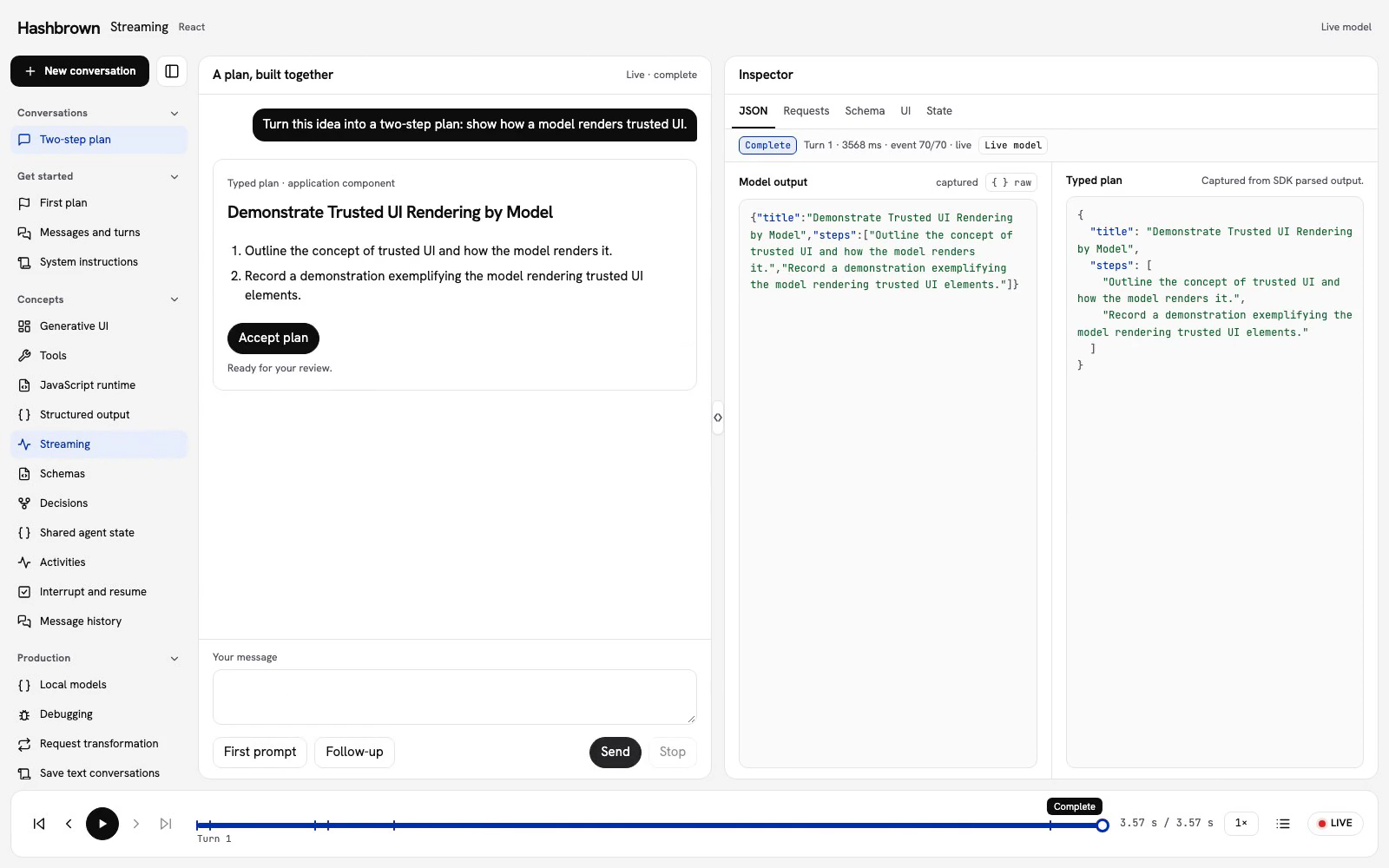
We do not need to wait for the whole two-step plan before showing useful feedback. Let’s stream the title, then show steps as their values resolve. We’ll keep Accept plan disabled until the response finishes successfully.
I use the same conversation in Structured output. Here, we’ll slow down and follow the boundary between raw text, parsed values, and application state.
Run the workbench
Use the panel above, or run the workbench on your machine.
Choose what can appear early
The streaming lesson uses this shared response schema:
export const workbenchStreamingPlanSchema = s.object(
  'A two-step plan proposal',
  {
    title: s.streaming.string('A concise plan title'),
    steps: s.streaming.array(
      'Exactly two concise steps',
      s.string('A clear action'),
    ),
  },
);
The title uses s.streaming.string, so the interface can display it before its closing quote arrives. The steps use s.streaming.array around ordinary strings. Each step can appear once its string value resolves; it does not need to wait for the entire array.
useStructuredChat() parses the incoming response with this schema. Our component renders typed content as it changes. We do not call JSON.parse() on each network chunk.
Follow one response
Keep JSON selected. The center feed shows the plan preview, and the inspector's Typed plan section lists the SDK's resolved values.
| Moment | Preview | Application state |
|---|---|---|
| Waiting for output | No new plan | Unchanged. |
| Title string is arriving | Partial title | Accept plan remains disabled. |
| Step strings resolve | Resolved steps appear | Still unchanged during generation. |
| Successful completion and validation | Reviewable two-step plan | Accept plan becomes available. |
| Explicit acceptance | The same plan | Revision advances from 0 to 1. |
Provider chunk sizes and timing vary. Several values may arrive together. The replay uses real React SDK requests and OpenAI output, with unchanged provider events paced at 20 ms for filming and footage slowed to half speed for readability. It does not script provider output; the normal host adds no event delay.
Follow the second turn
Accept the first plan, choose Follow-up, and send “Make the second step shorter.” The browser tool reads the accepted plan before the model proposes a revision. The first step stays the same; the second becomes shorter.
Use the bottom player to revisit Streaming JSON, Parsed output, and Plan accepted. The chat, JSON, and state follow the same captured moment. Raw events puts every frame on the scrubber. Replay does not call the model, execute a tool, or accept a plan.
Keep previews separate from writes
A resolved field is useful feedback, but it does not prove that the document is complete or that the run will succeed. The application checks a nonempty title, exactly two bounded steps, the current turn and revision, and successful completion before accepting.
Stop invalidates acceptance immediately. A failed, cancelled, truncated, or stale response cannot replace the accepted plan. Stopping a client request does not undo work a server or tool has already performed.
Pick a streaming boundary deliberately
Use streaming strings for text that is useful while it grows. Use streaming arrays for collections that can appear progressively. Use streaming objects when the interface can handle fields becoming available separately. An ordinary object can resolve once its required field values are present, even before its closing brace; that is still a preview of the full document.
For a finite local source without a provider, use the JSON Parser recipe. For a form, continue with Natural language forms.
Read the checked React client, or return to Skillet schemas and Exposing components.