JavaScript runtime
The JavaScript runtime evaluates a script in a separate QuickJS context and returns its result. It is useful when a calculation or transformation is easier to express as code, including code submitted by a model through a JavaScript tool. You can learn the execution boundary with an ordinary application-owned script first.
The context has no browser window, document, or fetch. Host functions are capabilities you explicitly provide. Keep them narrow, validate their arguments in the handler, and bound their work. A runtime deadline interrupts JavaScript evaluation; it does not roll back a host side effect or impose a memory limit.
QuickJS uses only the capabilities you expose
Scroll horizontally to see the full diagram, or expand it.
Read the diagram
The application submits a script to a fresh QuickJS context. A script may call an explicitly registered host function. The host validates and returns its result, then QuickJS returns the evaluation result or an error wrapper. Host side effects are not rolled back by a runtime timeout.
Evaluate a calculation before adding host access
Use an existing React application with @hashbrownai/react installed and a bundler that can load Hashbrown’s QuickJS dependency. This example requires no model, API key, endpoint, or workbench session. It evaluates a fixed script with no host capabilities.
import { useState } from 'react';
import { useRuntime } from '@hashbrownai/react';

export function ReadingEstimate() {
  const runtime = useRuntime({ timeout: 1_000, functions: [] });
  const [output, setOutput] = useState('');
  const [running, setRunning] = useState(false);
  async function estimate() {
    if (running) return;
    setRunning(true);
    try {
      const response = await runtime.run(
        '({ books: 3, totalMinutes: 3 * 20 })',
        new AbortController().signal,
      );
      setOutput(JSON.stringify(response));
    } catch (error) {
      setOutput(String(error));
    } finally {
      setRunning(false);
    }
  }
  return (
    <main>
      <button type="button" disabled={running} onClick={estimate}>
        Estimate reading time
      </button>
      <pre aria-live="polite">{output}</pre>
    </main>
  );
}
The last expression is the script result. A successful response wraps it in result; evaluation errors use an error wrapper, and initialization or host failures may reject the promise. Showing the whole wrapper here makes that distinction visible. Check it before consuming the result in application logic.
Each call creates a fresh QuickJS context, so variables do not persist between calls. Add host functions only when the calculation needs current application data. The workbench below demonstrates that next step with an explicitly validated read capability and cancellation.
Explore it in the workbench
The workbench below replays a recorded run of this lesson.
Run visible JavaScript against the plan, inspect actual host calls and recover from errors.
Recorded with actual Hashbrown React runtime APIs and genuine QuickJS execution. The scripts are application-owned; there is no model or provider request and no simulated JSON streaming. Each run uses a fresh context. The host validates arguments explicitly. Estimates leave the plan unchanged. Footage is slowed to half speed for readability. Replay executes no scripts, host functions, requests or application writes. No narration. Read the text walkthrough.
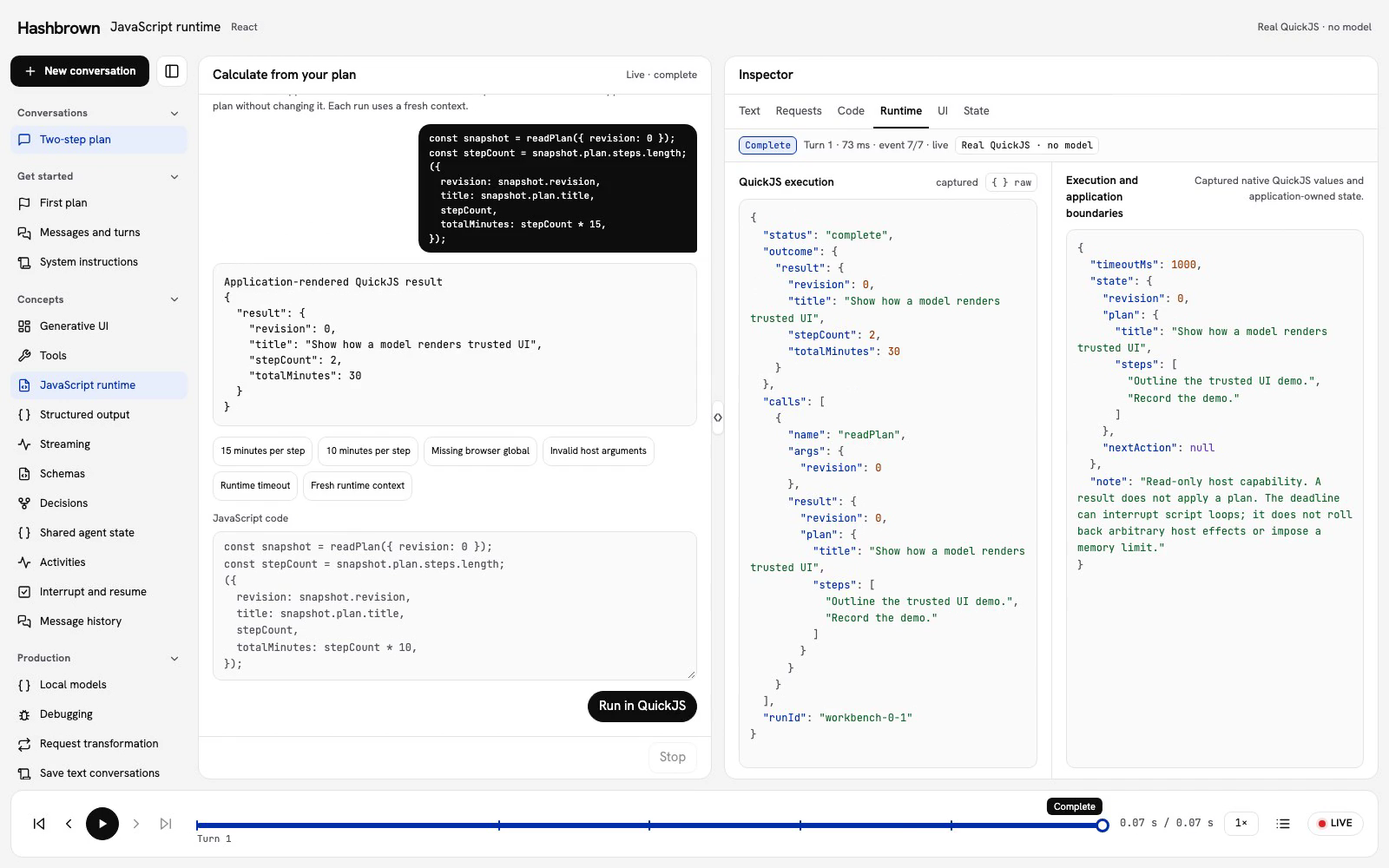
Let's estimate how long our plan will take. We have two steps. At 15 minutes per step, that's 30 minutes. Change the estimate to 10 minutes per step and run it again: 20 minutes. The plan hasn't changed. We've calculated a result from it.
Run the example
In the Live tab above, start with 15 minutes per step, then choose Run in QuickJS. Next, choose 10 minutes per step and run again.
These are application-owned scripts running through the real Hashbrown React runtime API. There is no model or provider request in this lesson. Code doesn't stream into a generated component. The workbench captures the submitted source, actual host calls, and the result or error as each occurs.
Use Code to inspect the script, Runtime to inspect execution, and State to compare the application-owned plan. The bottom player moves through captured moments. Replay executes no scripts, host functions, requests, or application writes.
Give JavaScript a narrow capability
QuickJS runs JavaScript in a separate context. It doesn't have your browser's document, window, or fetch. We explicitly expose one function, readPlan, so the script can read a detached snapshot of the current plan.
The handler executes in your host application, outside QuickJS. It checks that the arguments contain exactly one nonnegative integer revision, that it matches the current application revision, and that the plan is valid. It then copies the plan. The script cannot use this function to apply a change.
The schema describes the function to the runtime and to a model when you use a JavaScript tool. It does not automatically validate arguments or results. Keep validation in the handler.
Start with the React Quickstart, then compare the complete native client and shared host contract. Call hooks at the top level of your React component or custom hook.
The client creates the native runtime with useRuntimeFunction and useRuntime. This excerpt uses the workbench's checked schemas and session controller:
const read = useRuntimeFunction({
  name: 'readPlan',
  description: 'Read the application-owned plan without changing it.',
  args: workbenchJavaScriptReadPlanSchema,
  result: workbenchJavaScriptPlanResultSchema,
  handler: async (args, signal) => session.readPlan(args, signal),
  deps: [session],
});
const runtime = useRuntime({ functions: [read], timeout: 1_000 });
The session controller owns the current run, validates the host call, forwards cancellation and captures plain values. It rejects work from an inactive conversation or an old run. The full client shows how the session and runtime are connected.
Submit the exact script
The first script reads the plan and calculates its estimate:
const snapshot = readPlan({ revision: 0 });
({
  revision: snapshot.revision,
  title: snapshot.plan.title,
  stepCount: snapshot.plan.steps.length,
  totalMinutes: snapshot.plan.steps.length * 15,
});
The host handler is async. Inside the script, readPlan(...) appears synchronous: the QuickJS bridge waits for it before continuing. The final expression supplies the result; this is a script, so don't add a top-level return.
const response = await runtime.run(code, signal);A successful evaluation returns a wrapper such as:
{
  "result": {
    "revision": 0,
    "title": "Show how a model renders trusted UI",
    "stepCount": 2,
    "totalMinutes": 30
  }
}
Check the wrapper before using the value. QuickJS evaluation errors return an error wrapper; initialization or host failures can also reject the promise. The workbench handles both. A result is application-rendered data, not a model reply or an applied plan.
Try a failure, then recover
Choose Missing browser global and run document.title. QuickJS reports a missing browser global. Next, Invalid host arguments supplies a string instead of an integer revision. Our host handler rejects it explicitly.
Choose the estimate again. It still returns 30 minutes. A failed evaluation doesn't prevent the next run, and application state remains at revision zero.
The extra presets let you interrupt a loop and check context lifetime. Each call to runtime.run creates a new QuickJS runtime and context. Variables do not persist between runs. Keep application data in your application and expose only the functions each script needs.
Bound execution and handle cancellation
The example configures a 1,000 ms runtime deadline and forwards an AbortSignal to run. The SDK combines that signal with its deadline and passes it to exposed handlers. Forward it again when a handler calls cancellable operations such as fetch.
QuickJS checks interruption while evaluating JavaScript, including loops. Initialization also consumes the deadline. A caller's timer-based signal depends on the browser event loop; it cannot reliably interrupt synchronous code before the event loop runs. Keep the runtime deadline bounded.
Timeouts don't forcibly stop arbitrary host code, roll back side effects, or impose a memory limit. Keep handlers narrow and bounded. In this example, Stop, navigation and disposal invalidate the run so a late outcome cannot replace the current conversation.
Let a model submit code
Once direct execution is clear, useToolJavaScript can wrap a runtime as a chat tool. Create a separate runtime for that integration: the workbench's session.readPlan() handler is bound to explicit Run actions and cannot be reused unchanged by a model tool.
Use the shared readWorkbenchJavaScriptPlan(args, application) validator in your model-facing host handler. Read a fresh application snapshot at invocation, forward the model request's cancellation signal, and reject callbacks from inactive or superseded requests. The read-only validator checks the revision and copies the plan; your request lifecycle owns cancellation and origin checks.
Add the returned JavaScript tool to your chat's tools collection, using tools and your existing provider endpoint. That version requires a model; the direct workbench doesn't. The model receives the exposed function descriptions and type signatures, submits a script, and receives the actual result or error wrapper.
Start with read-only functions. Add mutation capabilities only when their handlers can enforce your application's validation, authorization and resource limits. A sandbox doesn't replace those checks.
Next steps
- Expose tools to read application data or perform checked actions.
- Use structured output when the task needs typed data rather than code execution.
The conversation workbench guide explains the inspector, keyboard controls, and read-only playback.