Tool calling
A tool is an application function a model can ask to call. Its name, description, and argument schema tell the model when to use it. Your handler supplies the actual result, and the model can use that result in its next request.
Use tools when an answer depends on current application data or a checked action. A model cannot infer today’s inventory from its training data. Give it a focused way to read inventory instead of pasting every product into every prompt. Keep reads separate from writes so a useful lookup does not also change application state.
A tool connects the model to application code
Scroll horizontally to see the full diagram, or expand it.
Read the diagram
A client sends tool descriptions with a request. The model asks for a named tool with arguments. The client calls its browser handler, receives application data, and sends that result for the next model response.
Give the assistant a current value
Use the endpoint and client configuration from the Quickstart. Render the component below inside the existing HashbrownProvider.
Here the application owns a selected book. The read-only tool returns that selection when the model needs it. Returning a detached value keeps the tool result focused; no workbench store or recording helper is needed.
import { useChat, useTool } from '@hashbrownai/react';

export function ReadingAssistant() {
  const selectedBook = 'Pride and Prejudice';
  const readSelectedBook = useTool({
    name: 'readSelectedBook',
    description: 'Read the title of the book currently selected in the app.',
    handler: async () => ({ title: selectedBook }),
    deps: [selectedBook],
  });
  const chat = useChat({
    system:
      'Use readSelectedBook before answering questions about the selected book.',
    tools: [readSelectedBook],
  });
  return (
    <main>
      <button
        type="button"
        disabled={chat.isLoading}
        onClick={() =>
          chat.sendMessage({
            role: 'user',
            content: 'Who wrote the selected book?',
          })
        }
      >
        Ask about this book
      </button>
      {chat.error && <p role="alert">The request failed.</p>}
      {chat.messages.map((message, index) =>
        message.role === 'assistant' ? (
          <p key={index}>
            {typeof message.content === 'string'
              ? message.content
              : JSON.stringify(message.content)}
          </p>
        ) : null,
      )}
    </main>
  );
}
The model chooses whether to call a tool; the system instruction makes the lookup part of this feature’s expected behavior. For tools that accept arguments, add a schema. Forward the handler’s AbortSignal to cancellable I/O. Enforce access to remote data on the server even when the browser tool initiates the lookup.
Explore it in the workbench
The workbench below replays a recorded run of this lesson.
Follow readContext from browser tool to continuation, then read the accepted plan in the second turn.
Recorded in the real React workbench with OpenAI requests, browser tools, Hashbrown streaming, and application state. Footage slowed to half speed for readability. Replay reads captured frames. No narration. Read the text walkthrough.
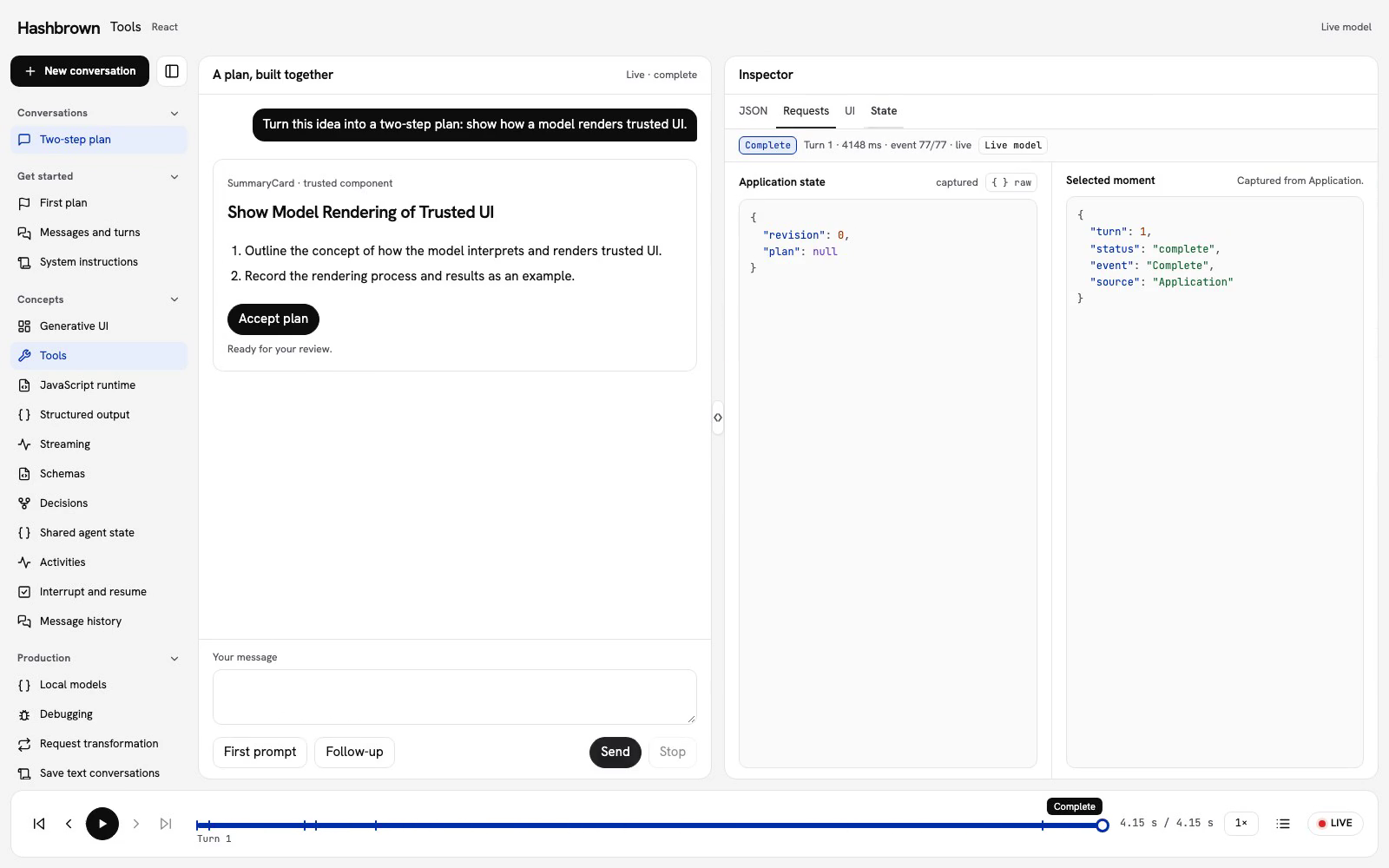
Our two-step plan has an accepted version and a revision number. Before proposing a change, the model needs to read both. Let’s give it one small browser tool: readContext.
The same conversation appears in Generative UI. In this lesson, we’ll follow the request, the tool result, and the continuation that produces the card.
Run the same conversation
Use the panel above, or run the workbench on your machine.
The replay uses this checked React client with real provider requests. The local server keeps credentials, instructions, tools, and response schema on the server. Refresh clears the in-memory conversations and accepted plan.
Read application state
useTool() describes a function the model can call. This handler reads the current application snapshot. Recording the result makes it inspectable; reading context does not change the plan.
const readContext = useTool({
  name: 'readContext',
  description:
    'Read the current accepted plan and application revision. This tool never changes state.',
  handler: async () => {
    const result = store.getSnapshot().application;
    store.record('tool', { name: 'readContext', result });
    return result;
  },
  deps: [store],
});
The React version uses deps to keep handler dependencies current; the Angular version reads the session store inside its handler. Both pass this tool in the tools collection supplied to useUiChat().
Follow the round trip
- Send the first prompt. The server streams a
readContextcall. - Hashbrown runs the browser handler. Its result contains
revision: 0andplan: null. - Hashbrown sends that result in a continuation request. The model now has the context it needs to propose a plan.
- Review the card and select Accept plan. This explicit user action advances application state to revision
1. - Send the follow-up. The next tool result contains revision
1and the accepted plan.
Select Requests to see each request and tool result in a table grouped by turn. Tool calls sit under the request that called them. Select a tool row to see its Call and Result, or select the request to see Raw request (exactly as sent) and Response (every streamed event).
Keep reads and writes deliberate
A handler runs when the model calls it. Keep a read like readContext separate from a write like accepting the plan. A schema describes values; application code decides whether an action is allowed.
The workbench checks the current turn, application revision, successful completion, and plan rules before accepting. A cancelled or failed response cannot be accepted. Historical playback is read-only, including when you revisit a tool result.
For a remote write, enforce identity, authorization, and validation on the server. See Securing a public endpoint.
Tool options and arguments
This tool needs no arguments. Add schema when the model must supply values, and validate application rules inside the handler. Pass the provided AbortSignal to any asynchronous work that supports cancellation.
UseToolOptions
| Option | Type | Required | Description |
|---|---|---|---|
name | string | Yes | The name of the function that the LLM will call |
description | string | Yes | Description of what the function does |
schema | s.SchemaInput | No | Schema defining the function arguments |
handler | Function | Yes | The function to execute when called |
deps | React.DependencyList | Yes | Dependencies used to memoize the handler; pass like you would to useCallback |
Schema Inputs
The schema option accepts:
- Skillet schemas (
s.string,s.object, etc.) - Standard JSON Schema objects (the
~standardspec, e.g. Zod/ArkType) - Raw JSON Schema objects
Standard JSON Schema inputs are normalized to Skillet (draft-07) before streaming and validation. Unsupported keywords throw at runtime.
API Reference
Handler Signatures
With input Arguments:
handler: (input: s.InferSchemaInput<Schema>, abortSignal: AbortSignal) =>
  Promise<Result>;
Without input Arguments:
handler: (abortSignal: AbortSignal) => Promise<Result>;Server-Executed Tool Calls
Not every tool the model calls runs in the browser. An agent server can
execute its own tools and stream only the call and its result to Hashbrown.
Those calls appear on the assistant message as serverToolCalls, a
display-only list that Hashbrown never executes. Each entry carries the tool's
name, its toolCallId, a status, and args: the arguments resolved so
far, growing as the server streams them, or null before any JSON has parsed.
| Status | Meaning |
|---|---|
inProgress | Argument deltas are still arriving; args may be partial |
executing | The arguments are complete; the server is running the tool |
complete | The server reported the tool's result |
Server calls also describe themselves. These fields are optional, and a server sends only the ones it knows:
| Field | Meaning |
|---|---|
outcome | How the call ended: success, failure, denied or cancelled |
label | A short, human-readable description of what the call is doing or did |
icon | A generic icon name, such as search |
kind | provider when the model provider ran the tool, server when the agent server did |
builtin | The provider built-in tool, such as web_search |
queries | The queries the call ran, such as search terms |
sources | The sources the call produced: id, kind, title, and optionally href |
error | Why the call failed: { message, code? } |
timing | { startedAt, settledAt? } in epoch milliseconds |
parentToolCallId | The id of the tool call that spawned this one |
status stays inProgress, executing or complete, and a settled call is
always complete. outcome says how it ended:
| Outcome | Meaning |
|---|---|
success | The call completed |
failure | The call failed; result is rejected with { message, code? } |
denied | The call was not allowed to run |
cancelled | The call was cancelled before it finished |
A provider call is never dispatched to a client tool, even one with the
same name.
The b4.step Contract
An AG-UI server describes its tool calls by sending a b4.step step record
(version 1) in one of two carriers: the metadata['b4.step'] key on the
tool-call events, or a CUSTOM event named b4.step. Hashbrown merges the
records into the matching serverToolCalls entry, so any server that emits
b4.step, such as a B4.run agent, has its steps
appear automatically, with no client code to add. Servers that do not emit it
keep working: the fields are simply absent.
Display Tool Steps
getServerToolCallLabel and groupServerToolCalls provide pure display data.
They render no components and preserve original calls and sources. Application
callbacks override producer labels; missing or invalid wording falls back to a
bounded lifecycle label without exposing arguments or results.
import {
  getServerToolCallLabel,
  groupServerToolCalls,
  type ServerToolCallLabelOverrides,
  type UiAssistantMessage,
} from '@hashbrownai/react';

const labels: ServerToolCallLabelOverrides = {
  lookup: {
    label: (call) =>
      call.status === 'complete' ? undefined : 'Checking context…',
    group: (calls) => `Checked context ${calls.length} times`,
  },
};

function stepRows(answer: UiAssistantMessage<never>) {
  return groupServerToolCalls(answer.serverToolCalls ?? [], {
    labels,
    exclude: ['task', 'writeTodos'],
  }).map((row) => ({
    item: row,
    label:
      row.kind === 'group' ? row.label : getServerToolCallLabel(row, labels),
  }));
}
Only adjacent successful, complete calls with matching name, kind, built-in, provider identity, and parent call can group. Open, failed, denied, cancelled, or excluded calls remain individual rows and break groups. The exclusions above are application policy: no tool names are hardcoded by the helper. Groups keep all original calls, and collect sources by ID with the first occurrence winning.
formatDuration, noFlashRemaining, NO_FLASH_MS (300 ms), and
ELAPSED_TICK_MS (one second) are also available from
@hashbrownai/react. These are optional caller presentation policy.
noFlashRemaining(startedAt, now) computes a remaining delay; it never reads a
clock, starts a timer, hides a row, or discards calls. Both timestamps must use
the same clock. Skip the delay for restored history or unknown timing. If your
application refreshes elapsed labels, it owns the clock and scheduling; the
one-second constant does not install a timer. formatDuration(undefined) leaves
unknown duration unknown. See turn summaries for explicit turn-clock options.
Citations
When the answer cites its sources, the assistant message carries citations.
Each citation's sourceId is the id of a source on one of the message's
server tool calls, or of the message's own sources. Alongside quote, a
citation may carry block and, only when the provider gives true offsets,
start and end. Some providers also require an attribution to be shown
with the answer; each one has mustRender: true, so show it unmodified. Show
citations clearly and make them clickable.
Collect turn sources separately from required provider attribution:
import {
  groupTurns,
  collectTurnSources,
  collectTurnAttributions,
  type UiChatMessage,
} from '@hashbrownai/react';

function answerAnnotations(messages: readonly UiChatMessage<never>[]) {
  return groupTurns(messages).map((turn) => ({
    sources: collectTurnSources(turn),
    attributions: collectTurnAttributions(turn),
  }));
}
collectTurnSources walks assistants in order, visiting each answer's own
sources before its server-call sources. It deduplicates by ID and preserves the
first original source object. collectTurnAttributions keeps separate records
for every attribution, including duplicates, with the owning
assistantMessageId. Render each required attribution beside that answer,
unmodified, at full width, without link tracking. Preserve provider HTML and
widget tokens verbatim. Use trusted provider/backend data and the provider's
supported rendering integration; the collector does not sanitize, interpret,
or authorize markup. A deduplicated source list does not replace attribution.
Because args resolve progressively, a component can paint from a server
call before it finishes, the way it does for streaming text.
export function Answer({ message }: { message: UiAssistantMessage<never> }) {
  return (
    <>
      {message.serverToolCalls?.map((call) =>
        call.name === 'render' && call.args ? (
          <Draft key={call.toolCallId} args={call.args} />
        ) : null,
      )}
      {message.ui}
    </>
  );
}
Tools you register with useTool keep appearing in
toolCalls exactly as before; only calls with no matching client tool land in
serverToolCalls.
Next steps
Read the complete React client, or return to the workbench. Continue with Structured output to use the same tool with typed plan data, or Generative UI to focus on the trusted component.
Connect tools to native subagents
Native AG-UI subagents can expose which invocation requested a tool and which invocation produced its result. Import SubagentRun from @hashbrownai/react to type the records exposed by the chat's subagents property (a readonly array in React, a signal of a readonly array in Angular). Plain, structured, and UI chat share this projection; see Activities for reactive grouping examples and lifecycle states.
import type { SubagentRun, UiChatMessage } from '@hashbrownai/react';

function callsRequestedBy(message: UiChatMessage<never>, run: SubagentRun) {
  return message.role === 'assistant'
    ? (message.serverToolCalls ?? []).filter(
        (call) => call.subagentRunId === run.subagentRunId,
      )
    : [];
}
An assistant message's subagentRunId identifies its producer. Each projected tool call's subagentRunId identifies the requester; resultSubagentRunId independently identifies the result producer. A child can request a tool that the parent or another child executes. When a result exists and resultSubagentRunId is absent, its producer is the parent; do not inherit the requester's ID. An absent result is not evidence that the parent executed anything. Compare opaque IDs directly, including empty strings.
The producer supplies parentSubagentRunId, parentToolCallId, and parentMessageId when it can link the child to its enclosing invocation, spawning call, and message. Reusable names are labels, not invocation IDs. Hashbrown does not orchestrate these agents, infer tool success from a child finishing, or create per-child shared state. A child error does not settle tool outcomes or fail the whole run.
Suspended children can appear as awaiting; approval handling still belongs to pendingInterrupts and resume(). A resume acknowledgement resolves the answered waits without proving tool execution or child completion, even if a subsequent continuation uses a new ID or fails. Native snapshots retain message/result provenance; restored lifecycle details are unknown unless explicit retained interrupts establish a wait.