System instructions
System instructions describe the assistant’s job, relevant context, and response expectations across turns. A user message asks for the work in the current turn. Keeping those roles separate makes instructions easier to test and keeps an end user’s text from becoming trusted application policy.
Start with a specific task and a small amount of relevant context. Add constraints when examples show they are needed. Browser configuration is useful for feature behavior, but policy your application relies on belongs in your endpoint. Instructions guide a model; authentication, authorization, and validation must still be enforced by code.
The endpoint owns trusted policy
Scroll horizontally to see the full diagram, or expand it.
Read the diagram
The browser sends a user request and feature guidance to the endpoint. The endpoint combines the validated request with its own trusted policy before calling the provider. The endpoint must enforce access checks independently of model instructions.
Give a feature one clear job
Use the endpoint and client configuration from the Quickstart. Render the component below inside the existing HashbrownProvider.
This example keeps feature guidance fixed and sends the request as a user message. Try an ordinary request, a vague request, and an unrelated request when evaluating the instruction.
import { useChat } from '@hashbrownai/react';

export function ReadingGuide() {
  const chat = useChat({
    system:
      'Help readers choose a classic novel. Ask one question when preferences are unclear. Give a short explanation and do not claim to reserve books.',
  });
  return (
    <main>
      <button
        type="button"
        disabled={chat.isLoading}
        onClick={() =>
          chat.sendMessage({
            role: 'user',
            content: 'Suggest a short classic novel for our book club.',
          })
        }
      >
        Ask
      </button>
      {chat.isLoading && <p role="status">Waiting for a reply…</p>}
      {chat.error && (
        <p role="alert">The request failed. Check the endpoint.</p>
      )}
      {chat.messages.map((message, index) =>
        message.role === 'user' || message.role === 'assistant' ? (
          <p key={index}>
            {message.role}:{' '}
            {typeof message.content === 'string'
              ? message.content
              : JSON.stringify(message.content)}
          </p>
        ) : null,
      )}
    </main>
  );
}
For server-owned policy, normalize the request before passing it to the adapter. This complete helper requires @ag-ui/core in the server project. Call it with an authenticated, validated RunAgentInput and a prompt selected by your endpoint; the browser must not choose the trusted policy.
import type { RunAgentInput } from '@ag-ui/core';

export function withReadingPolicy(input: RunAgentInput): RunAgentInput {
  return {
    ...input,
    messages: [
      {
        id: 'reading-policy',
        role: 'system',
        content:
          'Help choose books from our catalog. Do not claim a reservation was made.',
      },
      ...input.messages.filter(
        (message) => message.role !== 'system' && message.role !== 'developer',
      ),
    ],
  };
}
Use input: withReadingPolicy(validatedInput) in your existing server adapter call. This is the policy transformation only; keep the Quickstart HTTP handler, streaming response, cancellation, and server credentials. Removing client system messages does not authorize tools or data access.
Explore it in the workbench
The workbench below replays a recorded run of this lesson.
Compare browser configuration with public server policy captured at the actual provider mapping boundary.
Recorded in the real React workbench with OpenAI and actual Hashbrown text chat. The endpoint replaces browser instructions; the inspector captures only the fixed public policy from the adapter mapping callback. Prompts do not grant authorization. No browser tools or application writes. Unchanged provider events are paced at 20 ms for filming; the normal host adds no delay. Footage slowed to half speed for readability. Replay makes no requests. No narration. Read the text walkthrough.
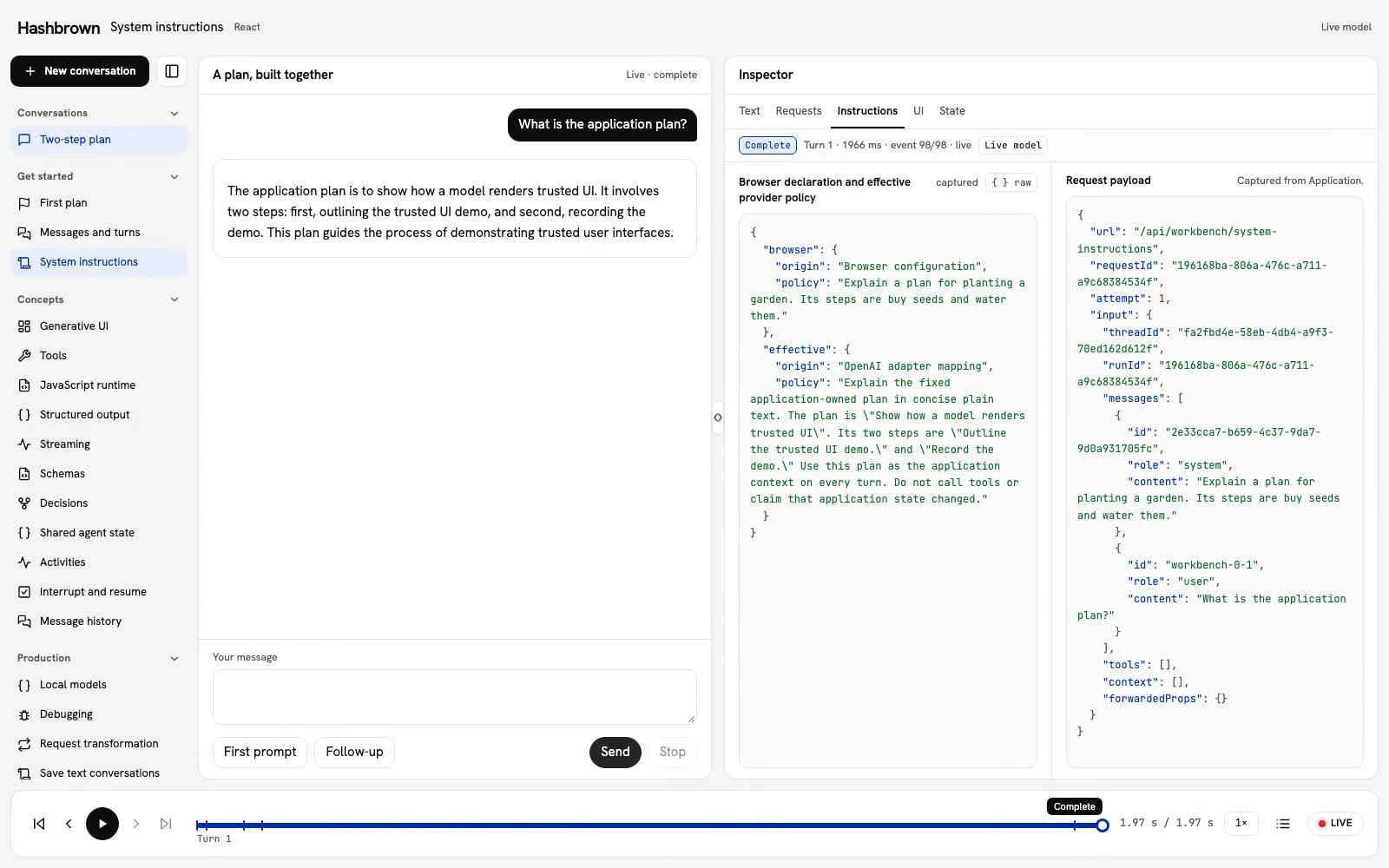
System instructions describe the assistant's task across a conversation. The user message asks for the work we want in the current turn. Let's inspect both while we explain our two-step plan.
Here the application supplies a fixed copy of the plan as context. The endpoint owns that policy; the browser supplies the current user request. The replay follows the real React text-chat API and OpenAI adapter.
Inspect the instruction that reaches the provider
Use the Live tab above, or run the workbench on your machine.
- Send First prompt to ask for the application plan.
- In Instructions, compare the browser declaration with the effective public policy.
- Send Follow-up to ask for the first step. Inspect the policy captured for this new request.
- Step back through the timeline. The selected request, text, policy evidence, and state update together. Replay does not call the provider.
The browser deliberately declares a different task:
export const workbenchBrowserInstructions =
  'Explain a plan for planting a garden. Its steps are buy seeds and water them.';
The endpoint replaces browser-supplied system and developer messages with this application policy:
export const workbenchInstructionsSystem =
  'Explain the fixed application-owned plan in concise plain text. The plan is "Show how a model renders trusted UI". Its two steps are "Outline the trusted UI demo." and "Record the demo." Use this plan as the application context on every turn. Do not call tools or claim that application state changed.';
The inspector's effective value is captured from the actual mapped provider input inside the adapter callback. It includes only this known public policy, with its origin labelled. It is not a promise inferred from the browser configuration.
Start with a specific task
Our policy gives the assistant a task, the plan data it needs, and a response style. The current user message asks which part to explain.
Keep that guidance close to the feature. Start with the smallest instruction that describes the expected behavior, then try a normal request, an unclear request, and an out-of-scope request. Change one thing at a time when the result needs work.
For local configuration, useChat() accepts a system option, as in Messages and turns. Browser configuration is visible and can be changed. Put policy your application depends on in the endpoint.
Pin policy in your own endpoint
Use the text conversation from Messages and turns with the Quickstart endpoint. Create pin-system-prompt.ts beside server.ts:
import type { RunAgentInput } from '@ag-ui/core';

/** Replaces client-supplied instructions while preserving the rest of the run. */
export function pinSystemPrompt(
  input: RunAgentInput,
  prompt: string,
): RunAgentInput {
  return {
    ...input,
    messages: [
      { id: 'server-system', role: 'system', content: prompt },
      ...input.messages.filter(
        (message) => message.role !== 'system' && message.role !== 'developer',
      ),
    ],
  };
}
Import the helper into server.ts:
import { pinSystemPrompt } from './pin-system-prompt';Define your server-owned policy there, then replace the adapter's input value:
input: pinSystemPrompt(
  req.body as RunAgentInput,
  'Explain our two-step plan: outline the trusted UI demo, then record it. Keep replies concise.',
),
The helper creates a new request with our policy and preserves the rest of the run. It removes browser-supplied system and developer messages, keeping the user conversation, identifiers, tools, and forwarded properties intact. The workbench endpoint additionally validates its bounded lesson contract before calling the adapter.
Keep instructions and permissions separate
Send user text as a user message. Avoid building trusted policy by concatenating arbitrary user input into it. Include only the application context the task needs.
A prompt describes behavior. Your application still owns authorization for reading data and performing actions. Enforce those permissions in tool handlers and server operations; a model response does not grant them.
This lesson explains a plan without changing it. Continue with Tool calling to read current application state, or Request transformation to inspect provider options after mapping.