Prose in React
Streaming Markdown turns a growing assistant string into readable headings, lists, links, and citations. Use it when the answer is prose and the reader benefits from seeing it before the request finishes. The conversation API owns messages and cancellation; the renderer owns formatting.
Let’s build a help panel that explains a returns policy. We will render the original assistant text as it grows, and finish parsing when the request stops, including a stopped or failed partial answer.
Finish formatting even when generation stops early
Scroll horizontally to see the full diagram, or expand it.
Read the diagram
The conversation runtime supplies the growing original assistant text to the Markdown renderer. When the run stops producing text, including cancellation or failure, isComplete finalizes Markdown parsing. Separately, the SDK lifecycle determines whether the run succeeded, stopped, or failed. Finalized formatting does not prove successful generation, citation accuracy, or permission for an application action.
Render a help reply
Start with the React Quickstart. The following frontend example uses its configured Hashbrown provider and same-origin /api/chat endpoint. Keep the provider key and model configuration on the server. Mount the component beneath HashbrownProvider and keep it mounted for the conversation lifetime.
import { ProseRenderer, useChat } from '@hashbrownai/react';

export function ReturnsHelp() {
  const chat = useChat({
    system:
      'Explain this public returns policy in Markdown: unused items may be returned within 30 days with a receipt.',
  });
  return (
    <section aria-label="Returns help">
      <button
        disabled={chat.isLoading}
        onClick={() =>
          chat.sendMessage({
            role: 'user',
            content: 'What do I need to return an item?',
          })
        }
      >
        Explain the policy
      </button>
      {chat.messages.map((message) =>
        message.role === 'assistant' && typeof message.content === 'string' ? (
          <ProseRenderer key={message.id} isComplete={!chat.isLoading}>
            {message.content}
          </ProseRenderer>
        ) : null,
      )}
      {chat.error && <p role="alert">The reply could not finish. Try again.</p>}
      <button disabled={!chat.isLoading} onClick={() => chat.stop()}>
        Stop
      </button>
    </section>
  );
}
The fixed prompt keeps this screen small. Replace it with a labelled composer for an open conversation. isComplete finalizes Markdown parsing; it does not report request success. Keep failure and cancellation visible separately. If you add citations, use the renderer’s citation event and resolved URL rather than guessing references from the source string. A rendered citation does not prove retrieval or factual accuracy.
Explore it in the workbench
The workbench below replays a recorded run of this lesson.
Follow streamed Markdown into a formatted explanation, inspect a source reference, then ask for a shorter reply.
Recorded from the existing OpenAI capture through the renamed React prose workbench in read-only replay. The capture retains its original commit and recording time; lesson IDs and endpoint paths use prose. The original capture used the actual Hashbrown SDK and browser readContext tool. No new provider requests or writes. Playback uses recorded timing with bounded pauses. A source reference does not prove retrieval or correctness. No narration. Read the text walkthrough.
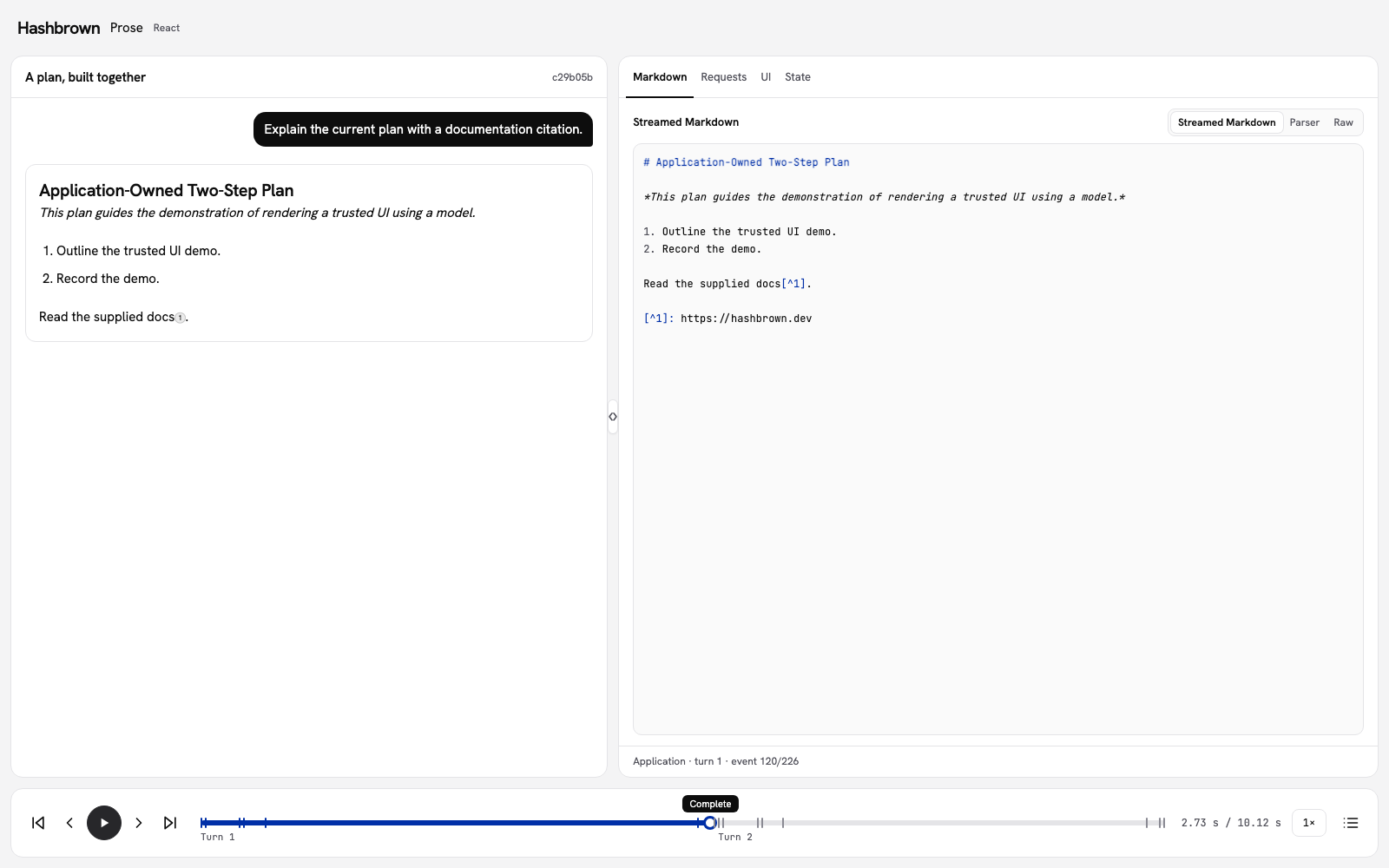
I want to read a reply while it arrives. Let's explain the same two-step plan in Markdown, follow its source reference, and ask for a shorter explanation.
useChat owns the conversation. ProseRenderer formats the assistant string as it grows. This is text chat: the model is not generating component props.
Run the workbench
Use the panel above, or run the workbench on your machine. The Markdown inspector opens first. Its endpoint is /api/workbench/prose.
The application supplies a fixed plan. The model explains that plan; it does not replace its steps or apply an action.
Follow the reply
- Send First prompt. The browser's
readContexttool supplies the current plan and revision. - Watch raw Markdown arrive in the inspector and formatting appear in the chat. The reply includes a heading, emphasis, a list, and a documentation footnote.
- Select the numbered citation after its source URL resolves. The inspector's Selected reference section shows the reference the renderer selected. The workbench prevents navigation.
- Send Follow-up to shorten the explanation in the same conversation. The plan stays at revision 0.
- Use the bottom player to inspect either reply. Chat, Markdown, source details, and state follow the selected frame. Replay does not send requests or run tools.
Give a reference a clear meaning
The example supplies this public source directly:
export const workbenchMarkdownSource = 'https://hashbrown.dev';The citation does not verify the explanation or prove that the model retrieved the page. It demonstrates a reference rendered from the supplied Markdown. An unresolved marker has no usable source URL yet and cannot open source details.
The click handler records the renderer's actual citation ID, number, URL, and originating message. It does not guess references from the raw text. During replay, citation handlers cannot navigate or change live state.
Finalize parsing separately from success
isComplete tells Prose that the current text has ended. It does not mean the answer succeeded. Finalize a stopped or failed partial reply too, and report the request outcome separately.
Stop cancels active work and keeps the partial explanation visible. A failed or early response does not change the plan. Check the request and terminal event, return to live, then submit an explicit retry. The workbench keeps an earlier error from settling the new request.
Turn on Raw events to see every captured chunk on the scrubber. Markdown streaming is labeled as text; the AG-UI transport still carries JSON event envelopes around those text chunks.
Use the framework API
The shared text client also hosts the plain-text onboarding lessons. Prose uses workbenchTextSystem and readContext; its renderer handles the streamed Markdown:
const chat = useChat({
  system:
    lesson.id === 'system-instructions'
      ? workbenchBrowserInstructions
      : plain
        ? workbenchConversationSystem
        : workbenchTextSystem,
  tools: plain ? [] : [readContext],
  transport,
});
Read the checked example
The workbench guide explains setup, conversation lifetime, and playback. The framework client uses the real SDK renderer for both live text and captured history.
For the next minor release, see the prose rename guide. For older parser integrations, see v0.6 parser migration notes. Continue with Streaming for typed props and Debugging for request failures.