Messages and turns
A conversation is a sequence of messages with roles. A user message starts a turn; the assistant’s reply answers it. The next request includes the current history, so a follow-up can refer to a name, preference, or fact established earlier.
A turn and a provider request are different units. A simple text reply may need one request. A tool-using turn may need a request to choose a tool, a handler result, and another request to produce the reply. Keep that distinction in mind when showing progress or investigating a failure.
A turn can need several requests
Scroll horizontally to see the full diagram, or expand it.
Read the diagram
The user sends one message. The client requests a model response, receives a tool call, runs its handler, sends the result in a second request, and receives an assistant reply.
Create a conversation
Use the endpoint and provider from the Quickstart. Create src/ConversationBasics.tsx:
import { useState } from 'react';
import { useChat } from '@hashbrownai/react';

/** A text conversation that keeps earlier turns in the current chat instance. */
export function ConversationBasics() {
  const [prompt, setPrompt] = useState(
    'Call our book club Lighthouse. Suggest a classic novel for our first meeting.',
  );
  const chat = useChat({
    system:
      'Help a reader organize a book club. Remember its name in this conversation. Keep replies concise.',
    debugName: 'onboarding',
  });

  return (
    <main>
      <h1>A conversation with context</h1>
      <label htmlFor="prompt">Your message</label>
      <input
        id="prompt"
        value={prompt}
        onChange={(event) => setPrompt(event.currentTarget.value)}
      />
      <button
        type="button"
        disabled={chat.isLoading || !prompt.trim()}
        onClick={() => {
          chat.sendMessage({ role: 'user', content: prompt });
          setPrompt('What did I name our club, and what should we discuss?');
        }}
      >
        Send message
      </button>
      {chat.isLoading && <p role="status">Waiting for a reply...</p>}
      {chat.error && (
        <p role="alert">The request failed. Check your server and try again.</p>
      )}
      <ol aria-label="Conversation">
        {chat.messages.map((message, index) => (
          <li key={index}>
            <strong>{message.role}: </strong>
            {message.role === 'user' ||
            message.role === 'assistant' ||
            message.role === 'error'
              ? typeof message.content === 'string'
                ? message.content
                : JSON.stringify(message.content)
              : 'Activity received'}
          </li>
        ))}
      </ol>
    </main>
  );
}
In the frontend entry, import ConversationBasics and render <ConversationBasics /> inside HashbrownProvider in place of <FirstPlanApp />.
Send the first message, then ask What did I name our club, and what should we discuss? The second reply should refer to Lighthouse. The wording can vary; the earlier user message is the context for that name.
Explore it in the workbench
The workbench below replays a recorded run of this lesson.
Name the plan, follow up in the same conversation, and inspect retained messages and fresh run identities.
Recorded in the real React workbench with OpenAI and actual Hashbrown text chat. No browser tools or generated component props. Messages remain in the current local instance; no persistence across refresh is demonstrated. Unchanged provider events are paced at 20 ms for filming; the normal host adds no delay. Footage slowed to half speed for readability. Replay makes no requests or writes. No narration. Read the text walkthrough.
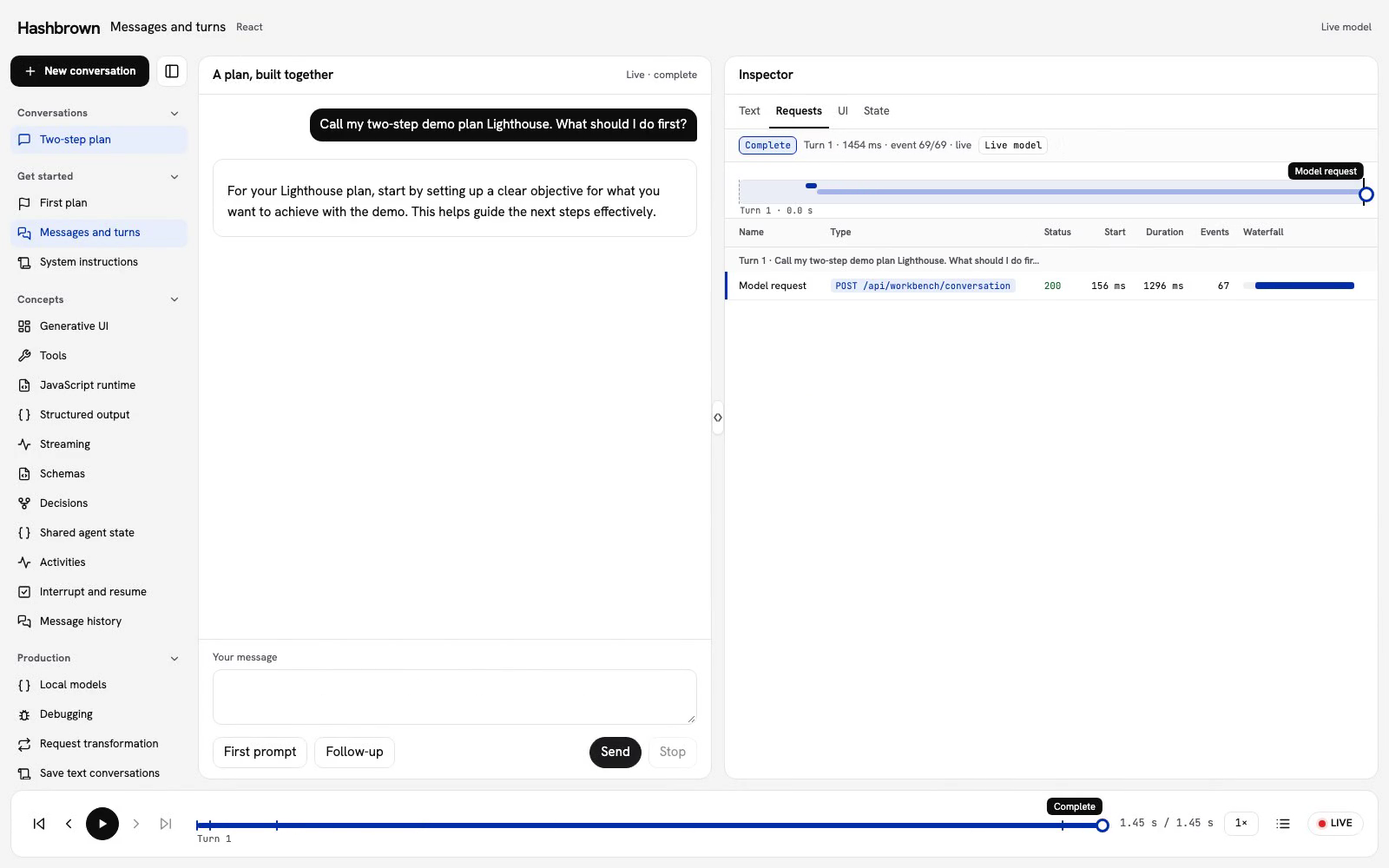
Let's give our two-step plan a name, then ask the assistant to use it in a follow-up. The second request keeps the earlier exchange in the same conversation.
This lesson uses text chat. There are no tools or generated components, so we can focus on the messages themselves.
Inspect the two requests
In the Live tab above, or on your machine, send First prompt, then Follow-up. Select Requests, pick each turn's request, and open Raw request to compare the envelopes:
| Value | What to look for |
|---|---|
messages | The follow-up includes the earlier user message and assistant reply. |
threadId | The conversation keeps the same thread identity. |
runId | The next run has a fresh identity. |
Drag the bottom timeline, or the overview above the request table, to revisit either turn. The chat, current request, text, and captured state move together. Replay makes no new request.
A message, a turn, and a request
A message is one item in the conversation, with a role and content. A user message starts the work we ask the assistant to do. The assistant's streamed reply becomes another message.
A turn can involve more than one model request. This lesson has no tools, so each of its two user turns needs one provider request. With tools, the assistant may request a handler, receive its result, and make another provider request before finishing that turn.
The system option supplies feature guidance. It is not another user message. We'll inspect that distinction in System instructions.
Start another conversation
Choose New conversation in the workbench. It starts with no messages and makes no request until you send one. The earlier conversation remains independently selectable in the sidebar.
The current chat instance retains its messages while it lives. A page refresh does not automatically load them again. A threadId identifies a conversation; it is not a database or a persistence strategy.
Next, use System instructions to give the conversation a consistent job, then Tool calling to answer with current application data.
Continue with Message history when you need to save and restore messages. That is separate from the workbench's read-only inspection timeline.