Natural language forms
Natural-language input can give a form a useful first draft. A customer describes a trip; the model proposes a destination and duration; the customer corrects those fields before submitting. This works well when prose is easier to start with than a blank form, but precise controls still matter.
Keep generated data, editable fields, and submitted application state separate. A response arriving in the browser must not submit the form or overwrite edits made while generation was in progress.
Give the user a separate copy to edit
Scroll horizontally to see the full diagram, or expand it.
Read the diagram
Generated preview, editable reviewed fields, and applied application state are separate values. Only a fresh successful completed and valid draft can be copied by the Review action. Editing changes that reviewed copy. Explicit Apply checks the edited values and source freshness before changing application state. New generation invalidates the old reviewed copy and does not silently overwrite user edits or submit a form.
Generate a form draft
Start with the React Quickstart. The following frontend example uses its configured Hashbrown provider and same-origin /api/chat endpoint. Keep the provider key and model configuration on the server. Mount the component beneath HashbrownProvider and keep it mounted for the conversation lifetime.
import { useState } from 'react';
import { s } from '@hashbrownai/core';
import { useStructuredCompletion } from '@hashbrownai/react';
import { reviewTrip } from './review-trip';

export const tripSchema = s.object('A trip draft for user review', {
  destination: s.string('The destination city'),
  days: s.integer('Number of days'),
});

export function TripDraft() {
  const [input, setInput] = useState<{ id: string; text: string } | null>(null);
  const [reviewed, setReviewed] = useState<{
    sourceId: string;
    destination: string;
    days: number;
  } | null>(null);
  const [applied, setApplied] = useState<ReturnType<typeof reviewTrip>>(null);
  const result = useStructuredCompletion({
    input,
    schema: tripSchema,
    system: 'Extract a trip draft. Never submit or book anything.',
  });
  const canReview =
    !result.isLoading &&
    !result.error &&
    result.lastRunFinishReason === 'stop' &&
    input !== null;
  return (
    <section>
      <button
        disabled={result.isLoading}
        onClick={() => {
          setReviewed(null);
          setInput({ id: crypto.randomUUID(), text: 'Three days in Lisbon' });
        }}
      >
        Generate trip draft
      </button>
      {result.error ? (
        <p role="alert">Generation failed. Try again.</p>
      ) : (
        <pre>{JSON.stringify(result.output, null, 2)}</pre>
      )}
      <button
        disabled={!canReview}
        onClick={() => {
          const draft = reviewTrip(result.output);
          if (canReview && draft && input)
            setReviewed({ ...draft, sourceId: input.id });
        }}
      >
        Review draft
      </button>
      {reviewed && (
        <fieldset disabled={result.isLoading}>
          <label>
            Destination{' '}
            <input
              value={reviewed.destination}
              onChange={(event) =>
                setReviewed({ ...reviewed, destination: event.target.value })
              }
            />
          </label>
          <label>
            Days{' '}
            <input
              type="number"
              value={reviewed.days}
              onChange={(event) =>
                setReviewed({ ...reviewed, days: Number(event.target.value) })
              }
            />
          </label>
          <button
            onClick={() => {
              const trip = reviewTrip(reviewed);
              if (canReview && trip && reviewed.sourceId === input?.id) {
                setApplied(trip);
                setReviewed(null);
              }
            }}
          >
            Apply
          </button>
        </fieldset>
      )}
      <p>
        Applied trip:{' '}
        {applied ? `${applied.destination}, ${applied.days} days` : 'None'}
      </p>
    </section>
  );
}
The completion starts with null, so mounting makes no request. The preview can change while generation runs. The structured completion API owns parsing here. Enable Review draft only after a fresh successful completion, validate the completed structured value, then copy its values into editable fields. The workbench below demonstrates a separate text-and-parser implementation that also validates the original JSON document. For this form, require a trimmed destination of 1–120 characters and an integer duration from 1 through 14.
Create review-trip.ts with this application helper. It validates both a generated draft and the user’s edited values. It defines the boundary independently of the component library:
export function reviewTrip(
  value: unknown,
): { destination: string; days: number } | null {
  if (typeof value !== 'object' || value === null) return null;
  const trip = value as Record<string, unknown>;
  if (typeof trip.destination !== 'string' || typeof trip.days !== 'number')
    return null;
  const destination = trip.destination.trim();
  return destination.length > 0 &&
    destination.length <= 120 &&
    Number.isInteger(trip.days) &&
    trip.days >= 1 &&
    trip.days <= 14
    ? { destination, days: trip.days }
    : null;
}
The labelled inputs change only the reviewed copy. Apply validates it again and consumes that review. The source ID ties the fields to the current request; generating again discards the old review. This example has one local editor. Add an application revision check if another screen or client can change the accepted trip. A backend save must repeat value validation and check identity and ownership.
Explore it in the workbench
The workbench below replays a recorded run of this lesson.
Generate, review, edit and explicitly apply a plan, then use the applied context in a follow-up.
Recorded with real OpenAI JSON and actual framework parser APIs in the checked React workbench. Source completion, parser completion, original JSON validation and application actions remain separate. Review and Apply are explicit; browser readContext returns the applied plan and revision. Unchanged protocol events are paced at 20 ms for filming; the normal host adds no delay. Footage is slowed to half speed for readability. Replay makes no requests or writes. No narration. Read the text walkthrough.
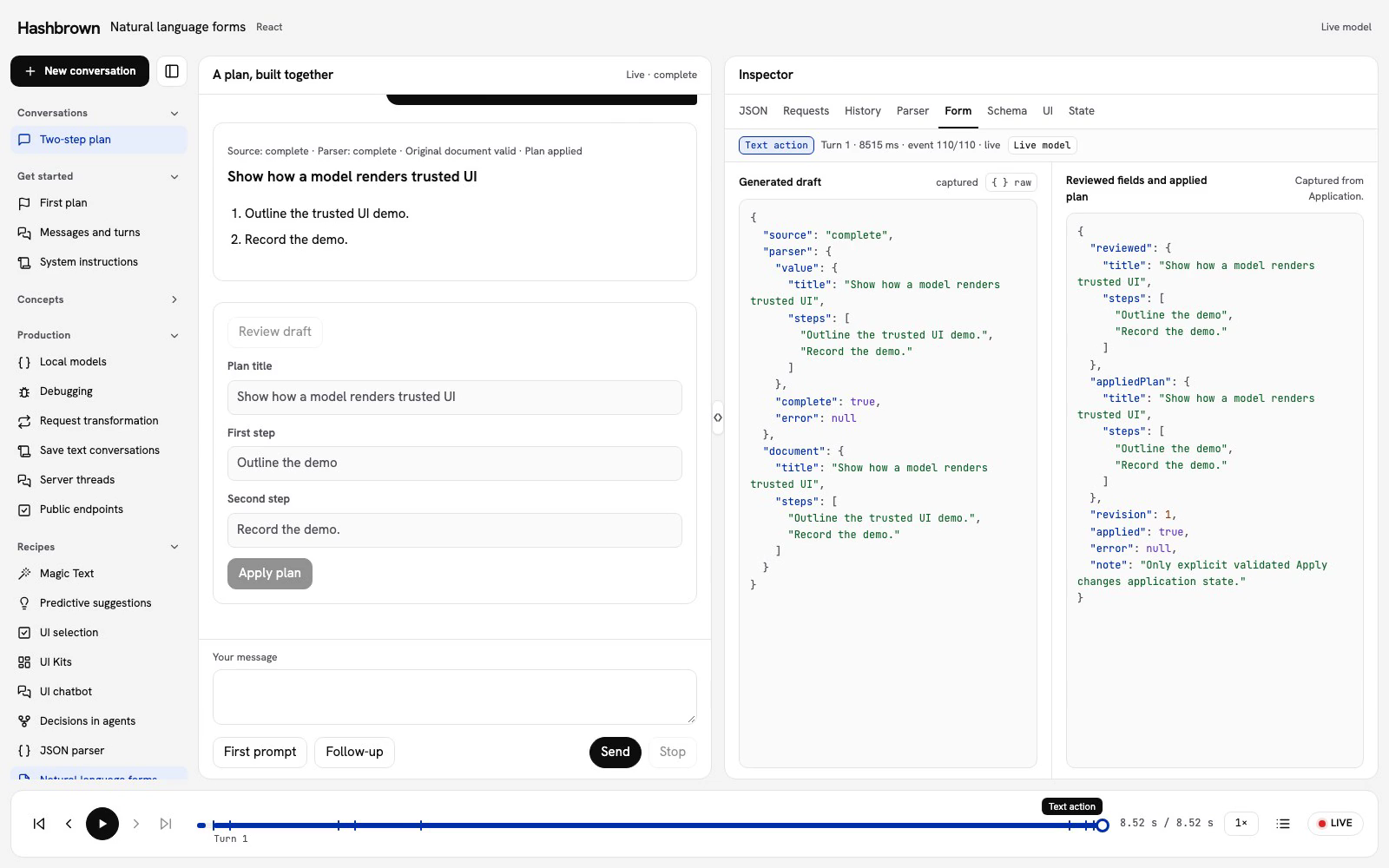
Let's use a prompt to fill a form. We'll generate a two-step plan, review it in ordinary editable fields, and apply the reviewed values. Generating a response will not submit the form for us.
Keep the values separate
| Value | Who changes it | Purpose |
|---|---|---|
| Request text | The user | Describes the desired plan. |
| Generated draft | The actual model response, parsed by Hashbrown | Proposes title and step values. |
| Reviewed fields | Review draft, then the user | Holds an editable application copy. |
| Applied plan | The validated Apply handler | Holds the application's accepted plan and revision. |
The workbench begins with the same application-owned two-step plan at revision zero. A new draft leaves that accepted data in place. Typing, parsing a partial response, or rendering a component does not apply a replacement.
Generate, review, edit, apply
- Open Natural language forms in the canonical workbench.
- Send the first prompt. The read-only
readContexttool returns the current application plan and revision. - Watch the JSON become a draft. Review draft stays disabled until the source successfully completes and the original document validates.
- Select Review draft to copy that document into Plan title, First step, and Second step.
- Edit the first step to Outline the demo. The applied plan has not changed.
- Select Apply plan. The handler validates the reviewed values and advances the application revision.
- Ask for a shorter second step. Inspect
readContext: it returns the applied plan, including the edited first step. - Review the next draft. If the model rewrote the first step, restore Outline the demo in the field, then apply the reviewed values explicitly.
The replays for both frameworks use real OpenAI requests, real browser tool results, and their actual text and parser APIs. The model proposes data. It can rewrite a value we asked it to keep. That is why we review the next draft too. Our application owns the form and its actions.
Validate both the document and the edits
The parser's preview is useful while the response arrives. A fresh successful source, completed parser, and valid original JSON are required before Review can create an actionable form copy.
The application then validates the edited fields again when applying:
- A trimmed title of 1–120 characters.
- Exactly two steps, each 1–200 trimmed characters.
- The same user turn and assistant source that produced the reviewed draft.
- The same application revision on which that draft was based.
- A successful current run, with no error, pending interrupt, recovery requirement, or earlier Apply for this turn.
The handler rechecks these rules. A disabled button is presentation, not the validation boundary. Whitespace-only or oversized edits stay editable and cannot replace the accepted plan.
A new generation invalidates the previous review. A cancelled, failed, replaced, or stale response cannot reuse a completed-looking draft. The existing applied plan remains available throughout.
Use current application context
The browser tool reads the accepted plan without changing it. The server pins the tool declaration and instructs the model to preserve the applied first step during the follow-up, including edits made after the earlier model response.
This is application-provided context. It is not authorization for a server write. If your form saves to a backend, validate the reviewed values again, verify identity and ownership, and show saving and failure states. See Securing a Public Endpoint.
Keep ordinary labelled inputs available. Users need a precise path to correct the generated draft; natural-language input does not replace usable controls or explicit submission.
Inspect and replay
Form pairs the generated document with reviewed fields, the applied plan, and its revision. Parser shows actual parser values and the independent source lifecycle. Requests shows the browser tool result and the follow-up input.
Replay uses immutable captured values. It cannot edit fields, apply a plan, rerun a tool, or call the provider. Returning to live restores the current application view. This local example does not persist a form across a page refresh.
Read the checked source
- React client binds the actual SDK and framework parser.
- Shared authoring contract defines the schema, original-document validation, and explicit review actions.
- Capture and application guards bind observations and Apply to the current request and revision.
Use Structured output when you want the structured chat API to own parsing. Use Streaming JSON Parser for the direct parser boundary shown here, or Exposing components when the model should select trusted components.