Predictive suggestions
Predictive suggestions offer a short list of useful next actions from the current application state. Use them to reduce navigation in an editor, planner, or dashboard. The application defines the action catalogue and executes the accepted action; the model proposes an ID and a reason.
Let’s suggest the next step for an article draft. Each explicit request captures a revision and a fresh context ID. If the draft changes while the response arrives, those suggestions become stale.
Suggestions belong to the snapshot that requested them
Scroll horizontally to see the full diagram, or expand it.
Read the diagram
An explicit request captures current application data, revision, and a fresh context ID. A completed valid response becomes a suggestion only for that snapshot. Accept rechecks successful completion, known action, context and revision before the browser application handler changes state. Dismiss hides a suggestion without changing application state. Changed context, cancellation, errors or replacement invalidate old suggestions; a fresh request is explicit.
Request a suggestion from a snapshot
Start with the React Quickstart. The following frontend example uses its configured Hashbrown provider and same-origin /api/chat endpoint. Keep the provider key and model configuration on the server. Mount the component beneath HashbrownProvider and keep it mounted for the conversation lifetime.
import { useState } from 'react';
import { s } from '@hashbrownai/core';
import { useStructuredCompletion } from '@hashbrownai/react';

export const suggestionSchema = s.object('Next action for this draft', {
  contextId: s.string('Copy the input context ID exactly'),
  actionId: s.enumeration('A known action', ['preview', 'proofread', 'none']),
  reason: s.string('A short reason for the suggestion'),
});

export function ArticleSuggestions() {
  const [input, setInput] = useState<{
    contextId: string;
    revision: number;
    draft: string;
  } | null>(null);
  const result = useStructuredCompletion({
    input,
    schema: suggestionSchema,
    system: 'Suggest one next action. Do not execute it.',
  });
  return (
    <section>
      <button
        disabled={result.isLoading}
        onClick={() =>
          setInput({
            contextId: crypto.randomUUID(),
            revision: 3,
            draft: 'A guide to Lisbon',
          })
        }
      >
        Suggest next action
      </button>
      {result.error ? (
        <p role="alert">Generation failed. Try again.</p>
      ) : (
        <pre>{JSON.stringify(result.output, null, 2)}</pre>
      )}
    </section>
  );
}
The revision 3 and article text are fixed example data. In an editor, copy both from the current document in the request handler. null keeps completion idle; each button press supplies a fresh context ID. This component only previews the proposal.
Before offering Accept, require a successful completed request, a known action ID, a bounded nonempty reason, and an exact match to the captured context ID and current document revision. Recheck them in the acceptance handler. Map preview and proofread to application functions; treat none as a valid empty recommendation. Dismissal changes presentation only. A new request, a changed document, cancellation, or an error makes the earlier proposal unavailable.
Explore it in the workbench
The workbench below replays a recorded run of this lesson.
Dismiss a context-bound proposal, request fresh suggestions, then explicitly accept an action and follow up.
Recorded in the real React workbench with OpenAI streaming requests and the actual Hashbrown SDK. Suggestions are context-bound completions; only explicit acceptance changes application state. Unchanged provider events are paced at 20 ms for filming; the normal host adds no delay. Footage slowed to half speed for readability. Replay makes no requests or writes. No narration. Read the text walkthrough.
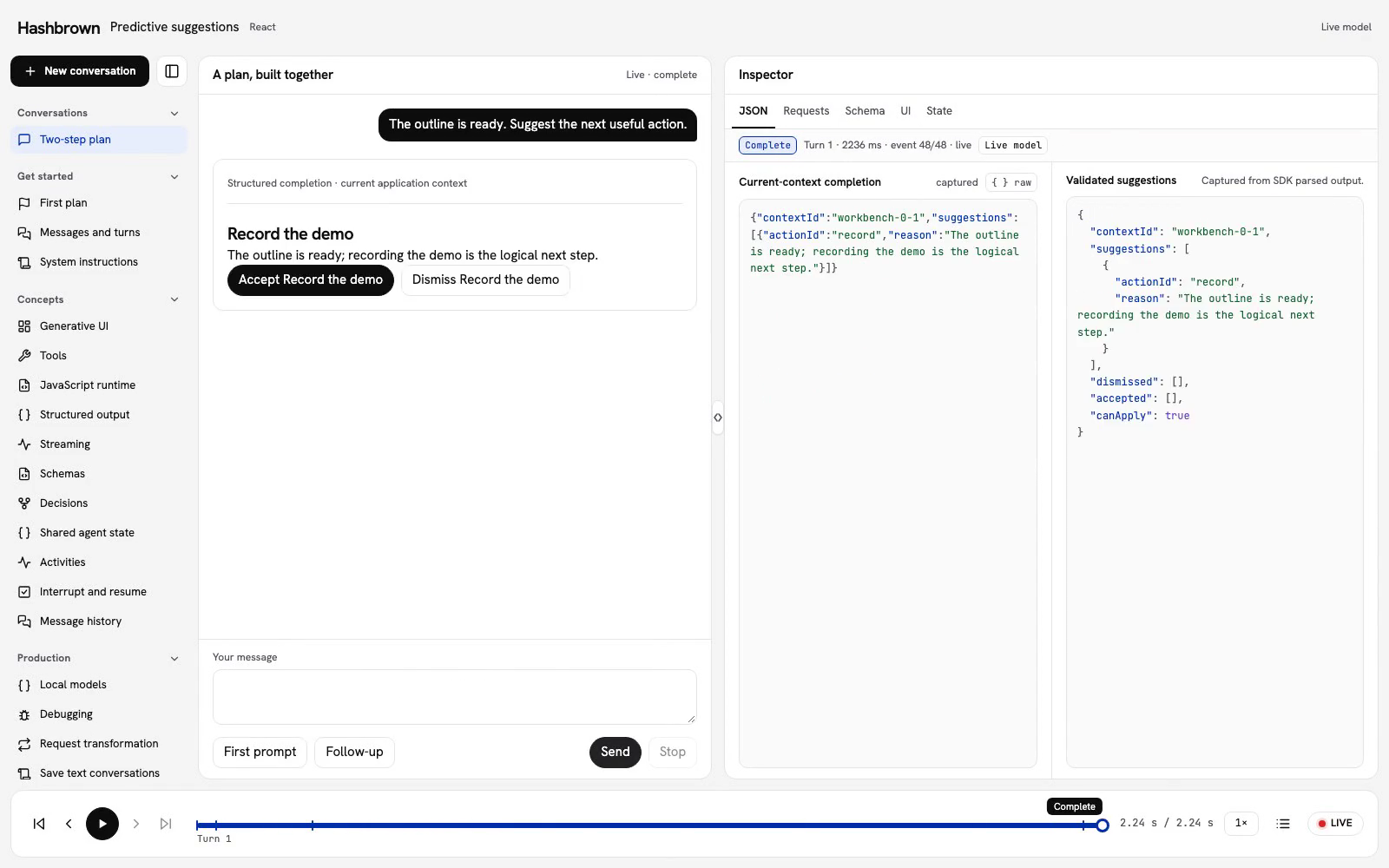
Let's suggest what to do next with our two-step plan. The model can propose recording, reviewing, or clarifying progress. Our application owns those actions. Only Accept applies one.
The workbench uses useStructuredCompletion. Each request receives an explicit snapshot of the current context. This is a structured completion, not a chat API that preserves the earlier conversation for us.
Run the workbench
Use the panel above, or run the workbench on your machine. The endpoint is /api/workbench/predictions. No request starts until you send a prompt.
Review, dismiss, and accept
- Send First prompt. The request captures a fresh
contextId, your prompt, and the application snapshot. - Inspect the completion JSON. Wait for a complete, successful, valid result before offering an action.
- Choose Dismiss for the recording proposal. It hides that proposal for this reply. The application revision remains 0.
- Send First prompt again. This is a fresh request with a new context ID and the same unchanged plan. Choose Accept on its new recording proposal; the accepted action is saved and the revision advances to 1.
- Older proposals are now stale. Request fresh suggestions instead of applying an earlier snapshot. The first proposal stays marked as dismissed; accepting a later proposal does not rewrite its history.
- Send Follow-up. The third snapshot includes the accepted action, so it cannot be applied again. The model can now suggest reviewing the recorded demo.
Keep the catalogue in the application
The model supplies an ID and a reason. It does not supply executable code, invent an action name, or call a write tool. Here, acceptance saves nextAction and acceptedActions in local state. It does not record the screen or perform an external operation.
export const workbenchActionLabels: Readonly<
  Record<WorkbenchActionId, string>
> = {
  record: 'Record the demo',
  review: 'Review the demo',
  clarify: 'Clarify progress',
};
The shared schema constrains the response shape:
export const workbenchPredictionsSchema = s.object(
  'Current-context predictive suggestions',
  {
    contextId: s.string('Copy the current input contextId exactly'),
    suggestions: s.array(
      'Zero to three unique suggestions excluding accepted actions',
      s.object('A catalogue action proposal', {
        actionId: s.enumeration('Application action', workbenchActionLabels),
        reason: s.string('Nonempty concise reason, at most 140 characters'),
      }),
    ),
  },
);
The application also checks the current contextId, successful completion, captured revision, unique known IDs, and nonempty reasons of at most 140 characters. It rejects more than three proposals. Already accepted or dismissed actions are not actionable.
A valid empty array means there are no new suggestions. Show that result without treating it as a request failure. These suggestions do not include a confidence score; their schema and context checks do not prove that the proposed action is useful.
Use the framework API
The checked client connects the lesson to the real SDK:
const completion = useStructuredCompletion({
  input: request,
  system: workbenchPredictionsSystem,
  schema: workbenchPredictionsSchema,
  transport,
  debounceTime: 0,
  retries: 0,
});
Capture context before sending
Keep the initial completion input null until the user requests suggestions. Give each explicit request a fresh context ID, including repeated prompts. Copy the current application snapshot rather than reading changing state halfway through the response.
The workbench records each request in the feed so we can inspect its lifetime. The actual completion input contains the current snapshot. It does not claim that prior assistant replies are model conversation history.
Changing application state does not silently apply or regenerate suggestions. A new request is explicit. When accepting an item, recheck the current context and revision inside the handler, even if the button was enabled when it rendered.
Handle replacement and failure
Partial, malformed, stale, failed, early, or cancelled output cannot apply an action. Stop invalidates the current result. Return to live and send again to retry. When a replacement request starts, the earlier result is no longer actionable.
The bottom player replays captured completion JSON, proposals, dismissal, and acceptance. Historical controls are inert. Replay makes no requests and performs no application writes.
Read the framework client and shared recipe contracts. Continue with Structured output for schema-driven responses and UI selection for choosing an application-owned view.