A local model generates on the user’s device instead of sending prompts to a hosted provider. Use it when on-device processing fits your privacy, latency, or connectivity requirements and the supported devices can run the model. Availability, downloads, preparation, inference, and cancellation are separate application states.
Let’s extract a trip destination and duration from a short request. We will explicitly prepare the browser-managed model, stream a typed draft, and check successful completion and validate the parsed destination and day count before showing a ready brief. A local transport uses the same structured chat contract; it does not remove validation or authorization requirements.
Preparation and generation have different lifetimes
Scroll horizontally to see the full diagram, or expand it.
Check the device, prepare explicitly when needed, then generate locally. Unavailable models leave generation disabled.Read the diagram
An explicit Prepare action checks the native browser model capability. An already available model becomes ready without opening a preparation session. Downloadable or downloading availability opens a temporary preparation session and reports progress; the helper destroys that session when preparation settles. Unavailable capability or preparation failure leaves generation disabled. Stop cancels preparation and late sessions are destroyed. Generation is a separate local transport request after readiness, with completion and data validation still required.
Choose where the model runs
“Local” can describe several different setups:
Runtime
Who supplies the model?
How Hashbrown reaches it
Chrome's built-in model
The browser manages the model and its download.
experimental_chrome runs in the browser. This is our example below.
Edge's built-in model
Edge manages a model in supported preview channels.
experimental_edge, or experimental_local to detect Chrome then Edge. Eligibility differs from Chrome.
WebLLM
Your application chooses and manages a model and engine.
experimental_webllm uses an application-owned engine. See the advanced section below.
Ollama
A separate local server manages the model.
Use the Ollama adapter from your application server. This is a localhost server workflow.
There is no automatic hosted fallback in this recipe. If the native model is unavailable, we explain the problem and leave generation disabled. A cloud fallback should be an explicit application choice, including permission to send the request off-device.
Browser support and model identity
As reviewed October 30, 2026, Chrome 148 shipped the web Prompt API with text, image and audio input and constrained text output. Device, language and modality eligibility still apply; audio requires the documented GPU path. Current Chrome setup is the authority for those changing requirements. Experimental native tools are a separate capability from the stable text/media API.
The browser manages model updates and can remove or replace downloaded models. JavaScript does not expose a stable model-version selector; model management explains manual inspection through on-device internals. Preserve the observed manifest in a test report instead of identifying a model from browser version, download size or a flag label alone.
Edge's Prompt API remains a separate developer-preview route. Its Phi-4-mini default and CPU-capable Aion preview have different requirements; they do not establish Chrome-equivalent media or native-tool behavior. The Prompt API specification is a Draft Community Group Report, not a W3C Standard or a cross-browser support guarantee.
What has actually been tested?
The following is a dated qualification snapshot, reviewed October 30, 2026. It is not a promise that every model, browser or supported device will produce the same result. The October 24–26 inference runs used an Apple M1 Max with 32 GB RAM, macOS 26.5 and Chrome 155.0.8059.85 unless noted. No new model inference or cross-hardware tests were run for this documentation update.
The Chrome v4 experiment below used manifest gemma4-2b-it; it is not evidence of Gemini Nano 4B. Both WebLLM rows used 0.2.86 with Phi-3.5-vision-instruct-q4f16_1-MLC. The Ollama row used server 0.40.11 with qwen2.5:14b Q4_K_M.
Tested configuration
Fixed-sample result
Remaining boundary
Chrome v4 / Gemma 2B phases
Single-component cases: 16/16 across two samples.
Each full sample: 8/10. Nested UI remains unqualified.
Four exact image responses across two framework cases.
Arbitrary vision and image-conditioned tools/UI unqualified.
WebLLM structured tools
Six cases; 14 model requests; eight handlers.
Text-only, application-selected tools and single-component/schema output.
Ollama
Provider/compatibility: 7/10. Frameworks: 12/20.
Required calls, exact receipts and truncation status still failed.
The Chrome phase samples failed nested workflows either before a handler ran or by returning the wrong heading. Nano and E4B reported availability but did not establish a native tool session in these tests. The WebLLM image requests used small generated red/blue squares; the tool cases required six exact final outputs. None of these results qualifies broad catalogs, arbitrary nested UI or media-conditioned tool composition. The complete failed gates remain failed.
Start with text extraction into a small schema. Check completion and application bounds before accepting a result.
For a known tool sequence, let the application choose phases and expose only the required tools and components. A schema validates shape; it cannot prove the right record was fetched or the requested number of components was chosen.
Use Chrome's managed model when browser eligibility fits your users. Use an application-owned WebLLM engine when explicit model/runtime ownership matters. A flag named v4, a model file's size, or a successful availability check does not identify a selectable Gemini Nano 4B configuration.
Use the Ollama adapter when inference belongs in a separately managed local service. Verify where that service runs: a container, remote host or cloud model is a different privacy boundary from the user's browser.
Treat Edge and other engines as separate qualification targets. Chrome results do not establish Edge support, and an OpenAI-shaped API does not establish tool-history, cancellation or structured-output compatibility.
Read test results at the right level
Deterministic aimock and controlled-worker tests verify adapter behavior: schema and argument rejection, canonical history, cancellation, overlapping runs and resource cleanup. They do not measure a real model's accuracy. Real-model suites separately assert exact arguments, tool order, hidden receipt values, raw JSON, component count/props and final cleanup. The retained failures were not converted into passes by repairing answers or weakening assertions.
Availability, session creation, inference, schema validity and semantic correctness are separate gates. Test all of them with the exact options your application will use. Keep the real-model targets local: the conformance instructions document opt-in flags, explicit download permission and CI refusal.
Repeat Stop followed by a new request, token-limit truncation, dependent tools and a fresh conversation. Check that no old result can apply state, every owned session/reader is released, and no hosted inference fallback occurs. A small passing sample is evidence for those fixtures, not a reliability percentage for arbitrary prompts.
The vision run's first-token times were 14.57–16.52 seconds; the text-only tool run's were 1.23–3.03 seconds across its 14 requests. These are different fixed workloads, not a controlled speed comparison. Catalog VRAM estimates and process RSS are not measured peak GPU allocation. Budget for initial download, cold preparation and warm inference separately.
Local inference does not make a whole application offline or private by itself. Tool handlers, image resolvers, analytics, application assets and model downloads can still use the network. Keep those destinations and permissions explicit. Cross-hardware qualification remains deferred; WebLLM audio is not implemented or qualified by these results.
Use a supported desktop Chrome on HTTPS or localhost. Check Chrome's current Prompt API requirements and let Prepare model check the actual device. Browser version alone does not establish availability: model installation, languages, device resources and browser policy also matter.
Edge's adapter has separate eligibility and setup requirements; follow Microsoft's Prompt API instructions. The replays establish Chrome inference on the test machine, not Edge or native mobile inference.
The first explicit preparation may download a browser-managed model. Show the actual progress and allow Stop preparation. Model downloads, application assets and telemetry have separate network behavior; local generation does not make the whole application offline. The workbench disables Hashbrown development telemetry.
Build a standalone trip brief
The complete application below uses ordinary trip data and needs no workbench capture helpers. Create the shared runtime file and framework client at the shown paths; retain the Quickstart frontend setup. The workbench later on this page uses a separate two-step plan lesson.
Share the schema and preparation logic
Create runtime/local-models.ts. Our Skillet schema asks for two fields: a destination and a number of days. The application also checks that the destination is nonempty and bounded, and that the day count is an integer from 1 through 14.
Preparation asks for the same English text-output capability as the generation transport. If the model is already available, it creates no session. Otherwise, an explicit preparation action creates a temporary session, reports download progress, and destroys that session when preparation settles. Cancellation also guards late completion so an older operation cannot restore a ready state.
runtime/local-models.ts
import { s } from '@hashbrownai/core';/** The complete trip brief extracted by the local model. */export const tripBriefSchema = s.object('A short trip brief', { destination: s.string('The destination city or place'), days: s.integer('The number of days, from 1 to 14'),});/** A parsed trip brief; application bounds are checked separately. */export type TripBrief = s.Infer<typeof tripBriefSchema>;/** Native availability states understood by this example. */export type NativeAvailability = 'available' | 'downloadable' | 'downloading' | 'unavailable';/** The native text-language options shared with the Chrome transport. */export interface NativeModelOptions { expectedOutputs: { type: 'text'; languages: 'en'[] }[]; signal?: AbortSignal; monitor?: (monitor: EventTarget) => void;}/** The small native API surface used only for explicit model preparation. */export interface NativeLanguageModel { availability( options: Pick<NativeModelOptions, 'expectedOutputs'>, ): Promise<NativeAvailability | { status: NativeAvailability }>; create(options: NativeModelOptions): Promise<{ destroy(): void }>;}/** Inputs for one cancellable preparation attempt. */export interface PrepareLocalModelOptions { readonly model: NativeLanguageModel | undefined; readonly signal: AbortSignal; readonly onProgress?: (percent: number) => void;}/** Runtime state required to display a fresh, complete trip brief. */export interface TripBriefRun { readonly requestId: string | undefined; readonly cancelled: boolean; readonly messages: readonly { readonly id?: string; readonly role: string; readonly content?: unknown; }[]; readonly isSending: boolean; readonly isReceiving: boolean; readonly isGenerating: boolean; readonly isLoading: boolean; readonly error?: unknown; readonly finishReason?: string;}/** Reads the native API without opening a session or starting a download. */export function getNativeLanguageModel(): NativeLanguageModel | undefined { const model = (globalThis as { LanguageModel?: unknown }).LanguageModel; if ( (typeof model !== 'object' && typeof model !== 'function') || model === null || !('availability' in model) || typeof model.availability !== 'function' || !('create' in model) || typeof model.create !== 'function' ) return undefined; return model as NativeLanguageModel;}function aborted(): DOMException { return new DOMException('Model preparation stopped.', 'AbortError');}function withAbort<T>(promise: Promise<T>, signal: AbortSignal): Promise<T> { return new Promise((resolve, reject) => { const stop = () => reject(aborted()); if (signal.aborted) stop(); else signal.addEventListener('abort', stop, { once: true }); promise.then( (value) => { signal.removeEventListener('abort', stop); if (signal.aborted) reject(aborted()); else resolve(value); }, (error: unknown) => { signal.removeEventListener('abort', stop); reject(error); }, ); });}/** * Checks availability and, when needed, prepares the model after a user action. * Preparation sessions are always destroyed, including sessions resolved after cancellation. */export async function prepareLocalModel({ model, signal, onProgress,}: PrepareLocalModelOptions): Promise<void> { if (signal.aborted) throw aborted(); if (!model) throw new Error( 'Chrome Prompt API is missing. Use a supported desktop Chrome browser, then select Prepare model to try again.', ); // These match experimental_chrome({ outputLanguage: 'en' }) text defaults. const options: NativeModelOptions = { expectedOutputs: [{ type: 'text', languages: ['en'] }], }; const availability = await withAbort(model.availability(options), signal); const status = typeof availability === 'string' ? availability : availability.status; if (status === 'available') return; if (status === 'unavailable') throw new Error( 'The local model is unavailable. Check Chrome device and Prompt API requirements, then select Prepare model to try again.', ); if (status !== 'downloadable' && status !== 'downloading') throw new Error( 'Chrome returned an unknown availability result. Select Prepare model to try again.', ); let active = true; const listeners: (() => void)[] = []; let creation: ReturnType<NativeLanguageModel['create']> | undefined; let session: Awaited<ReturnType<NativeLanguageModel['create']>> | undefined; try { creation = model.create({ ...options, signal, monitor: (monitor) => { if (!active || signal.aborted) return; const progress = (event: Event) => { if (!active || signal.aborted) return; const { loaded, total } = event as Event & { loaded?: number; total?: number; }; if (typeof loaded !== 'number' || !Number.isFinite(loaded)) return; const fraction = typeof total === 'number' && Number.isFinite(total) && total > 0 ? loaded / total : loaded; onProgress?.(Math.round(Math.max(0, Math.min(1, fraction)) * 100)); }; monitor.addEventListener('downloadprogress', progress); listeners.push(() => monitor.removeEventListener('downloadprogress', progress), ); }, }); session = await withAbort(creation, signal); } finally { active = false; for (const remove of listeners) remove(); if (session) session.destroy(); else void creation?.then( (lateSession) => lateSession.destroy(), () => undefined, ); }}/** Returns a trimmed independent trip brief only when application bounds pass. */export function validateTripBrief(input: unknown): TripBrief | undefined { if ( typeof input !== 'object' || input === null || !('destination' in input) || typeof input.destination !== 'string' || !('days' in input) || typeof input.days !== 'number' || !Number.isInteger(input.days) ) return undefined; const destination = input.destination.trim(); if ( destination.length < 1 || destination.length > 80 || input.days < 1 || input.days > 14 ) return undefined; return { destination, days: input.days };}/** Withholds partial, stale, stopped or failed runs until a valid result settles. */export function getReadyTripBrief(run: TripBriefRun): TripBrief | undefined { if ( !run.requestId || run.cancelled || run.error || run.isSending || run.isReceiving || run.isGenerating || run.isLoading || (run.finishReason !== undefined && run.finishReason !== 'stop') ) return undefined; const reversed = [...run.messages].reverse(); const userIndex = reversed.findIndex((message) => message.role === 'user'); if (userIndex < 0 || reversed[userIndex].id !== run.requestId) return undefined; const answer = reversed .slice(0, userIndex) .find((message) => message.role === 'assistant'); return validateTripBrief(answer?.content);}
getReadyTripBrief requires a fresh request, successful completion, settled runtime, valid fields, and no stop or error. A partial response can be useful for display in other applications, but it does not make this typed preview ready.
This helper validates the parsed message.content, not the original model JSON. A successful native stream ending and valid parsed fields do not independently prove that the source document was well formed: a parser may recover usable values from malformed source. This standalone read-only preview does not provide an original-document validation boundary for writes. If acceptance depends on exact source validity, retain and validate the original text separately; the recorded workbench below uses its capture layer for that stronger check.
Connect the frontend
In react/src/main.tsx, import LocalModels from ./LocalModels and render it inside the existing provider:
The component supplies its own local transport. We don't need a provider URL or a chat endpoint.
Run the existing frontend development command (npm run dev for the Quickstart Vite app, or ng serve for Angular). Keep it on localhost while testing. Each client sets experimental_chrome directly on its structured chat, so generation stays with that transport.
Create react/src/LocalModels.tsx:
react/src/LocalModels.tsx
import { useEffect, useRef, useState } from 'react';import { experimental_chrome } from '@hashbrownai/core';import { useStructuredChat } from '@hashbrownai/react';import { getNativeLanguageModel, getReadyTripBrief, prepareLocalModel, tripBriefSchema,} from '../../runtime/local-models';const transport = experimental_chrome({ outputLanguage: 'en', events: { downloadRequired: () => { throw new Error( 'Model download required. Select Prepare model, then try again.', ); }, },});/** Extracts a complete trip brief with an explicitly prepared browser model. */export function LocalModels() { const [prompt, setPrompt] = useState('Three days in Lisbon.'); const [preparation, setPreparation] = useState<{ state: 'idle' | 'preparing' | 'ready' | 'error'; progress?: number; issue?: string; }>({ state: 'idle' }); const [requestId, setRequestId] = useState<string>(); const [stopped, setStopped] = useState(false); const controller = useRef<AbortController | undefined>(undefined); const chat = useStructuredChat({ schema: tripBriefSchema, system: 'Extract the destination and trip length from the request. Return a destination of 1–80 characters and an integer number of days from 1 to 14.', transport, debugName: 'local-models', }); const generating = chat.isSending || chat.isReceiving || chat.isGenerating || chat.isLoading; const busy = preparation.state === 'preparing' || generating; const brief = getReadyTripBrief({ requestId, cancelled: stopped || preparation.state !== 'ready', messages: chat.messages, isSending: chat.isSending, isReceiving: chat.isReceiving, isGenerating: chat.isGenerating, isLoading: chat.isLoading, error: chat.error, finishReason: chat.lastRunFinishReason, }); const status = stopped ? 'Stopped. Prepare the model or generate again.' : preparation.state === 'preparing' ? preparation.progress === undefined ? 'Preparing model…' : `Downloading model: ${preparation.progress}%` : preparation.state === 'error' ? preparation.issue : generating ? 'Generating locally…' : requestId && chat.error ? 'Generation failed. Select Prepare model, then generate again.' : brief ? 'Trip brief ready.' : requestId ? 'No complete valid trip brief. Generate locally to try again.' : preparation.state === 'ready' ? 'Model ready. Generate locally.' : 'Prepare the model to begin.'; useEffect(() => () => controller.current?.abort(), []); async function prepare() { if (busy || controller.current) return; const next = new AbortController(); controller.current = next; setStopped(false); setRequestId(undefined); setPreparation({ state: 'preparing' }); try { await prepareLocalModel({ model: getNativeLanguageModel(), signal: next.signal, onProgress: (progress) => { if (!next.signal.aborted && controller.current === next) setPreparation({ state: 'preparing', progress }); }, }); if (!next.signal.aborted && controller.current === next) setPreparation({ state: 'ready' }); } catch (error: unknown) { if (!next.signal.aborted && controller.current === next) setPreparation({ state: 'error', issue: error instanceof Error ? `${error.message} Check Chrome support and select Prepare model to try again.` : 'Preparation failed. Check Chrome support and select Prepare model to try again.', }); } finally { if (controller.current === next) controller.current = undefined; } } function generate() { if (busy || preparation.state !== 'ready' || !prompt.trim()) return; const id = crypto.randomUUID(); setStopped(false); setRequestId(id); chat.setMessages([{ id, role: 'user', content: prompt.trim() }]); } function cancel() { if (!busy) return; setStopped(true); if (controller.current) { controller.current.abort(); controller.current = undefined; setPreparation({ state: 'idle' }); } if (generating) chat.stop(); } return ( <main> <h1>Extract a trip brief locally</h1> <label htmlFor="trip-request">Trip request</label> <textarea id="trip-request" value={prompt} onChange={(event) => setPrompt(event.currentTarget.value)} /> <nav aria-label="Local model actions"> <button type="button" disabled={busy} onClick={() => void prepare()}> Prepare model </button> <button type="button" disabled={busy || preparation.state !== 'ready' || !prompt.trim()} onClick={generate} > Generate locally </button> <button type="button" disabled={!busy} onClick={cancel}> Cancel </button> </nav> <p role="status">{status}</p> <h2>Trip brief</h2> <section aria-label="Trip brief" data-testid="trip-brief" aria-busy={busy} > {brief && ( <dl> <dt>Destination</dt> <dd>{brief.destination}</dd> <dt>Days</dt> <dd>{brief.days}</dd> </dl> )} </section> </main> );}
Opening the page and editing the request send nothing. Prepare model checks readiness and may prepare the browser-managed model. Generate locally sends a fresh independent user message. Cancel stops preparation or generation and leaves a stopped state. A later explicit action recovers.
The transport rejects a download request during generation and asks us to prepare again. This matters if a previously prepared model has been evicted or its availability changes. A generation button should not quietly begin a new model download.
Generate a trip brief
Select Prepare model. If a download is needed, keep the page open and watch its progress. Generation remains disabled until preparation succeeds.
Leave Three days in Lisbon. in the request and select Generate locally.
Review the typed destination and day count. The intended result is Lisbon and 3 days. The example displays a brief only after successful completion and application validation.
Try Two days in Porto. Each run replaces the previous messages, so the new brief answers that request independently.
While a request is pending, select Cancel. The stopped state remains visible and an old result cannot replace a later run. Generate another brief explicitly to continue.
This is extraction, rather than a travel recommendation. We are checking whether a small schema can turn the supplied text into application data. A schema and a valid day count do not establish that a generated destination or interpretation is correct. Review the result before using it elsewhere.
Handle unavailable models and failures
State
What it means
What to do next
API missing or unavailable
This browser/device cannot currently provide the requested native capability.
Check the browser's official setup, policy, hardware, language, and model status; then prepare again.
Download needed
The browser needs model files before generation.
Choose Prepare model explicitly and wait for completion.
Preparation failed
The model did not become ready.
Check eligibility, connectivity and disk space, then prepare again.
Invalid or incomplete output
Generation ended without a usable trip brief.
Clarify the request and generate again. Keep the previous result cleared.
Stopped
We cancelled preparation or generation.
Start another explicit preparation or generation when ready.
If generation reports that preparation is needed again, use Prepare model before retrying. The model may have been removed or become unavailable since the last check. Refresh also clears this component's ready state and result; preparation checks the browser's current state again.
The recorder separately checks unavailable APIs, download progress/failure, cancellation, late session cleanup, invalid or failed output, and recovery with deterministic native-API shims. Those checks exercise the real clients and transport contracts. They do not establish model accuracy, real Edge support, or native inference on mobile devices. Mobile checks cover layout and the simulated contract only.
Explore it in the workbench
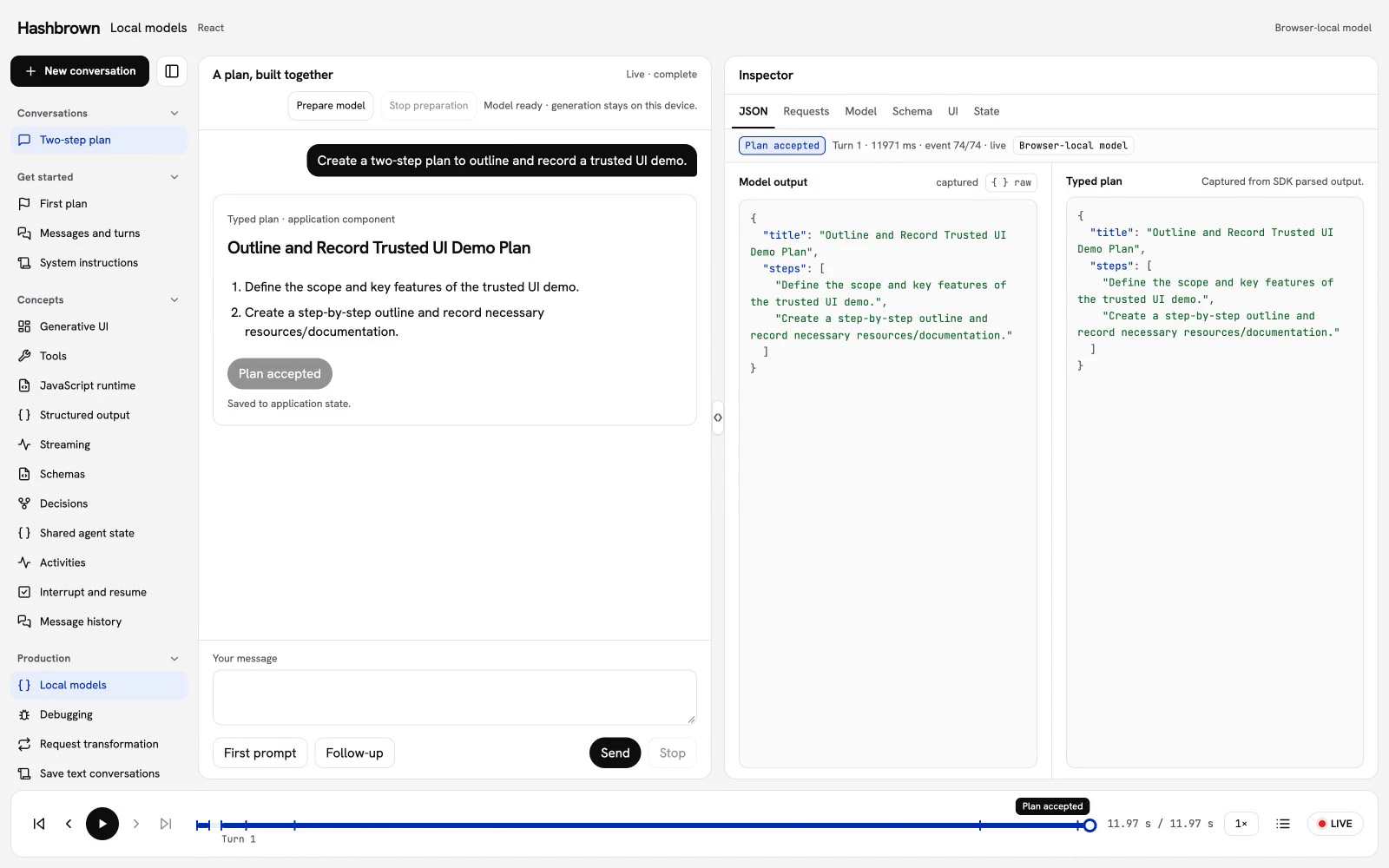
The workbench below replays a recorded run of this lesson.
Prepare the native model, generate a typed plan locally, and explicitly accept each proposal.
Actual native Chrome inference through the Hashbrown React structured-chat API and experimental_chrome transport. The existing dedicated test profile had a model available under requested v4 browser configuration; that configuration does not identify the loaded model or establish availability elsewhere. No new download, scripted model answer or hosted model request. Actual-speed footage with reading pauses; no narration. Native EOF, JSON validation and application acceptance are distinct. Replay opens no sessions, sends no prompts, downloads no models and writes no application state. Test-only native API fixtures are excluded from published footage. Read the text walkthrough.
Let's build the same two-step plan on the user's device. First, prepare the model. Then ask it to outline and record a trusted UI demo. We'll inspect the local request, follow the JSON into a typed preview, and explicitly accept the plan before asking for a shorter second step.
The replay uses real Chrome inference through the actual React client and experimental_chrome transport. Each framework has its own recording. The existing dedicated test profile had a model available under its requested v4 browser configuration; that configuration does not identify the loaded model or establish availability on another device. No new model download, scripted answer, or hosted model request supplies this footage. Playback runs at actual speed, with pauses for reading and no narration.
Follow the local turn
Open the Live tab above in a supported desktop Chrome browser. Choose Prepare model. Generation stays disabled until preparation succeeds.
Send the first prompt. Hashbrown sends the request to the browser's native model.
Inspect Requests. The row says LOCAL Chrome Prompt API, with the effective SDK envelope and native stream events. There is no HTTP model response.
Follow JSON and UI. Parsed fields are a preview while the native stream is active.
Select Accept plan after a valid response completes. State advances to revision one.
Send the follow-up. Its explicit application context contains the accepted plan and revision. Review and accept the revised proposal separately.
Model separates preparation from inference and shows actual allowlisted transport metadata when available. The bottom timeline follows captured preparation, requests, JSON, UI, and application state. Replay opens no sessions, sends no prompts or requests, starts no downloads, and applies no changes.
Connect a structured chat
The native frontend uses useStructuredChat with the same plan schema as the other structured lessons. Its capture wrapper delegates to the actual native transport:
import { experimental_chrome } from '@hashbrownai/core';const native = experimental_chrome({ outputLanguage: 'en', events: { downloadRequired: () => { throw new Error('Select Prepare model before generating.'); }, },})();
The shared preparation helper checks the same English text-output capability. It uses an explicit gesture to prepare a downloadable model, reports progress, and destroys the temporary preparation session. If the model is already available, preparation opens no session. Cancellation also destroys sessions that resolve late.
Keep the throwing downloadRequired callback during inference. Availability can change after preparation; pressing Send must not silently start a download. Ask the user to prepare again.
The workbench sends a fresh application snapshot with each local request. The model receives the accepted plan and revision as context, without a browser tool or a server round trip. This context is visible in Requests. A model response still does not change application state.
Complete, validate, then accept
The native API streams text into Hashbrown's structured parser. After a normal native stream EOF, the transport emits its SDK terminal event. That event is not independent provider finish-reason metadata, and it does not prove that the JSON is complete or correct.
Acceptance separately checks successful current completion, the original JSON document, exactly two bounded steps, matching parsed fields, the current user turn and application revision. Stopped, failed, truncated, malformed and stale proposals remain unavailable. Preparing again also withholds acceptance until preparation succeeds.
Handle unavailable models and recovery
If the API is missing or unavailable, explain the issue and keep generation disabled. Prepare model is an explicit retry. If preparation fails, is stopped, or completes after navigation, its old callbacks cannot mark the new conversation ready.
During generation, Stop cancels the current SDK run. Partial fields can remain visible as an unavailable preview. Send a fresh request to recover; the cancelled run cannot apply state or replace the new result. Changing conversations also stops active preparation and inference.
There is no automatic hosted fallback. Sending a prompt off-device should be an explicit application choice.
Keep local capabilities explicit
The text/schema browser factories support text and schema-constrained output and reject tool calls. Keep schemas small and verify them on the actual model and hardware. The separate experimental_chrome_tools() factory supports experimental Chrome v4 typed tools; see its advanced section below. Structured and component UI output require an explicit finalization policy; media composition remains unsupported. The tool calling guide also describes application-owned handlers with server adapters.
Chrome image/audio input requires an explicit experimental_chrome media configuration and an application resolver. WebLLM uses a separately managed engine. These are advanced options with different resource and capability contracts; the trip-brief example uses text only.
Use experimental_chrome for media. Media is off by default; enable each input
kind and provide an application resolver. The resolver receives an AG-UI
ImagePart or AudioPart plus the run's AbortSignal, and returns an encoded
Blob and an optional dispose callback. This example accepts inline base64
only. URL and provider file handles require your application's explicit
resolution policy; Hashbrown does not fetch them.
AG-UI inline sources use { type: 'data', value: base64, mimeType }; value
contains canonical base64 bytes, without a data: URL prefix. Keep media in
user messages. Canonical AG-UI content parts survive message lowering and immutable
history snapshots; ordinary JSON arrays keep their legacy representation. The
transport preserves part order, validates and decodes images
before creating a session, and releases its ImageBitmaps and resolver cleanup
callbacks when each run settles, including errors and cancellation. Each media
run gets its own native session. Replayed history is resolved again.
media.inputLanguages defaults to ['en'] and describes input independently
of outputLanguage. The transport checks the exact requested input modalities
and languages. Missing or unknown availability fails closed. A downloadable or
downloading model requires an explicit events.downloadRequired callback;
without it, media requests fail before creation. Prepare downloads through your
application's user-initiated flow and retain Chrome's activation requirements.
Image input accepts PNG, JPEG and WebP, with defaults of 10 MiB encoded bytes
and 16 million decoded pixels per image (images.maxBytes, images.maxPixels).
Audio is a separate opt-in: add audio: { maxBytes: 10 * 1024 * 1024, maxDurationSeconds: 30 } to media, then send an audio part with the same
source shape and mimeType: 'audio/wav'. Only encoded PCM16 RIFF WAV with one
or two channels and an 8–48 kHz sample rate is supported. The transport preserves
that encoding and sample rate. Defaults are 10 MiB and 30 seconds per audio
part; media.maxTotalBytes defaults to 20 MiB across the run's media history.
Raw PCM, video, documents, media tool results and media combined with
transformRequest are unsupported.
Chrome 155 has transcribed the retained generated speech fixture through its raw
native API. The real Hashbrown media suite passed all four Angular/React
image/audio cases, with one resolution, disposal, session creation and session
destruction per run. Deterministic shims check transport/framework contracts
separately from real inference.
experimental_chrome_tools() selects a separate text-and-tools transport.
It requires Chrome's experimental tool-use feature
and its v4 model; normal Chrome 155 defaults do not expose the typed tool
interfaces. The local test launcher enables
AIPromptAPIToolUse,OnDeviceModelConversationBackend,AIApiFoundationalModel:model_version/v4
only for its dedicated browser profile. These flags are experimental and do not
enable a hosted fallback.
Prepare the model in an explicit user-initiated download flow before starting
chat. The transport checks exact tools, languages and input/output types. A
model that requires downloading fails unless the application supplies an
events.downloadRequired callback; that callback must honor Chrome's actual
activation requirement. timeoutMs defaults to 180000 and bounds setup and
inference. Stop or dispose an abandoned response to release its owned session.
import { experimental_chrome_tools, s } from '@hashbrownai/core';import { useChat, useTool } from '@hashbrownai/react';const transport = experimental_chrome_tools();export function LocalCounter({ value }: { value: number }) { const readCounter = useTool({ name: 'read_counter', description: 'Read the current application counter value.', schema: s.object('Read counter', {}), handler: async () => ({ value }), deps: [value], }); const chat = useChat({ transport, tools: [readCounter], system: 'Call read_counter before answering. Return only the value property as plain text.', }); return ( <section> <button onClick={() => chat.sendMessage({ role: 'user', content: 'Read the counter.' }) } > Read counter </button> <p>{chat.lastAssistantMessage?.content}</p> </section> );}
Tool execution remains in Hashbrown and your application. The browser receives
only declarations. Tool handlers and application-owned approval/denial gates
run through the existing framework workflow; no browser callback auto-executes
them. Each model run owns a fresh session and replays authoritative history,
including typed success/error results with their canonical call IDs.
The tested Chrome 155/v4 model emits empty native callID values. The adapter
assigns a stable canonical ID only when that completed turn contains exactly
one call. Ambiguous batches requiring ID repair fail before execution. Valid
native IDs are preserved; malformed, conflicting and duplicate IDs fail.
By default, schema-plus-tools and UI requests are rejected. The finalization
opt-in also accepts component UI through the existing UI chat APIs. Media and
media tool results remain unsupported. Use experimental_chrome() for the existing
text/schema or explicitly enabled media paths. The adapter never removes a
schema silently to make a tool request work.
Without the finalization option, final replies remain unconstrained text. Clear application instructions can
ask the model to extract a particular property from a JSON tool result, but
formatting is a model-quality concern: an initial native workflow returned a
correct receipt inside fenced JSON despite a plain-string request. Hashbrown
preserves that output. The default factory does not constrain final replies.
To opt into schema output after tool planning, use useStructuredChat with your existing schema:
import { useStructuredChat } from '@hashbrownai/react';const transport = experimental_chrome_tools({ schemaFinalization: 'after-tool-planning',});const chat = useStructuredChat({ transport, tools: [readCounter], schema: s.object('Counter answer', { value: s.number('Current counter') }), system: 'Call read_counter first. Return a JSON object with only value containing the current counter.',});
Tool planning runs without a response constraint so it can request additional or
dependent tools. Hashbrown executes validated calls through the usual handlers
and permission gates. Planning prose is excluded from the public conversation.
Once a planning turn contains no calls, the same native session receives one
additional prompt with responseConstraint set to the chat schema. Only that
final answer streams through Skillet. With no tools declared, the schema is
applied directly without an extra planning pass.
This is an experimental, opt-in orchestration policy, and adds a terminal model
pass when tools are declared. A finalization tool call fails before execution;
unsupported schemas and invalid output surface as errors. There is no weaker
constraint retry, fence removal or hosted fallback. The capability report's
adapter.structuredOutput describes adapter policy; inference: 'unknown'
means the actual model/schema combination still needs verification. Media
composition remains unsupported.
For component UI, use useUiChat with the same transport, your existing
exposeComponent(...) definitions and ordinary tools. The generated component
wrapper is the final response schema; you do not supply another schema or turn
components into executable tools. For an exposed counterComponent whose numeric
value prop displays the result of the existing counter tool:
import { useUiChat } from '@hashbrownai/react';const chat = useUiChat({ transport, components: [counterComponent], tools: [readCounter], system: 'Call read_counter before answering. Render the counter component with the exact value returned by the tool.',});
Only final UI text reaches the existing Skillet parser and trusted component
renderer. The model still has to select a component and copy tool data correctly.
A successful simple-object response does not establish support for every UI kit,
recursive children or larger catalogs. Test the exact kit on your browser/model;
unsupported native constraints and transport failures surface as errors. Component
parsing keeps the existing renderer behavior: unknown components are omitted and
invalid props can retain a fallback without mounting the trusted component. Capability
adapter.ui describes the explicit adapter policy, while inference stays unknown.
The initial real Chrome 155/v4 component canary failed strict workflow checks
with a catalog offering both status and panel components: it made unrequested tool calls, attempted
undeclared rendering tools, or added components. Clearer instructions passed 4/8 cases but did not establish reliability. The
dated component UI research
records the failures separately from the passing adapter and renderer contracts.
A follow-up with workflow-specific catalogs passed 2/8 and 4/8 in two fixed
production samples. Only the no-tools cases passed in both samples; tool-driven
component UI has not met the native qualification gate.
Expose only the tools and components needed for the current workflow. A lookup
that renders a leaf does not need a dependent tool or a container component.
Dependent workflows can expose both required tools while keeping the component
kit small. Tool argument validation and component schemas check structure; they
do not guarantee that the model follows the requested sequence or returns the
requested number of components. Keep permission checks in application handlers
and measure exact tool calls and rendered output on the actual model.
Applications can opt into explicit tool phases when a workflow has known steps:
The selector runs once per request against an owned, deeply frozen snapshot of
the current user turn. It includes the user message, thread/run IDs and completed
calls with argument objects and raw success/error text. Earlier user turns do not
advance the current phase. Keep this function pure; use the existing tool handlers
and permission gates for application actions. The application decides how to
handle failed tools; there is no automatic retry or phase counter.
A tool phase exposes only the selected tool and requires exactly one call before
any handler can run. Zero calls, multiple calls or an out-of-phase name fail. Its
planning prose is hidden. A final phase directly constrains the full conversation
and tool results without another planning turn. Every attempted finalization
tool call fails before execution, including a call after partial streamed text.
Chrome requires native tool declarations to replay typed tool history. During
finalization Hashbrown retains only declarations referenced in validated history,
including earlier turns, in the original catalog order. These are visible to the
model for replay compatibility; the final phase permits zero executable calls.
With no historical calls it retains none. History is not flattened into prose.
A private phase instruction is appended to the same native prompt after the
unchanged history; it adds no inference pass and is omitted from framework history.
This policy controls execution phases, not UI cardinality or model quality. The
phase research
records browser compatibility and exact-output results separately.
Two fixed production samples each passed 8/10 phase cases. All single-component
lookup, dependent, no-tools and cross-turn replay cases passed in both frameworks
in both samples (16/16). Nested workflows failed either inside Chrome before a
handler ran or by choosing the wrong panel heading. The full native suites remain
failed; nested UI is unqualified on this measured Chrome/model configuration.
Stopping a conversational run or sending a replacement request retains the
original user request and committed history with an explicit runtime
cancellation marker before subsequent input. The marker stays in model
history and is omitted from ordinary assistant rendering and schema/UI parsing.
Both real v4 Stop cases returned the exact new lookup token with that marker;
cleanup and history assertions passed independently. Keep testing follow-up
instructions on the actual model; a marker does not guarantee model obedience.
detectChromeToolsCapabilities() reports serializable exact-option and model
availability evidence without downloading or inferring. Its inference value
stays unknown: interface/availability checks do not prove model quality.
Eight raw native compatibility canaries passed exact success/error responses
and fresh-session replay in both browser projects. See the
local conformance commands
for opt-in native and aimock targets; all local-model suites refuse CI.
Use experimental_webllm({ engine }) when the application wants to select and manage its own browser model. Hashbrown does not import WebLLM or declare it as a dependency or peer dependency. Install WebLLM in the consuming application only. Structural consumer checks cover WebLLM 0.2.85 and 0.2.86 direct and worker engine declarations. These checks establish assignability, with upstream declaration-body checking skipped; they do not establish model capability.
Create the worker in the application:
// local-worker.tsimport { WebWorkerMLCEngineHandler } from '@mlc-ai/web-llm';const handler = new WebWorkerMLCEngineHandler();self.onmessage = (event: MessageEvent) => handler.onmessage(event);
Prepare a model in a user-initiated action, then retain the resulting transport:
import { CreateWebWorkerMLCEngine } from '@mlc-ai/web-llm';import { experimental_webllm } from '@hashbrownai/core';const worker = new Worker(new URL('./local-worker.ts', import.meta.url), { type: 'module',});const engine = await CreateWebWorkerMLCEngine(worker, modelId, { initProgressCallback: (progress) => console.log(progress.text),});const transport = experimental_webllm({ engine });
Pass transport to <HashbrownProvider transport={transport}> or an individual hook's options.
The application owns model selection, downloads, worker creation, caching, and unloading. Pin the application runtime, model weights and compatible WASM library together when reproducibility matters; a model ID backed by mutable catalog URLs is not an immutable artifact identity. Stop active Hashbrown runs before calling engine.unload() and terminating the worker. The default text transport supports text, structured output, and trusted UI; it rejects tools and multimodal messages. Keep UI kits and schemas small, and test nested schemas on the real model.
Hashbrown converts the response schema to WebLLM's json_object format with a JSON-encoded schema string. This differs from OpenAI's json_schema wrapper. A truncated response raises WEBLLM_OUTPUT_TRUNCATED rather than completing successfully with partial JSON.
For an application-selected image model, experimental_webllm({ engine, media: { images: {}, resolve: resolveImage } }) enables image input through an image-capable engine. The application must qualify that model and implement resolveImage for every image source, including inline data. Hashbrown does not fetch image sources implicitly. Text-only input remains the default. See the vision qualification report for the tested model, exact cases, and limits.
The image opt-in accepts user-message images followed by trailing text; interleaved text/image layouts, audio, documents and media tool results are rejected. The resolver owns source access and receives an abort signal. Defaults bound each encoded image to 10 MiB and 16 million decoded pixels, with at most eight images and 20 MiB of encoded images across the run's complete history. Set smaller limits for your application and keep the resolver's network permissions explicit. These transport bounds are not a model's context or VRAM capacity.
Use experimental_webllm_tools for opt-in, application-controlled tool phases. The application selects one declared tool; the model generates its arguments as JSON. Hashbrown buffers the complete response, validates the arguments, and then dispatches through the existing tool handler. The application selects finalization when it is ready for schema output or trusted component UI. This protocol uses structured output rather than WebLLM's native tool mode.
Declare lookup_record through the normal tool API and supply a final response schema through structured chat or UI chat. The selector receives an owned, frozen view of the current user turn and completed calls, including their exact arguments and success/error result text. Use those results to choose dependent phases. Tool selection does not grant permission: handlers still own application authorization, confirmation, and side effects.
Tool phases accept text input only. Argument schemas must use closed objects with every property required, plus supported primitive, array, enum, and anyOf shapes and constraints. References, optional object fields, format annotations, and reserved property names (__proto__, constructor, prototype) are rejected before inference. Final response schemas retain the normal structured-output/UI path. Invalid, truncated, oversized, or cancelled argument generation dispatches no complete tool call; arguments are not streamed into handlers or repaired automatically. Keep component catalogs and workflows small and qualify them on the selected model.
WebLLM 0.2.86 with Phi-3.5-vision-instruct-q4f16_1-MLC passed six fixed text-only cases: lookup to schema, dependent lookup to schema, and lookup to one trusted Status component in both frameworks on an M1 Max. See the structured tool qualification report for exact assertions, timings, and limits. Broader catalogs, nested tool-plus-UI, and other devices remain unqualified.
The image and structured-tool opt-ins are available since Hashbrown 0.8.3. All engines remain application-owned; no WebLLM dependency is added to Hashbrown. The local conformance commands separate deterministic contracts from opt-in real-model qualification. Hashbrown WebLLM audio interop and cross-hardware qualification remain deferred. Upstream WebLLM 0.2.86 already lists Gemma E2B text/audio prebuilds; that availability does not add an audio transport to Hashbrown or qualify a model on your device. The earlier research assumption that no upstream prebuilt audio model existed was incomplete.
Upstream releases and Hashbrown qualification are separate records. The npm registry published WebLLM 0.2.87 on October 30, 2026; the Qwen JSON-termination fix is an example of why runtime/model/library versions matter for constrained output. Our retained real-model runs used 0.2.86, so 0.2.87 is not a newly qualified configuration here.
Native WebLLM tool mode is not interchangeable with the structured-phase transport. The 0.2.87 upstream protocol still restricts tool models and rejects caller-supplied system messages and response formats in that mode. Passing tools through would not preserve Hashbrown's system/schema/history contract. The application-selected protocol above keeps those contracts explicit.
Other browser runtimes are evaluation candidates, not additional Hashbrown support claims. Transformers.js has experimental constrained generation, and wllama has WASM/WebGPU and multimodal/tool interfaces. Neither has been qualified by these WebLLM tests. An integration must separately establish message mapping, exact tool replay, schema completion, cancellation and resource ownership.
Only one Hashbrown run may reserve a given engine at a time, including across transport instances. Overlap fails with MODEL_BUSY. Do not invoke that engine directly while Hashbrown owns a run. Cancellation interrupts the active generation without unloading the engine; pending engine creation or an interrupted stream keeps the reservation until it drains through completion. Cancellation during media preparation releases the reservation promptly before engine creation. The UI can stop before draining finishes, so an immediate replacement run may briefly receive MODEL_BUSY. An ignored or abandoned transport response must be disposed.
Local inference does not enable a hosted fallback automatically. Keep permission to send prompts off-device an explicit application choice. Model downloads and application telemetry have their own network behavior; local generation alone does not make the entire application offline.
The local-only real-worker suite checks structured output, nested trusted UI, and generation after Stop or token-limit truncation. The separate aimock suite checks transport contracts without downloading models. See the conformance test commands to run either locally; these suites reject CI execution.