Chat with Threadplane
Let's keep our Hashbrown conversation and give it a Threadplane message list and composer. Hashbrown will send the request and receive the response. Threadplane will display the text and give us Send and Stop controls.
We'll build a text conversation. If you already have a custom Hashbrown chat screen, use the migration checklist to decide which parts to replace.
Send a product question and follow up through the installed Threadplane controls and Hashbrown runtime.
Recorded in the installed React consumer using the pinned Threadplane source packages and actual Hashbrown adapter. Provider-native responses are scripted locally. Presentation styles added. No live model call or narration. Read the text walkthrough.
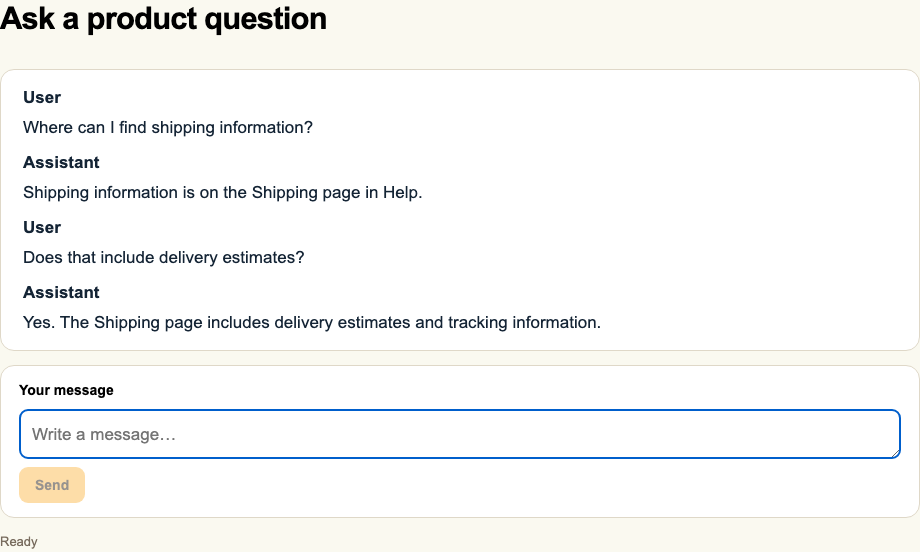
This walkthrough uses a separately installed React consumer and the actual Hashbrown OpenAI server adapter. Provider-native Responses events are scripted over local HTTP; there is no live model call or provider key. Presentation styles, header, and footer are added for the recording. The React footage uses its own components and input controls.
Before we start
Start with the Quickstart server and a Vite application using TypeScript. The installed consumer for this walkthrough uses React and React DOM 19.2.8 with Hashbrown core and React 0.8.0.
Threadplane’s React peer range starts at React 19.2.4; keep React and React DOM on matching versions. Keep the server's API key and model configuration on the server. The browser will continue to call /api/chat through the existing development proxy.
The React components used here are in Threadplane's source workspace. At the checked revision, @threadplane/react, @threadplane/core, and @threadplane/content are private packages. We'll build and install those local packages. There is no registry installation command for them in this recipe.
The example uses the APIs at Threadplane revision 2c7f01f. Keep the three local packages at that same revision.
Build the local packages
Clone Threadplane beside your existing frontend directory. Replace your-react-app below with that directory's name. Run the build inside the Threadplane checkout:
cd ..
git clone https://github.com/cacheplane/threadplane.git threadplane
cd threadplane
git checkout 2c7f01fa958441f3ed94e2559987217be284e94a
npm ci
npx nx build react
The React build also builds its workspace dependencies. Install the resulting packages in your frontend:
cd ../your-react-app
npm install --install-links ../threadplane/dist/libs/core ../threadplane/dist/libs/content ../threadplane/dist/libs/react
Use --install-links to pack these external directory dependencies into regular installed packages. This keeps their peer resolution in your frontend's dependency tree, rather than following a symlink back to the Threadplane checkout and potentially loading another React instance or missing local peers. The flag doesn't change npm workspace links.
Keep your existing @hashbrownai/core and @hashbrownai/react dependencies. These local Threadplane packages supply presentation; they don't replace the Hashbrown runtime.
Make sure the frontend TypeScript configuration includes Vite's client types. They provide declarations for imports such as @threadplane/react/chat/styles.css:
{
  "compilerOptions": {
    "types": ["vite/client", "react", "react-dom"]
  }
}
Merge this setting into the existing frontend tsconfig; keep its other options. If the starter has a src/vite-env.d.ts that references vite/client already, retain that reference. Restart the development server after changing the configuration.
Add the conversation
Create src/ThreadplaneChat.tsx. We select the user and assistant text from useChat, retaining each message's stable ID. Activity messages and synthetic errors have different shapes, so they don't become transcript rows.
ChatInput calls our onSubmit handler with the draft. Returning false keeps the draft when we can't send. An accepted submission returns true, which lets the composer clear it.
The transcript renders text literally, including Markdown punctuation. This small composition doesn't project citations, reasoning, tool cards, or generated components. The migration guide covers those boundaries.
Mount it under HashbrownProvider
Replace the Quickstart's root component with ThreadplaneChat. Import Threadplane's opt-in chat stylesheet once in the frontend entry point:
Keep the Quickstart proxy in vite.config.ts: /api forwards to http://127.0.0.1:3001. Start the existing Node server in one terminal, then run the frontend from your React project in another:
npm run devNo Threadplane server or extra browser endpoint is needed.
useChat owns this conversation's runtime and history. TextTranscript receives rows; ChatInput receives callbacks. They don't create another agent session. Keep the hook's owner mounted while you want to retain its in-memory conversation.
Send, stop, and try again
Select Send. You should see your message followed by a streaming assistant reply. Then send Does that include delivery estimates? The same useChat instance sends the first question and completed assistant reply with that follow-up. Enter sends; Shift+Enter adds a line. Accepted sends clear the draft and return focus to the composer.
Select Stop during a response to cancel the active request. With the tested Hashbrown 0.8.0 client, the unfinished assistant reply is removed; completed turns stay in the conversation. If a request fails, the page displays an error; restore the connection and explicitly send again. There is no automatic message on page load or automatic retry in this component.
The scripted walkthrough answers “Shipping information is on the Shipping page in Help,” then confirms that it includes delivery estimates and tracking information. A live model's wording and content depend on the instructions and product information your server supplies. The recording demonstrates the installed UI and request path, not a model's knowledge of your product.
The server still owns authentication, authorization, provider credentials, and model selection. The browser system option supplies model instructions; it isn't an access-control boundary. Use the public endpoint pattern for an application that accesses customer data, and server request customization for trusted instructions and context.
Next steps
Read Migrate chat presentation to Threadplane before replacing an existing screen. For saved conversations, review Message history. The source contracts are in ChatInput and TextTranscript.