Request transformation
Request transformation is a server-side hook for modifying the provider options after Hashbrown maps a conversation. Use it to add authorized context, set provider-specific options, or apply policy at the point where you can see the request the provider will receive.
Return the complete options object. Preserve the mapped conversation, tools, and response schema unless your endpoint deliberately owns a different contract. This hook uses provider-native types, so an OpenAI Responses transform is not interchangeable with an Anthropic transform. Load required context before sending; a failed lookup should not silently remove required policy.
Transform after mapping, before sending
Scroll horizontally to see the full diagram, or expand it.
Read the diagram
The endpoint gives a Hashbrown request to its provider adapter. The adapter maps it into provider-native options, awaits the transform callback, and sends the returned complete options to the provider.
Add context at the provider boundary
Use the OpenAI endpoint from the Quickstart, with openai and @hashbrownai/openai installed in the server project. This complete helper uses the provider’s public streaming request type. The fixed catalog policy below stands in for context your server has already authorized.
import type { ResponseCreateParamsStreaming } from 'openai/resources/responses/responses';

export function addCatalogContext(
  options: ResponseCreateParamsStreaming,
): ResponseCreateParamsStreaming {
  return {
    ...options,
    instructions: [
      options.instructions,
      'Our catalog is for book discovery. Reservations require a separate user action.',
    ]
      .filter(Boolean)
      .join('\n\n'),
  };
}
In the existing HashbrownOpenAI.stream.text call, import addCatalogContext from the module you saved and add transformRequestOptions: addCatalogContext beside model and input. This is an integration edit to the existing endpoint, not a replacement HTTP server. Keep its input validation, abort signal, credentials, and event streaming.
Spreading options preserves input, tools, text.format, and other mapped provider fields. Appending instructions retains existing guidance. If you load private catalog context asynchronously, authorize it on the server, forward cancellation to that lookup, and let required-context failures fail the request. Inspect only sanitized public fields when logging.
Explore it in the workbench
The workbench below replays a recorded run of this lesson.
Compare the actual mapped request before and after server-owned instructions, then accept and revise the plan.
Recorded in the real Angular workbench with OpenAI streaming requests and the actual Hashbrown SDK. The before/after trace is captured inside the real provider transformation callback. Unchanged provider events paced at 20 ms for filming. Footage slowed to half speed for readability. Replay makes no requests or writes. No narration. Read the text walkthrough.
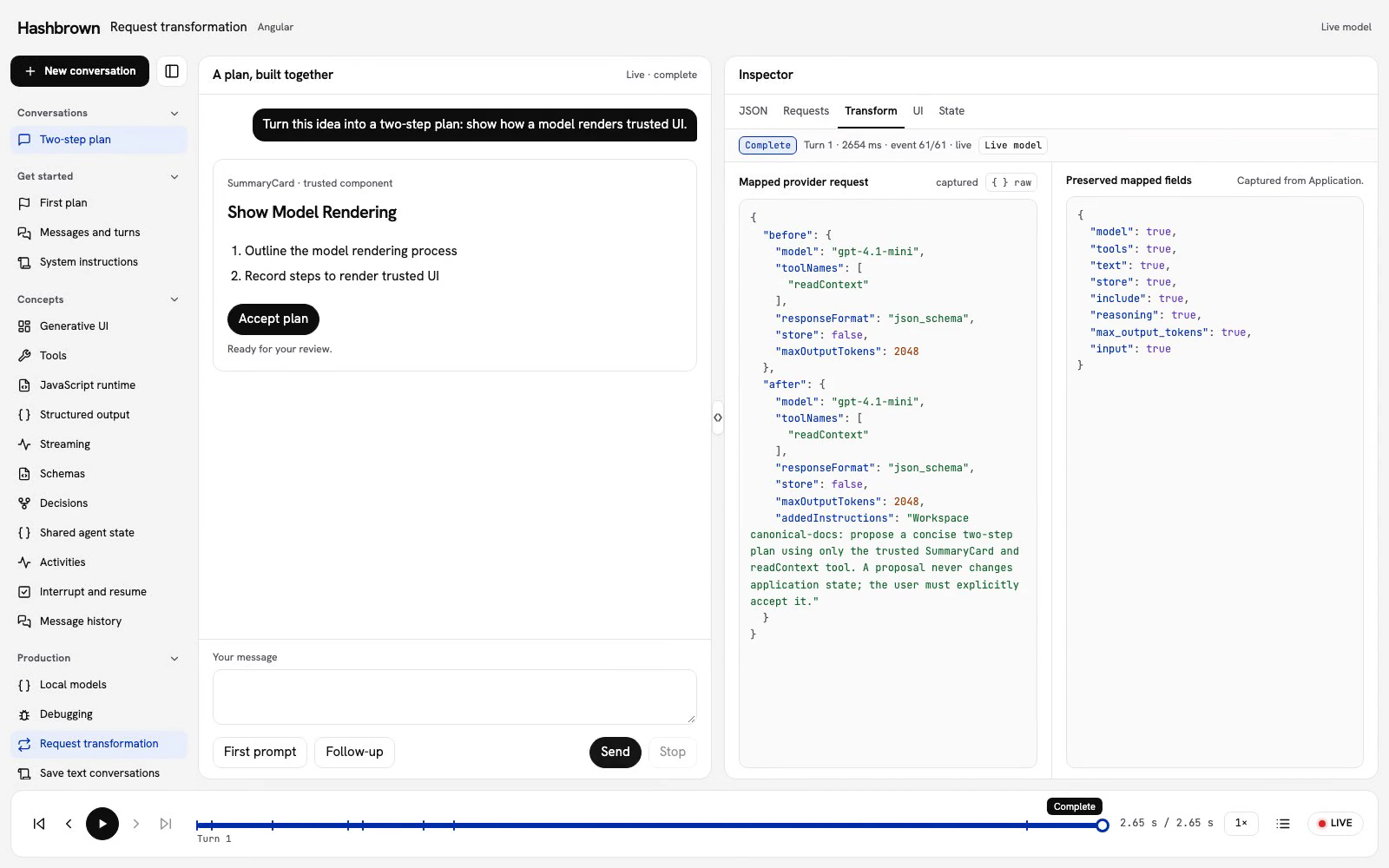
Our browser knows the conversation. Our server may know workspace context that belongs in the model request. Let’s add that context to the same two-step plan and inspect exactly what changed.
transformRequestOptions runs on the server after the adapter maps the Hashbrown request to provider options. It receives the mapped request, including tools and the response format. Return the complete options object the provider should receive.
Run the workbench
Use the panel above, or run the workbench on your machine. The Transform view opens first.
Send the first prompt. The model reads the current plan through readContext, then streams a trusted SummaryCard. Choose Accept plan after successful completion, and send the follow-up to shorten the second step. The accepted plan stays at revision 1 until you explicitly accept another proposal.
Inspect the actual callback
The Transform view compares the mapped options before and after the actual callback. It shows the model, tool names, response format, storage setting, output limit, and added instructions. Preserved mapped shows which mapped fields were preserved, and Raw shows the sanitized trace.
These values are captured inside the server callback, not reconstructed from the browser request. Each provider continuation has its own trace. Select Request transformed in the bottom timeline to inspect that callback. A request frame before the callback shows a waiting message; replay changes only the captured view.
The sample exposes only fixed public demo context. The trace omits message input, headers, and credentials. Do not copy private workspace instructions or user content into a browser inspector or log.
Add server-owned instructions
The server owns a public canonical-docs workspace policy. It asks for a concise two-step plan using the trusted SummaryCard and readContext tool, and reminds the model that the user must accept a proposal before application state changes.
export async function transformWorkbenchRequest(
  options: ResponseCreateParamsStreaming,
  context: typeof workbenchTransformContext,
): Promise<ResponseCreateParamsStreaming> {
  return {
    ...options,
    instructions: [options.instructions, context.policy]
      .filter(Boolean)
      .join('\n\n'),
  };
}
Spreading options preserves fields already mapped by Hashbrown. This function appends the workspace policy to existing instructions rather than replacing the chat’s system instructions. It returns a new object and does not mutate its input.
The asynchronous signature also lets your server await context from an application service. The canonical example uses fixed public context so the replay is easy to follow.
Keep the adapter’s contract
The checked OpenAI boundary uses the callback here:
transformRequestOptions: async (mapped) => {
  const before = applyWorkbenchUiToolPolicy(
    { ...mapped, max_output_tokens: 2048 },
    input,
    lessonId,
  );
  if (lessonId === 'system-instructions')
    instructions = traceWorkbenchInstructions(mapped);
  if (lessonId !== 'request-transformation') return before;
  const after = await transformWorkbenchRequest(
    before,
    workbenchTransformContext,
  );
  trace = traceWorkbenchTransformation(before, after);
  return after;
},
The shared host also has a context-tool policy for UI Kits and UI chatbot. It returns the options unchanged for this Request transformation lesson.
The shared host sets a server-owned output cap before applying the lesson transform. The trace compares that capped request with the returned request. The transform changes only instructions.
| Mapped field | Why preserve it? |
|---|---|
model | Keep the server-selected model. |
tools | Keep the callable tools and their argument schemas. |
text.format | Keep the schema that constrains trusted UI output. |
store | Keep the adapter’s storage choice. |
include | Keep requested provider fields, including reasoning.encrypted_content when configured. |
reasoning | Keep the selected reasoning configuration. |
max_output_tokens | Keep the server’s output limit. |
input | Keep the mapped conversation and tool results. |
The example emits a workbench.request-transformation custom event with the sanitized before/after trace. This event supports the workbench inspector; it is not required to use transformRequestOptions in your application.
Keep trust and recovery explicit
Request transformation is not authorization. Authenticate the request, authorize access to workspace context, and choose trusted policy on the server. Treat browser-supplied IDs as input to validate, not proof of access. Keep API keys in the server environment.
If context loading or transformation fails, fail closed: let the request report an error. Do not catch the error and send the original request without required policy. Keep the request’s abort signal connected to cancellable context and provider work. The workbench disposes the underlying event iterator when the consumer stops, including while delivering the trace.
An HTTP 401 or HTTP 403 may come from your endpoint before provider work starts. A provider error may instead arrive as a RUN_ERROR event after HTTP 200. Use Debugging to follow the request, response, and terminal event before trying again. A retry may repeat tool execution, so check earlier effects before repeating a write.
Read the complete example
- Shared transform: public workspace policy and sanitized trace fields.
- OpenAI boundary: real adapter callback and iterator disposal.
- Local endpoint: server-owned lesson policy and bounded requests.
This callback uses OpenAI Responses options. Other adapters expose their own provider option types; preserve their mapped tools and response schema in the same way. Continue with Tool calling or Streaming to follow the rest of the turn.