Save text conversations
Let's keep two small conversations in this browser. We'll finish a reply, save its text, refresh the page, and continue with the right conversation.
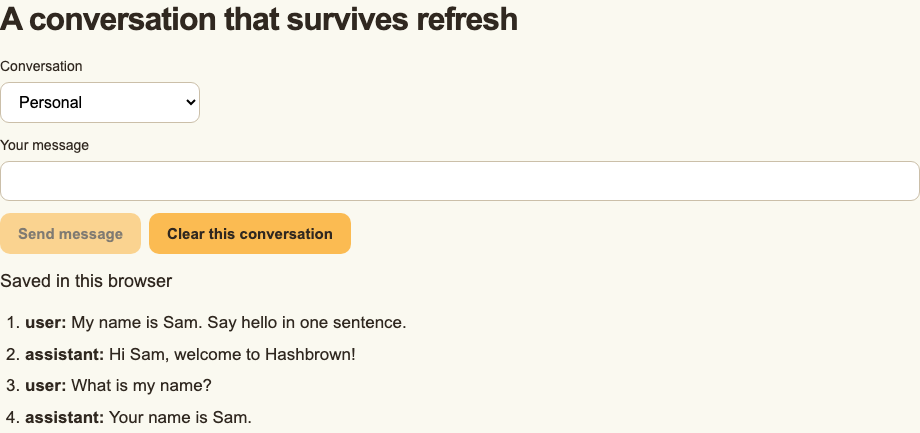
Save a completed text exchange, refresh, and switch between two browser-stored conversations.
Recorded in the browser-storage example with scripted responses. Only completed text is restored. Presentation styles added. No narration. Read the text walkthrough.
Before we start
Use the Quickstart endpoint and provider with a text-chat client. The files below replace the Quickstart's root view; the server endpoint stays the same.
This example saves completed user and assistant text. It does not save tool calls, generated UI, activities, shared state, provider reasoning metadata, or a canonical agent checkpoint. A paused interrupt cannot be restored from this format. See Message history for those boundaries.
Define the storage format
Create src/app/text-history.ts. We keep the storage version beside the messages so that an incompatible value is rejected before it reaches the chat.
import type { Chat } from '@hashbrownai/core';

/** One visible message in this example's deliberately text-only storage format. */
export interface SavedTextMessage {
  readonly role: 'user' | 'assistant';
  readonly content: string;
}

/** A load result that distinguishes unavailable storage from incompatible saved data. */
export interface LoadedTextHistory {
  readonly messages: SavedTextMessage[];
  readonly issue: 'invalid' | 'unavailable' | null;
}

/** The runtime fields inspected before saving a completed text conversation. */
export interface TextHistorySource {
  readonly role: string;
  readonly content?: unknown;
  readonly toolCalls?: readonly unknown[];
  readonly serverToolCalls?: readonly unknown[];
}

function validTextMessages(value: unknown): value is SavedTextMessage[] {
  return (
    Array.isArray(value) &&
    value.length <= 100 &&
    value.every(
      (message) =>
        typeof message === 'object' &&
        message !== null &&
        (message.role === 'user' || message.role === 'assistant') &&
        typeof message.content === 'string' &&
        message.content.length <= 10000 &&
        Object.keys(message).every(
          (key) => key === 'role' || key === 'content',
        ),
    ) &&
    (value.length === 0 || value[value.length - 1].role === 'assistant')
  );
}

/** Namespaces a conversation's storage without treating its identity as authorization. */
export function textHistoryKey(threadId: string): string {
  return `hashbrown:text-history:${encodeURIComponent(threadId)}`;
}

/** Reads version 1 text history, rejecting malformed or unknown versions. */
export function decodeTextHistory(stored: string | null): LoadedTextHistory {
  if (stored === null) return { issue: null, messages: [] };
  try {
    const value: unknown = JSON.parse(stored);
    if (
      typeof value === 'object' &&
      value !== null &&
      'version' in value &&
      value.version === 1 &&
      'messages' in value &&
      validTextMessages(value.messages)
    ) {
      return {
        issue: null,
        messages: value.messages.map(({ role, content }) => ({
          role,
          content,
        })),
      };
    }
  } catch {
    /* Invalid storage is reported rather than passed into the runtime. */
  }
  return { issue: 'invalid', messages: [] };
}

/** Projects a completed text conversation; tool/checkpoint data is not a supported format. */
export function encodeTextHistory(
  messages: readonly TextHistorySource[],
): string {
  const text = messages.map(({ role, content }) => ({ role, content }));
  if (
    !validTextMessages(text) ||
    messages.some(
      (message) =>
        (message.toolCalls?.length ?? 0) > 0 ||
        (message.serverToolCalls?.length ?? 0) > 0,
    )
  )
    throw new Error('Only completed text conversations can be saved');
  return JSON.stringify({ version: 1, messages: text });
}

/** Loads one conversation, including a browser storage getter that may throw. */
export function loadTextHistory(
  threadId: string,
  storage?: Pick<Storage, 'getItem'>,
): LoadedTextHistory {
  try {
    return decodeTextHistory(
      (storage ?? globalThis.localStorage).getItem(textHistoryKey(threadId)),
    );
  } catch {
    return { issue: 'unavailable', messages: [] };
  }
}

/** Saves supported completed text only; failures leave the previous stored value intact. */
export function saveTextHistory(
  threadId: string,
  messages: readonly TextHistorySource[],
  storage?: Pick<Storage, 'setItem'>,
): boolean {
  try {
    const encoded = encodeTextHistory(messages);
    (storage ?? globalThis.localStorage).setItem(
      textHistoryKey(threadId),
      encoded,
    );
    return true;
  } catch {
    return false;
  }
}

/** Deletes only the selected conversation and reports storage failures. */
export function deleteTextHistory(
  threadId: string,
  storage?: Pick<Storage, 'removeItem'>,
): boolean {
  try {
    (storage ?? globalThis.localStorage).removeItem(textHistoryKey(threadId));
    return true;
  } catch {
    return false;
  }
}

/** Recreates public text-chat inputs, without restoring a canonical agent checkpoint. */
export function restoreTextMessages(
  messages: readonly SavedTextMessage[],
): Chat.MessageInput<string, Chat.AnyTool>[] {
  return messages.map((message) =>
    message.role === 'assistant'
      ? { role: 'assistant', content: message.content, toolCalls: [] }
      : { role: 'user', content: message.content },
  );
}
A stored conversation has version: 1 and an array of text messages. This small example allows up to 100 messages, each no longer than 10,000 characters. It refuses a partial turn, a tool call, or a different message kind instead of silently dropping it.
restoreTextMessages() creates fresh public chat inputs. It does not recreate internal provider metadata or claim ownership of an interrupted run.
Storage reads and writes can fail, including when a browser blocks storage or its quota is full. The helper returns a result that the interface can show, and a failed encode leaves the earlier saved value intact. Unknown versions remain untouched until the user explicitly clears that conversation. If you change the format in your app, add and test a migration or ask the user to reset it.
Create the conversation view
Create src/app/saved-conversations.ts:
import {
  ChangeDetectionStrategy,
  Component,
  effect,
  inject,
  output,
  signal,
} from '@angular/core';
import { chatResource } from '@hashbrownai/angular';
import {
  deleteTextHistory,
  type LoadedTextHistory,
  loadTextHistory,
  restoreTextMessages,
  saveTextHistory,
} from './text-history';

type ThreadId = 'personal' | 'work';
interface Selection {
  readonly id: ThreadId;
  readonly initial: LoadedTextHistory;
  readonly revision: number;
}

@Component({
  selector: 'app-saved-thread',
  changeDetection: ChangeDetectionStrategy.OnPush,
  template: `
    <label for="conversation">Conversation</label>
    <select
      id="conversation"
      [value]="selection().id"
      [disabled]="chat.isLoading()"
      (change)="select($event)"
    >
      <option value="personal">Personal</option>
      <option value="work">Work</option>
    </select>
    @if (selection().initial.issue) {
      <p role="alert">
        Saved messages could not be restored. Clear this conversation to replace
        them.
      </p>
    }
    <label for="prompt">Your message</label>
    <input id="prompt" [value]="prompt()" (input)="onInput($event)" />
    <button
      type="button"
      [disabled]="
        chat.isLoading() ||
        !prompt().trim() ||
        selection().initial.issue === 'invalid'
      "
      (click)="send()"
    >
      Send message
    </button>
    <button type="button" [disabled]="chat.isLoading()" (click)="clear()">
      Clear this conversation
    </button>
    @if (chat.isLoading()) {
      <p role="status">Waiting for a reply...</p>
    }
    @if (chat.error()) {
      <p role="alert">
        The request failed. The previous saved conversation is unchanged.
      </p>
    } @else {
      <ol aria-label="Conversation">
        @for (message of chat.value(); track $index) {
          <li>
            <strong>{{ message.role }}: </strong>
            @if (
              message.role === 'user' ||
              message.role === 'assistant' ||
              message.role === 'error'
            ) {
              {{ message.content }}
            } @else {
              Activity received
            }
          </li>
        }
      </ol>
    }
    @if (saveState() === 'saved' && !chat.isLoading()) {
      <p role="status">Saved in this browser</p>
    }
    @if (saveState() === 'failed') {
      <p role="alert">
        We could not save or clear this conversation. Keep this page open to
        retain its current messages.
      </p>
    }
  `,
})
/** One live chat instance, seeded from the selected storage snapshot. */
export class SavedThread {
  private readonly initialSelection = inject(SavedConversations).selection();
  readonly selection = () => this.initialSelection;
  readonly selected = output<ThreadId>();
  readonly reset = output<void>();
  protected readonly prompt = signal(
    'My name is Sam. Say hello in one sentence.',
  );
  protected readonly saveState = signal<'idle' | 'saved' | 'failed'>('idle');
  protected readonly chat = chatResource({
    system:
      'You are a friendly onboarding assistant. Keep each reply to one sentence.',
    threadId: this.selection().id,
    messages: restoreTextMessages(this.selection().initial.messages),
  });

  constructor() {
    effect(() => {
      if (this.chat.isLoading() || this.chat.error()) return;
      const messages = this.chat.value();
      if (messages.length === 0) return;
      if (this.selection().initial.issue) {
        this.saveState.set('failed');
        return;
      }
      this.saveState.set(
        saveTextHistory(this.selection().id, messages) ? 'saved' : 'failed',
      );
    });
  }

  protected select(event: Event): void {
    const id = (event.currentTarget as HTMLSelectElement).value;
    if (id === 'personal' || id === 'work') this.selected.emit(id);
  }
  protected onInput(event: Event): void {
    this.prompt.set((event.currentTarget as HTMLInputElement).value);
  }
  protected send(): void {
    if (this.chat.isLoading() || !this.prompt().trim()) return;
    this.chat.sendMessage({ role: 'user', content: this.prompt() });
    this.prompt.set('');
  }
  protected clear(): void {
    if (deleteTextHistory(this.selection().id)) this.reset.emit();
    else this.saveState.set('failed');
  }
}

/** Switches between two browser-stored, completed text conversations. */
@Component({
  selector: 'app-saved-conversations',
  imports: [SavedThread],
  changeDetection: ChangeDetectionStrategy.OnPush,
  template: `
    <main>
      <h1>A conversation that survives refresh</h1>
      @for (active of [selection()]; track active.id + ':' + active.revision) {
        <app-saved-thread (selected)="select($event)" (reset)="reset()" />
      }
    </main>
  `,
})
export class SavedConversations {
  readonly selection = signal<Selection>({
    id: 'personal',
    initial: loadTextHistory('personal'),
    revision: 0,
  });
  protected select(id: ThreadId): void {
    this.selection.set({ id, initial: loadTextHistory(id), revision: 0 });
  }
  protected reset(): void {
    const active = this.selection();
    this.selection.set({
      ...active,
      initial: loadTextHistory(active.id),
      revision: active.revision + 1,
    });
  }
}
Let's look at the choices in this example:
- Load before creating the chat. The
messagesoption seeds the new instance. It does not become a live connection to storage. - Save after the reply finishes. We skip loading and error states, so a partial response does not replace the last saved conversation.
- Recreate the chat when switching. Angular tracks the selected ID and revision in the view, recreating the child for a new selection. That keeps the transcript and thread identity together.
- Show failures. If storage fails, the current conversation remains visible in memory. The interface warns the user to keep the page open.
- Clear one conversation. Reset removes only that conversation's stored value and creates a fresh text-chat instance.
The fixed Personal and Work IDs make the example easy to follow. In your app, choose IDs and storage keys that match your account and conversation model. An ID is a lookup key, not permission to read another user's data.
Render the example
In src/main.ts, import SavedConversations from ./app/saved-conversations and bootstrap it with the existing appConfig. Update src/index.html to contain <app-saved-conversations></app-saved-conversations> in place of <app-root></app-root>.
This is a browser-rendered example. If your application renders on the server, load browser storage after the browser takes over and create the chat from that client-side result. Do not treat a server-rendered empty snapshot as a reason to overwrite an existing browser conversation.
Refresh and switch conversations
- In Personal, send the message that introduces Sam. Wait for Saved in this browser.
- Refresh. The earlier exchange should return without starting a new model request.
- Switch to Work, introduce Lee, and wait for the save confirmation.
- Switch back to Personal and ask What is my name? The next request should include the Sam exchange.
- Select Clear this conversation to remove Personal. Work should still be available.
The recording uses deterministic AG-UI responses through the real client and storage code. Your model's wording can vary. The visible result and restored request history are what matter.
Choose what should be stored
Browser storage is plain text available to scripts on the same origin and to someone using the browser profile. It does not provide cross-device sync or server authorization. Decide what is appropriate to save, how long it should remain, and what should happen when a user signs out.
For application-owned server storage and opaque thread identity, continue with Threads. Hashbrown sends the current transcript on each run; a thread ID alone does not load it or turn the request into a message delta.