
I'm excited about decision models.
If you haven't played with one yet, here is the short version. A decision model is a model that answers closed questions instead of writing text. You hand it a question with a fixed set of answers, and it hands you back the answer along with a probability for each option. That's it. An LLM generates its answer token after token. A decision model reads your input in a single pass, so it answers in a few hundred milliseconds and costs a fraction of a cent. That makes it a great fit for intent classification, tool routing, and choosing which UI to show.
Hashbrown v0.8 added decisions alongside generative models, in both Angular and React. And I keep seeing people put decision models to work in agentic applications, which is great. I also keep seeing roughly the same shape:
- One model picks the tool.
- A second model pulls the parameters out of the conversation.
- A few yes or no questions check that the second model didn't make anything up.
- Hand-written code serializes the conversation into a string, runs both models, and merges their answers into a tool call.
It works.
But, that is a lot of glue. And most of it is glue that a framework should be writing for you.
So, let's look at how we built the same pattern into atc, our live air traffic example, and how little code it took with Hashbrown.
A quick tour of atc, a generative UI example
If you haven't seen atc yet, it's a live map of every aircraft over the Pacific Northwest, with an assistant you can just ask. I wrote about how we built it a few weeks ago. Since then, we've reorganized it around decisions.
Here's what happens when you type into the composer:
- You type "only jets below 10,000 ft". A decision model reads it as you type and says: that's a filter. When you press Enter, a structured completion turns your words into a typed filter, and the map dims everything else. Nothing is added to the chat.
- You type "what's the fastest plane near Seattle?". The same decision says: that's a question. A second decision picks which cards fit the answer, a
FlightCardin this case, and the chat streams the answer using only that card plus Markdown. - You type "show everything again". The decision says filter, and also answers a yes or no question, clear the filter?, with a high probability. The filter clears instantly, with no generative model involved at all.
The app is built twice, in Angular and React, on one shared core. I'll show both, straight from the repository. Code that lives in the shared core or on the server is the same for both frameworks, so it appears once.
Three questions, three Hashbrown primitives
Here's how I think about it. atc asks three kinds of questions, and each one gets the Hashbrown primitive that fits:
| The question | Kind | React | Angular | Model |
|---|---|---|---|---|
| Is this text a filter or a question? | Closed | useDecision() | decisionResource() | Decision (Jev) |
| Which cards fit this question? | Closed | useUiDecision() | uiDecisionResource() | Decision (Jev) |
| What filter did the user describe? | Open | useStructuredCompletion() | structuredCompletionResource() | Generative |
| What's the answer, and what goes on screen? | Open | useUiChat() | uiChatResource() | Generative |
A few things to note:
- Closed questions have a fixed set of answers that your application already understands. A decision model is fantastic at these, and it tells you how sure it is.
- Open questions have answers you can't list in advance: an airline name, an altitude, an airport. A generative model is fantastic at these, especially when a schema constrains what it can say.
- Each primitive is one call. There's no orchestration layer to write. You pick the hook or resource that matches the question, give it a schema, and read the result.
Let's walk through each one.
Step 1: Route user input with a decision model
First, we define the questions. This is a Skillet schema, the same schema language we use for everything else in Hashbrown:
export const routeSchema = s.object('Where to send what the user typed', {
  intent: s.enumeration('What the user wants', {
    filter:
      'Change which aircraft the map shows, by kind, airline, type, altitude or place',
    chat: 'Ask a question, or ask about a specific aircraft or airport',
    other: 'Anything else',
  }),
  clear: s.boolean('The user wants to remove the current map filter'),
});
Let's break that down:
intentis a choice question. Each option has a description, so the model knows whatfilterandchatmean in this app.otheris an escape hatch. If someone types something that's neither, the model has an honest answer to give.clearis a yes or no question, asked in the same request. Two questions, one round trip.routeSchemais aDecidableSchema, which means TypeScript only lets you ask what a decision model can answer: enumerations, booleans, bounded numbers, and objects of those. You can't accidentally ask a decision model for a string.
Next, we ask the questions with useDecision() in React, or decisionResource() in Angular:
const decision = useDecision({
  schema: routeSchema,
  input: routerDecisionInput(text),
  system: ROUTE_CONTEXT,
  debounceTime: 150,
  transport: tracked.transport,
});const decision = decisionResource({
schema: routeSchema,
input: computed(() => routerDecisionInput(text())),
system: ROUTE_CONTEXT,
debounce: 150,
transport: tracked.transport,
});Let's break that down:
inputis the text in the composer: a plain value in React, and a signal in Angular.routerDecisionInput()returnsnullfor anything under three characters, andnullkeeps the resource idle.systemis a paragraph of context about atc, with examples of filters and questions. It's the only prompt engineering in this step.debounceTime: 150in React, ordebounce: 150in Angular, asks once per typing pause. By the time you press Enter, the answer is usually already there.transportreports which text each answer was for, so the developer drawer can show timings. You don't need it to make the decision work.valueandmetacome back as plain values from the hook, or as signals from the resource.valueis typed from the schema, andmetamirrors its shape with the confidence for each question.
Finally, we turn the answer into an action with a plain, pure function:
/** Below this intent confidence, typed text goes to chat. */
const CONFIDENCE_THRESHOLD = 0.7;

/** At or above this probability, a filter intent also clears the filter. */
const CLEAR_THRESHOLD = 0.5;

export function routeAction(result: RouteResult | null): RouteAction {
  if (
    result === null ||
    result.value.intent === 'other' ||
    result.meta.intent.confidence < CONFIDENCE_THRESHOLD
  ) {
    return { kind: 'chat' };
  }
  if (result.value.intent === 'chat') return { kind: 'chat' };
  return result.meta.clear.probability >= CLEAR_THRESHOLD
    ? { kind: 'clear' }
    : { kind: 'filter' };
}
This is my favorite part of the whole example. The thresholds are our policy, written in our code, and they're trivially testable.
- Unsure means chat. Anything below 0.7, or
other, goes to the assistant, which can handle anything. - No answer means chat. If the decision hasn't arrived after a second, or it failed, Enter still works. It just goes to the chat.
- The badge shows the decision. As you type, the composer shows something like
→ filter 0.97, drawn dashed when the router is unsure. You can watch the model think.
Step 2: Choose UI components with a decision
When a message goes to the chat, there's a second closed question to ask: which of our cards fit this answer?
atc has four cards (FlightCard, ArrivalsBoard, AircraftCompare, and AirportCard) plus Markdown.
Sending all four on every turn works, but it makes the generative model's job harder than it needs to be.
So, we let a decision pick:
const narrowed = useUiDecision({
  chat,
  select: { max: CARDS_SELECT_MAX },
  minConfidence: CARDS_MIN_CONFIDENCE,
  system: 'Provided by the server.',
  transport: observed,
});private readonly narrowed = uiDecisionResource({
chat: this.chat,
select: { max: CARDS_SELECT_MAX },
minConfidence: CARDS_MIN_CONFIDENCE,
system: 'Provided by the server.',
transport: observeDecisions(inject(CARDS_DECISION_TRANSPORT), (settled) =>
this.turns.update((turns) => settleCards(turns, settled)),
),
});Then, instead of calling chat.sendMessage(), we call narrowed.sendMessage(content).
In both frameworks, transport only reports each decision to the developer drawer.
Let's break that down:
chatis our existinguseUiChat()oruiChatResource(), with its own system prompt, sixteen browser-side tools, and its transcript. None of that changes.select: { max: 2 }lets the decision keep up to two cards. A comparison of the highest and the fastest plane needsAircraftCompare. "Arrivals into Portland" needsArrivalsBoard.minConfidence: 0.7is the bar. Below it, the message goes out with every card, which is exactly how the app behaved before we added the decision.- Markdown is in a kit with
selectable: false, so it's never part of the question and it's always available. The assistant can always write a sentence. - When the turn finishes, the chat's components are restored for the next one.
Here's what I didn't write for this step:
- The questions. Hashbrown builds them from the components I already exposed, using each component's name and description.
- The narrowing. Hashbrown sends the chosen cards, and only those, for that one turn.
- The fallback. Hashbrown sends every card when the decision is unsure, fails, or is stopped.
Step 3: Extract typed values with structured output
Now for the open question. When the router says filter, we need typed values: an airline, a type code, an altitude range, an airport. That's not a closed question, and it's not a decision model's job. It's structured output, using a structured completion:
const completion = useStructuredCompletion({
  input,
  // Required by Hashbrown; the server replaces it with the filter prompt
  // (server/src/filter-handler.ts).
  system: 'Provided by the server.',
  schema: mapFilterSchema,
  transport: options.transport ?? FILTER_TRANSPORT,
  debounceTime: 0,
});const resource = structuredCompletionResource({
input,
// Required by Hashbrown; the server replaces it with the filter prompt
// (server/src/filter-handler.ts).
system: 'Provided by the server.',
schema: mapFilterSchema,
transport: options.transport ?? FILTER_TRANSPORT,
debounce: 0,
});And here's a slice of the schema it fills in:
export const aircraftFilterFields = {
  airline: s.anyOf([
    s.string('Airline ICAO code such as UAL, or a name such as United'),
    s.nullish(),
  ]),
  minAltitudeFt: s.anyOf([s.number('Minimum altitude in feet'), s.nullish()]),
  maxAltitudeFt: s.anyOf([s.number('Maximum altitude in feet'), s.nullish()]),
  near: s.anyOf([
    s.object('Only aircraft within radiusNm of an airport', {
      airport: s.string('ICAO code from lookupPlace, such as KBDN'),
      radiusNm: s.number('Radius in nautical miles, 5 to 150'),
    }),
    s.nullish(),
  ]),
  // ...kind, typeCode, approaching, and inAirspace
};

export const mapFilterSchema = s.streaming.object(
  'A filter for the aircraft shown on the map',
  aircraftFilterFields,
);
Let's break that down:
- Every field is required, and
nullmeans "any". The model has to answer every field, and it has an honest way to say "you didn't mention this". That's the difference between "not specified" and "made up". - The answer is validated. Hashbrown parses the output against the schema as it streams. A value that doesn't fit the schema never reaches the map.
- The answer streams.
s.streaming.object()means each field lands as soon as it's complete. The filter pill fills in chip by chip, and the map updates as it goes. - Normalization is a prompt rule, not a second model. The filter prompt says "Give airports as ICAO codes, such as KRDM", and "Helicopters means kind: rotor". In the chat,
setMapFiltergoes one step further and reports any airport codes it doesn't know, instead of quietly applying them.
What about follow-ups, like "now only Alaska"? We don't serialize ten messages into a string and hope. The input is the request plus the filter that's on the map right now:
export function filterRequestInput(
  request: string,
  current: MapFilter | null,
): string {
  return JSON.stringify({ request, current });
}
The prompt says "keep its fields unless the request changes or removes them". The application owns the state, and the model refines it.
And here's the part that makes me smile. Those filter fields are defined once, and atc uses them four ways:
- The arguments of the chat's
findAircrafttool. - The streamed output of the filter.
- The arguments of the chat's
setMapFiltertool. - The schemas the server pins.
One pure predicate applies a filter to an aircraft, for both the map and the assistant. So, the map and the assistant always agree.
Step 4: Pin the decision questions on the server
Decisions run on a server route that holds your API key.
In atc, that's /api/decide, and it pins the questions for each kind of decision:
/** The pinned Jev version; bump it deliberately. */
const DECIDE_MODEL = 'jev-1.14.0';

/** The questions and context each `kind` is pinned to. */
const KINDS: Record<string, { schema: DecidableSchema; system: string }> = {
  route: { schema: routeSchema, system: ROUTE_CONTEXT },
  cards: {
    schema: createSelectionSchema(cardGroups, { max: 2 }),
    system: CARDS_CONTEXT,
  },
};
And the call itself:
const decision = await HashbrownTypeSafe.decide({
  apiKey,
  model: DECIDE_MODEL,
  schema: pinned.schema,
  request,
  maxRequestChars: MAX_REQUEST_CHARS,
  signal: abortController.signal,
  fetch: options.fetch,
});

return sendJson(res, 200, decision);
A few things to note:
- The route schema is shared. The browser and the server import the same
routeSchemafrom@atc/shared, so they can't drift apart. - The cards questions come from core.
createSelectionSchema()produces exactly the questionsuiDecisionResource()sends, from the same component contracts. Again, I didn't write them by hand. - The client only sends text. This is a public endpoint, so the server ignores the client's questions and context and uses its own. Only the user's words come from the browser.
- The model is pinned. There is no
jev-latest, and that's on purpose. - No key, no problem. Without
TYPESAFE_API_KEY, the route answers 503, and the browser quietly takes the chat path. You can run atc locally with just an OpenAI key.
Preventing hallucinated values
This is the part I care about most.
When you split routing and extraction across two specialized models, you often end up asking one model to fact-check the other. Did it invent a city? Did it carry a value over from an earlier message? In atc, the guardrails live where they belong:
- The schema. Required fields,
nullfor "not mentioned", enumerations for closed sets like the aircraftkind, and descriptions that say exactly what each field means. - The state. The filter refines the one on the map, which the application owns. The model never has to reconstruct it from a transcript.
- The policy. Confidence thresholds live in a pure function,
routeAction(), that you can unit test with a handful of fixtures. - The tools. In the chat,
lookupPlaceturns "Bend" intoKBDNfrom atc's own airport directory. That's a lookup, not a model.
And if you want one more check, add one. A decision is just a schema and a call. A yes or no question with a probability is about five lines of Skillet.
Fallbacks when a decision fails
Every decision in atc fails open:
- The router is unsure, slow, or down. Enter goes to the chat.
- The cards decision is unsure or fails. The chat gets every card.
- The filter fails. The map goes back to the filter it was refining, and the pill says "Couldn't filter. Try again."
A decision model makes atc faster and sharper. It never makes atc fragile.
Debugging decisions in the developer drawer
atc has a developer drawer under the map. Turn on dev mode from the rail, and you can see:
- Router. Every submission, the route it took, the confidence, and how long the decision took.
- Cards. Which cards the decision kept for each turn, and with what confidence.
- Filter. The structured output as it streams, field by field.
- UI and tools. The streaming UI JSON and every tool call.
Because the router asks once per typing pause, the answer is usually ready by the time you press Enter. That's the whole point of a decision model: the answer is ready when you are.
Swapping or self-hosting the models
atc runs on OpenAI and TypeSafe today, but nothing in the browser knows that.
- The chat and the filter talk to the server over AG-UI. To use another provider, you swap
HashbrownOpenAI.stream.textfor another adapter in two handlers, such as@hashbrownai/ollamafor a model on your own machine. The README walks through it. - The decisions use
HashbrownTypeSafe.decide, which takes abaseURL. Point it at any endpoint that speaks the same System One API. - The client code doesn't change. Not a line.
And because the extraction step is just a generative model filling in a schema, there's no separate extraction model to host.
Build it yourself: the decision hooks and resources
atc is a big app, and it does a lot more than make decisions. So, I built a small one that does nothing else.
Meet Flight Desk. It's a single Angular page with three tabs, one for each way to use a decision model in Hashbrown:
- Route a message with
useDecision()ordecisionResource(). - Pick a view with
useUiDecision()oruiDecisionResource(), in candidates mode. - Narrow a chat with
useUiDecision()oruiDecisionResource(), in chat mode.
Every screenshot below comes from live models: TypeSafe's Jev for the decisions, and OpenAI's gpt-5-mini for the chat.
The whole thing is on GitHub if you want to run it.
Flight Desk itself is written in Angular.
For every step, I'll also show the same code with React hooks, written against the same @hashbrownai/react 0.8 release and type-checked.
Each Angular resource has a matching React hook:
| React | Angular |
|---|---|
useDecision() | decisionResource() |
useUiDecision({ candidates }) | uiDecisionResource({ candidates }) |
useUiDecision({ chat }) | uiDecisionResource({ chat }) |
<HashbrownProvider decision={{ url }}> | provideHashbrown({ decision: { url } }) |
The hooks take plain values and return plain values.
The resources take signals and return signals.
Otherwise, the options line up one to one, with one naming difference: React's debounceTime is Angular's debounce.
Install the packages
In the browser, decisions ship in the same packages you already use:
# React
npm install @hashbrownai/core @hashbrownai/react

# Angular
npm install @hashbrownai/core @hashbrownai/angular
On the server, add the TypeSafe adapter:
npm install @hashbrownai/typesafeThat's it for dependencies.
The adapter talks to TypeSafe with fetch, so there's no vendor SDK to install.
Write decidable questions
A decision starts with a Skillet schema, just like structured output.
The difference is that a decision schema can only ask closed questions.
Hashbrown calls this a DecidableSchema, and TypeScript enforces it:
| Skillet | Question type | meta for that question |
|---|---|---|
s.enumeration() | Choice | confidence, and probabilities per option |
s.boolean() | Yes or no | probability of yes |
s.integer() or s.number() with a minimum and maximum | Score | confidence, a weighted score, and probabilities per level |
s.object() of the above | One question per field | The same shape as the value |
Here are Flight Desk's router questions, one of each kind:
export const routeSchema = s.object('How to handle a traveller message', {
  intent: s.enumeration('What the traveller wants', {
    search: 'Find new flights between two cities',
    bookings: 'Check, change or cancel a trip they already booked',
    help: 'Ask a general question about baggage, check-in or travel rules',
    other: 'Anything else',
  }),
  urgent: s.boolean('The traveller needs help within the next few hours'),
  frustration: s.integer(
    'How frustrated the traveller sounds, from 1 (calm) to 5 (very upset)',
    { minimum: 1, maximum: 5 },
  ),
});
A few rules to keep in mind:
- The root is always
s.object(). Each field becomes one question, and all of them are answered in a single request. - No strings, arrays, or
anyOf. Those are open questions. Use structured output for them. - Scores need bounds. A score needs both a
minimumand amaximum, with 2 to 10 levels. - Describe every option. The descriptions are what the model reads, so make them distinct. Always give the model an honest way out, like
other.
Add the decision endpoint
Decisions run on your server, which holds the API key. I like one route per kind of decision, so the server can pin each one's questions:
/** The questions and context each kind of decision is pinned to. */
const KINDS: Record<string, { schema: DecidableSchema; system: string }> = {
  route: { schema: routeSchema, system: ROUTE_CONTEXT },
  view: { schema: viewSchema, system: VIEW_CONTEXT },
  cards: { schema: cardsSchema, system: CARDS_CONTEXT },
};

// Trimmed: the full route also forwards cancellation and bounds the input.
app.post('/api/decide/:kind', async (req, res) => {
  const pinned = KINDS[req.params.kind];
  const input = inputOf(req.body);
  if (!pinned || input === undefined) {
    res.status(400).json({ error: 'invalid_request' });
    return;
  }

  try {
    const decision = await HashbrownTypeSafe.decide({
      apiKey: typeSafeKey,
      model: 'jev-1.14.0',
      // Our questions and context; only the traveller's words come from the browser.
      schema: pinned.schema,
      request: { state: { system: pinned.system, input } },
    });
    res.json(decision);
  } catch (error) {
    if (error instanceof DecisionError) {
      res.status(error.status).json({ error: error.code });
    } else {
      res.status(500).json({ error: 'internal' });
    }
  }
});
Let's break that down:
schemapins the questions. The browser sends its own questions too, but the server ignores them and asks its own. That matters for any endpoint the public can reach.requestcarries the input. Here, only the user's words come from the browser. The context paragraph comes from the server.DecisionErrorhas a typedcodeand an HTTPstatus. The adapter retries rate limits for you, and reports everything else as one of these.- The model is pinned.
jev-1.14.0, on purpose.
In my testing, measured at the server across a few dozen requests, the router's three questions averaged about 100 ms, the view decision about 70 ms, and the card decision about 115 ms. The slowest of any of them was about 260 ms.
If you only have one decision, you can skip the :kind and point the provider at it instead:
<HashbrownProvider url="/api/chat" decision={{ url: '/api/decide' }}>
  <App />
</HashbrownProvider>provideHashbrown({
baseUrl: '/api/chat',
decision: { url: '/api/decide' },
});Flight Desk has three decisions, so each hook or resource passes its own transport instead.
Step 1: Route a message
Here's the router:
// Outside the component, so it's the same transport on every render.
const routeTransport = createHttpDecisionTransport({ url: '/api/decide/route' });

function RoutePanel() {
  const [text, setText] = useState('');
  const route = useDecision({
    schema: routeSchema,
    input: text.trim().length < 3 ? null : text.trim(),
    system: ROUTE_CONTEXT,
    debounceTime: 200,
    transport: routeTransport,
  });
  // ...
}protected readonly text = signal('');
protected readonly route = decisionResource({
schema: routeSchema,
input: computed(() => {
const text = this.text().trim();
return text.length < 3 ? null : text;
}),
system: ROUTE_CONTEXT,
debounce: 200,
transport: createHttpDecisionTransport({ url: '/api/decide/route' }),
});Let's break that down:
schemais therouteSchemafrom above. The value is typed from it, soroute.value?.intentin React, orroute.value()?.intentin Angular, is'search' | 'bookings' | 'help' | 'other'.inputis the text to decide about. When it changes, Hashbrown asks again. When it'snull, the resource stays idle, so short text never costs a request.systemis context for the decision model: what the app is, and what each answer means here.debounceTime: 200in React, ordebounce: 200in Angular, waits for a typing pause. Without it, every keystroke would be a request.transportsends this decision to/api/decide/route. Leave it out to use the provider's URL. In React, create it outside the component, so it's the same object on every render.
Both give you the same five things, as plain values from the hook or as signals from the resource:
value: the typed answer, ornull.meta: the same shape asvalue, with the confidence or probability for each question.isLoadinganderror: the request state.reload(): ask again with the last input.stop(): cancel the request in flight.
To turn the answer into an action, pass both to the policy below: routeAction({ value: route.value, meta: route.meta }) in React, or the same with route.value() and route.meta() in a computed() in Angular. Check that neither is null first.
Now, the policy. The model answers the questions; the app decides what to do with the answers:
export function routeAction(result: RouteResult | null): RouteAction {
  if (result === null) return { kind: 'idle' };
  const { value, meta } = result;
  if (
    meta.urgent.probability >= URGENT_THRESHOLD ||
    meta.frustration.score >= FRUSTRATION_THRESHOLD
  ) {
    return { kind: 'escalate' };
  }
  if (value.intent === 'other' || meta.intent.confidence < CONFIDENCE_THRESHOLD) {
    return { kind: 'assistant' };
  }

  return { kind: value.intent };
}
Here's a frustrated traveller.
The intent is bookings with a confidence of 1.00, but the probability of urgent is 0.89 and the frustration score is 3.69, so the policy hands them straight to a person:
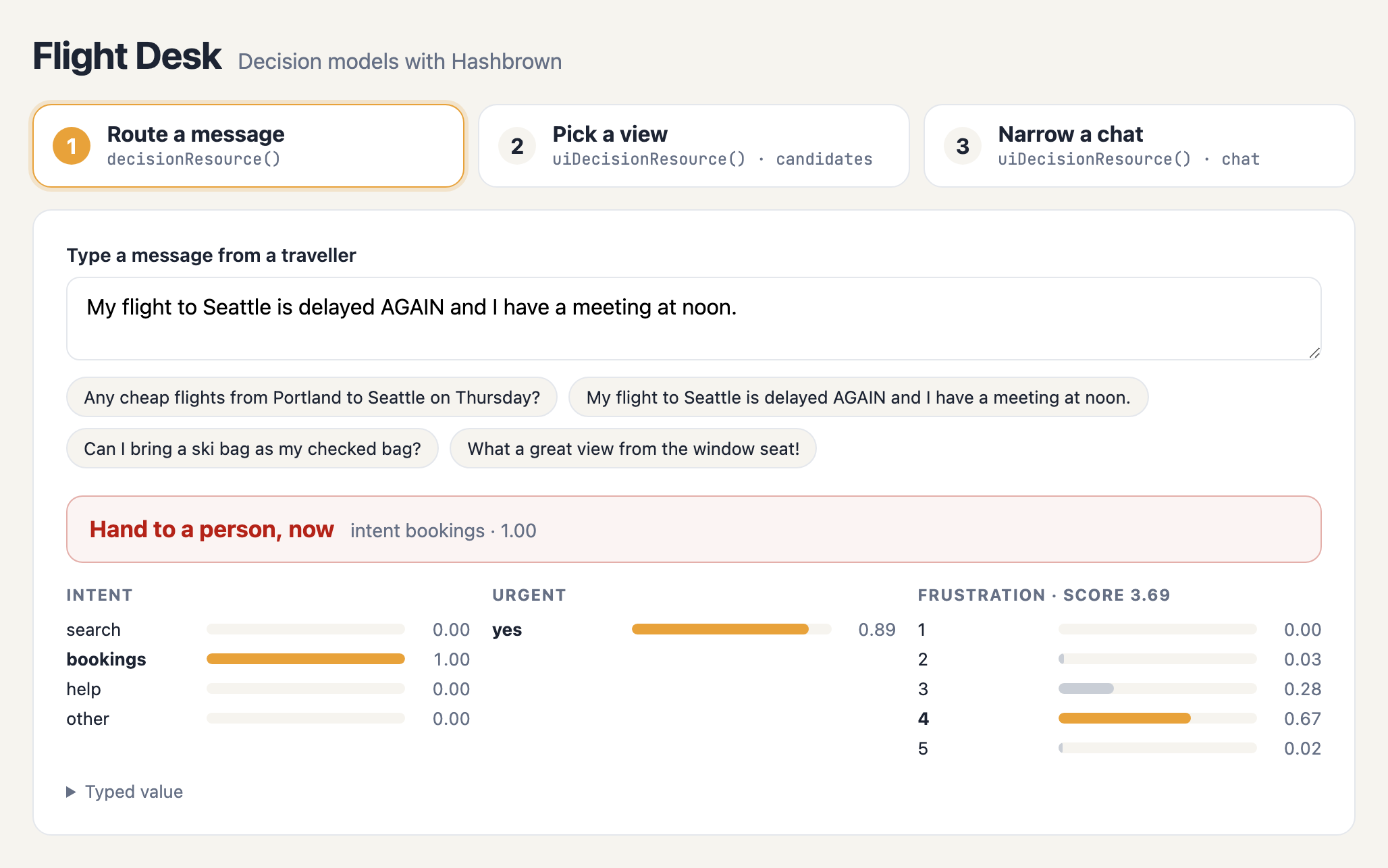
A few things to note:
- Three questions, one request. The choice, the yes or no, and the score all came back together.
- The score is more than a number.
meta.frustration.scoreis weighted by the probability of each level, so it can land between levels. That's a much better signal than "4". - The policy is plain code. It's easy to read, easy to test, and easy to change. The model never decides to page a person; your code does.
And here's a message that isn't about travel at all:
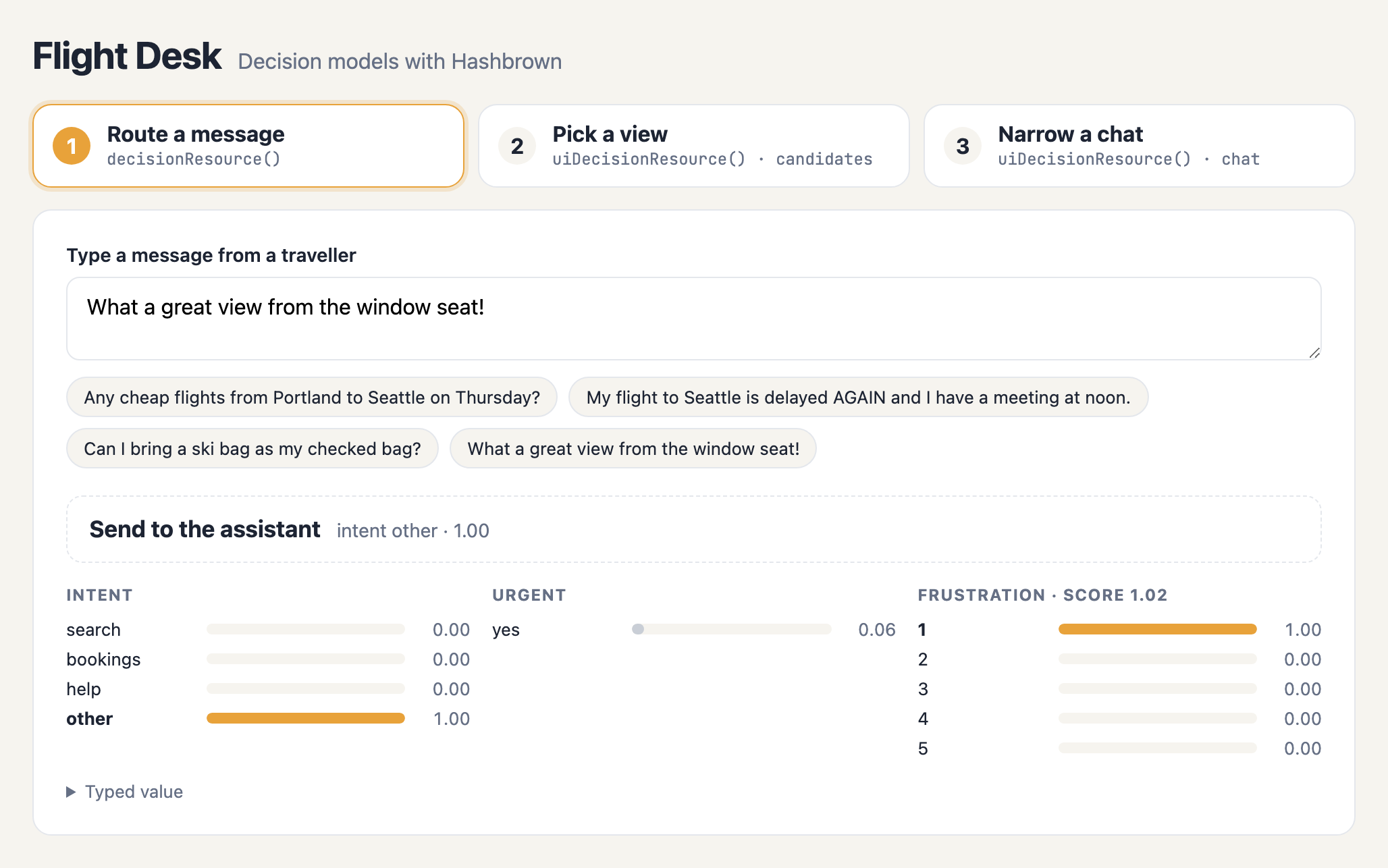
The model picks other with a confidence of 1.00, so the app sends it to the assistant.
That's why other is in the schema: without it, the model would have to pick the least wrong answer.
Step 2: Pick a view with candidates
Sometimes the question isn't "where does this go?" but "how should I show this?"
Flight Desk has already loaded a week of Portland to Seattle flights. It can show them three ways: a list, the single cheapest fare, or a calendar of the lowest fare each day. The app builds all three. The model only picks one:
const viewTransport = createHttpDecisionTransport({ url: '/api/decide/view' });

function ViewPanel() {
  const [request, setRequest] = useState<string | null>(null);
  const picked = useUiDecision({
    input: request,
    system: VIEW_CONTEXT,
    candidates: [
      { ...viewOptions[0], element: <FlightList flights={flights} /> },
      { ...viewOptions[1], element: <CheapestFare flights={flights} /> },
      { ...viewOptions[2], element: <FareCalendar flights={flights} start="2026-11-02" /> },
    ],
    select: 'one',
    minConfidence: 0.7,
    transport: viewTransport,
  });

  return picked.ids.length === 0 ? <FlightList flights={flights} /> : <>{picked.ui}</>;
}protected readonly request = signal<string | null>(null);
protected readonly picked = uiDecisionResource({
input: this.request,
system: VIEW_CONTEXT,
candidates: [
{ ...viewOptions[0], component: FlightList, inputs: { flights } },
{ ...viewOptions[1], component: CheapestFare, inputs: { flights } },
{ ...viewOptions[2], component: FareCalendar, inputs: { flights, start: '2026-11-02' } },
],
select: 'one',
minConfidence: 0.7,
transport: createHttpDecisionTransport({ url: '/api/decide/view' }),
});And in the Angular template:
@if (request() && picked.ids().length === 0) {
  <app-flight-list [flights]="flights" />
} @else {
  <hb-ui-decision [resource]="picked" />
}
Let's break that down:
candidatesare your options. Each has anidand adescriptionfor the model, plus what to render: a Reactelement, or an Angularcomponentwith itsinputs. The model never sees, or writes, any of the props.viewOptionsholds the ids and descriptions in a shared file, so the server can pin the same question withcreateSelectionSchema(viewOptions, 'one').select: 'one'asks a single choice question. Use{ max: 2 }to allow more than one.minConfidence: 0.7is the bar. Below it, nothing is chosen, andidsis empty.- Rendering is one line. The hook returns the chosen elements as
ui. In Angular,<hb-ui-decision>renders the chosen component with its inputs, or you can readpicked.chosen()and render it yourself.
When nothing is chosen, Flight Desk falls back to the full list.
That's one ternary in React, or one @if in Angular.
Here's "I can go any day next week, which day is best?":
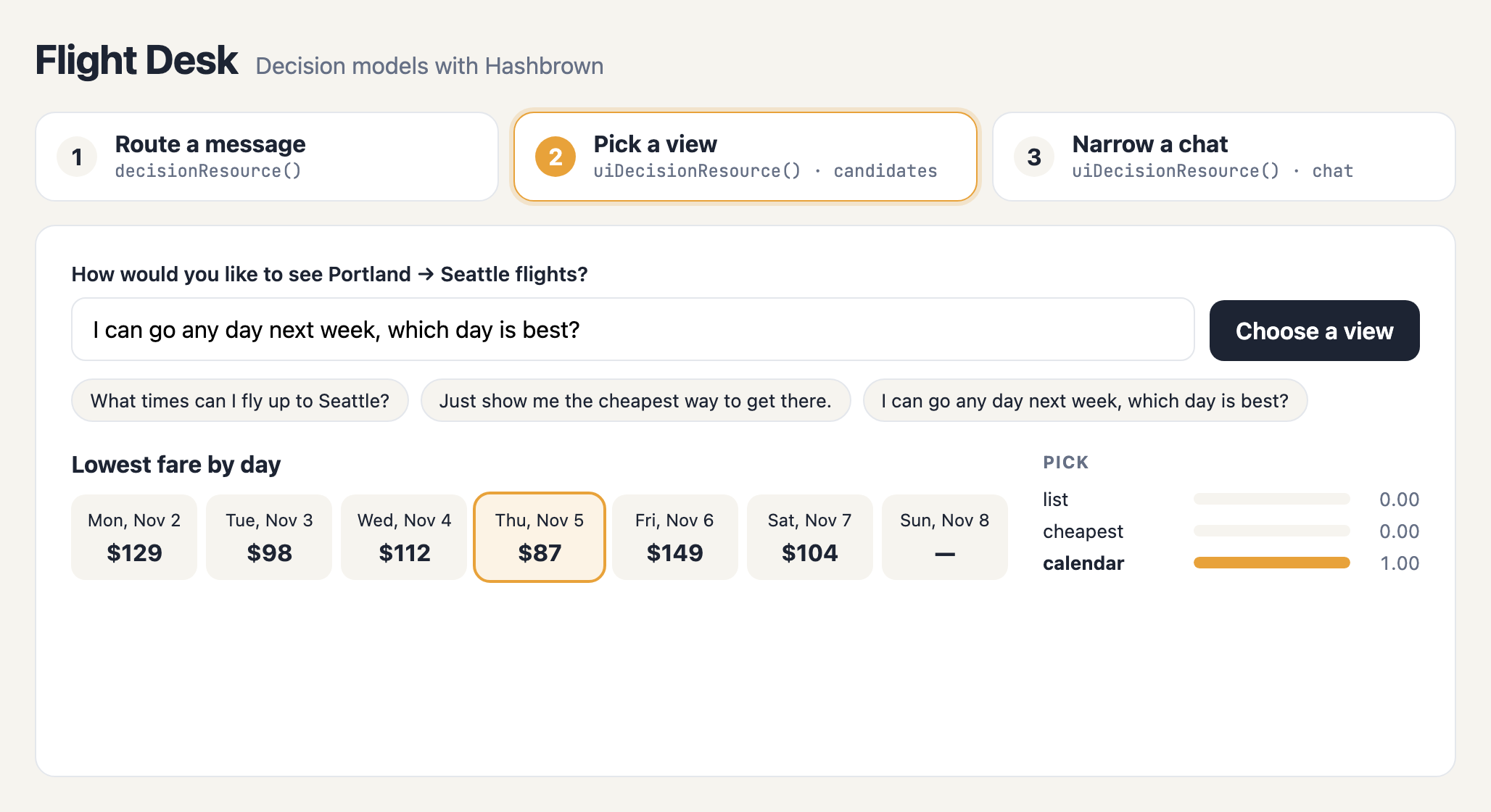
The model picked calendar, and the app rendered it with its own data.
Notice what the model didn't do: it didn't write a single price.
Every number on that calendar came from the app, so no number on it can be made up.
Step 3: Narrow a chat
The third tab is a regular Hashbrown chat, with two browser-side tools and two cards:
const cardsTransport = createHttpDecisionTransport({ url: '/api/decide/cards' });

function ChatPanel() {
  const prose = useUiKit({ components: [exposeMarkdown()], selectable: false });
  // findFlightsTool and findBookingsTool come from useTool()
  const chat = useUiChat({
    system: 'You are Flight Desk, a travel assistant. ...',
    components: [prose, flightCard, bookingCard],
    tools: [findFlightsTool, findBookingsTool],
  });
  const narrowed = useUiDecision({
    chat,
    select: { max: 2 },
    minConfidence: 0.7,
    system: 'Provided by the server.',
    transport: cardsTransport,
  });

  const send = (content: string) => narrowed.sendMessage(content);
  // ...
}protected readonly chat = uiChatResource({
system: 'You are Flight Desk, a travel assistant. ...',
components: [proseKit, flightCard, bookingCard],
tools: [findFlightsTool, findBookingsTool], // createTool() definitions
});
protected readonly narrowed = uiDecisionResource({
chat: this.chat,
select: { max: 2 },
minConfidence: 0.7,
system: 'Provided by the server.',
transport: createHttpDecisionTransport({ url: '/api/decide/cards' }),
});
protected send(content: string): void {
this.narrowed.sendMessage(content);
}Let's break that down:
chatreplacescandidates. It's theuseUiChat()oruiChatResource()you already have, and the options are its own components, by their names and descriptions.- The Markdown kit (
prosein React,proseKitin Angular) is a UI kit withexposeMarkdown()andselectable: false. It's never part of the question and always available, so the assistant can always write a sentence. narrowed.sendMessage()replaceschat.sendMessage(). It asks the decision first, narrows the chat to the chosen cards for this turn, sends the message, and puts every card back when the turn ends.isDecidingis true while the decision is in flight. Flight Desk shows "Choosing cards…" until it's done.decisionErroris set when the decision fails. The message still goes out, with every card.decisionholds the selection'svalueandmeta, which is where the chart on the right of the screenshots comes from.
As before, the hook returns plain values, and the resource returns signals: narrowed.isDeciding in React, narrowed.isDeciding() in Angular.
Here's a flight search:
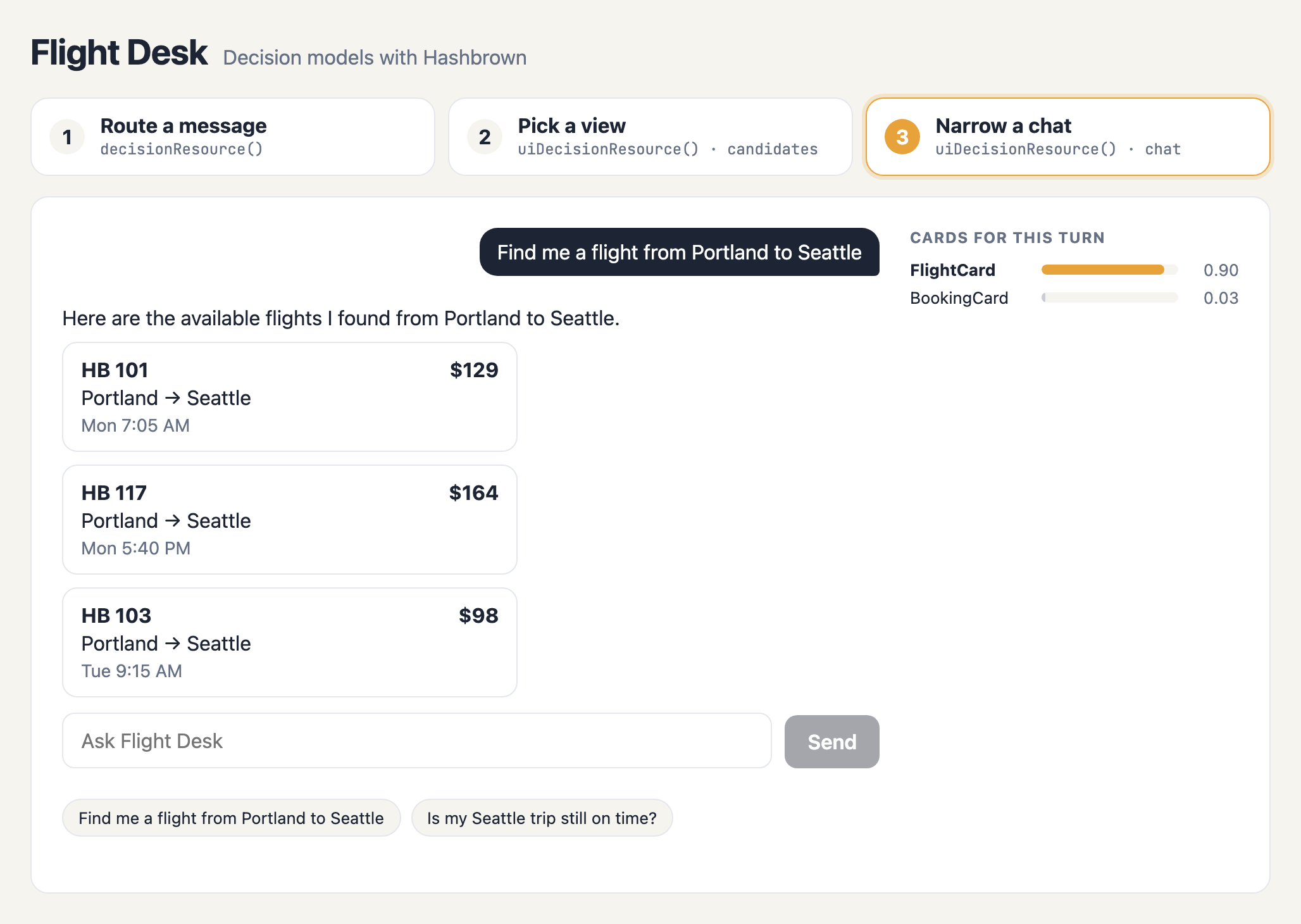
And here's a question about a trip that's already booked:
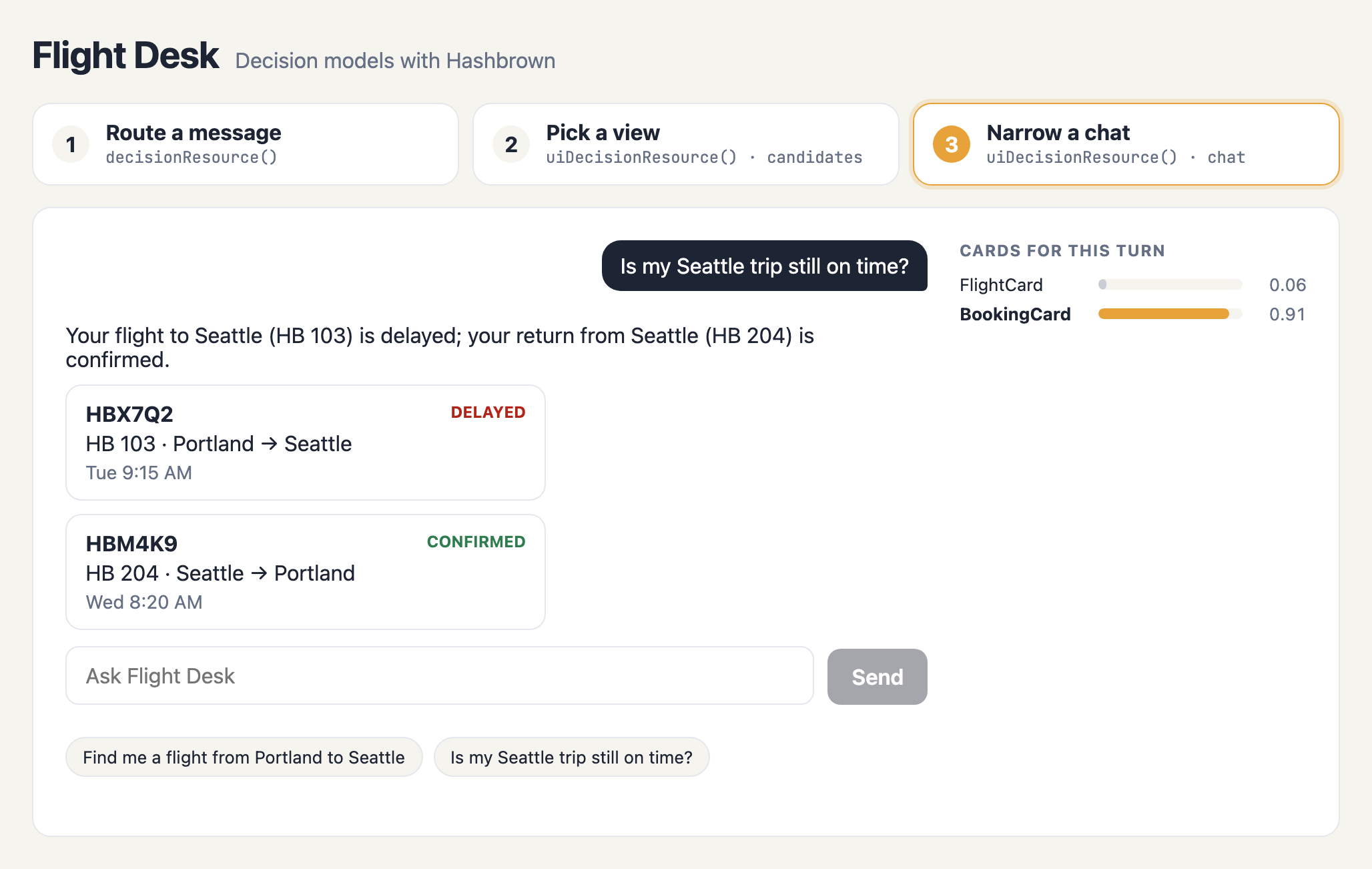
A few things to note:
- The decision ran before the chat did. The chart on the right is the decision, and the cards on the left are the chat's answer, rendered with only the cards it was given.
- The generative model still fills in the props. It calls
findFlightsorfindBookingsin the browser, then copies the results into the cards. Skillet validates every prop. - Narrowing isn't security. It shapes what the model is offered on one turn. Keep your access checks in your tools and on your server.
That's all three. Three tabs, three hooks or resources, and one server route.
So, how easy is it to use decision models with Hashbrown?
Let's count. For decisions in atc, here's what we wrote:
- Two schemas:
routeSchema, and the component contracts we already had for the cards. - Two paragraphs of context:
ROUTE_CONTEXTandCARDS_CONTEXT. - One pure function:
routeAction(), with two thresholds. - Two calls in each app:
useDecision()anduseUiDecision()in React, ordecisionResource()anduiDecisionResource()in Angular. - One server route that pins the questions and calls
HashbrownTypeSafe.decide.
And here's what Hashbrown did for us:
- Compiled our Skillet schemas into decision questions, and decoded the answers into typed values and confidence.
- Built the card-selection questions from our components, narrowed the chat for one turn, and restored it afterward.
- Fell back to the full chat whenever a decision was unsure or failed.
- Streamed and validated the extracted filter field by field.
- Ran the tools in the browser, rendered our components, and kept the transcript.
That's the trick. Let the decision model answer the closed questions, let the generative model answer the open ones, and let the framework do the plumbing.
Get started with decisions in Hashbrown
- Fly atc live, and turn on dev mode to watch the decisions.
- Run Flight Desk locally to try all three decision resources in one page.
- Read the source. The core files are numbered in steps, so you can read Angular and React side by side.
- Read about Decisions for Angular or React.
- Walk through UI selection for Angular or React.
- Put a decision inside your own agent with Decisions in Agents for Angular or React.
- Read what else shipped with decisions in the Hashbrown v0.8 release post.
I'd love to see what you build with it.