
I love airplanes.
I love flying in them, I love watching them, and I am that person who stops mid-sentence to look up at a contrail and wonder where it's headed. So when we went looking for a new flagship example for Hashbrown, I wanted to build a tool I would actually open on a Saturday morning with a cup of coffee.
Meet atc.
atc is a live map of every aircraft over the Pacific Northwest, with an assistant that you can just ask. "What's flying near Bend?" "Show me everything landing at Seattle." "Follow the fastest airliner." The assistant answers with the same cards, boards and map that the app already has, not a wall of text.
Here's the whole thing in 45 seconds:
This post is long, and it's on purpose. My goal is to teach you, and your coding agent, how atc is built. We'll go from the transponder in an airplane all the way to a streamed React or Angular component on your screen, with lots of code along the way.
Ok, let's dive in. ✈️
What is atc?
atc is a small, real app. Here's what it does:
- Polls live ADS-B positions for the Pacific Northwest every 3 seconds and draws every aircraft on a Leaflet map.
- Glides each plane smoothly between position reports, at 60 frames per second.
- Lets you click a plane to see its detail card, or follow it across the map.
- Gives you a chat panel where the model answers with your components: a
FlightCard, anArrivalsBoard, and anAircraftCompare. - Gives the model 10 tools that run in the browser, against the planes already on the map.
- Ships twice, in Angular and in React, on one shared, framework-free core.
The whole thing replaces our old invoicing example. That example was 30,000 lines of very serious business software. It turns out that people would rather ask about the 737 over their house than about accounts receivable. Who knew? 😆
Kudos
Before we get into the code, I want to say thank you. atc stands on the shoulders of a lot of open source and open data, and none of it would exist without these folks:
- adsb.lol, and every volunteer who runs a feeder on their roof. atc's aircraft positions come from adsb.lol, published as open data under the ODbL. This is a genuinely wonderful community project.
- vrs-standing-data.adsb.lol, the scheduled route data behind the
lookupRoutetool. - OpenStreetMap and its contributors, for the map tiles under every plane.
- Leaflet, still the friendliest map library on the web, more than a decade on.
- Angular and React. atc runs on Angular 22 with signals and zoneless change detection, and on React 19 with
useSyncExternalStore. - AG-UI, the open protocol that carries every message between the browser and the server. Congrats again on 1.0!
- OpenAI and the
openaiNode SDK. atc runs ongpt-5-miniby default. - aimock from the CopilotKit team, which lets our end-to-end tests run against a scripted model with no API key.
- Vite, Vitest, Playwright and Nx, for the build, the unit tests, the browser tests and the monorepo that holds them together.
- Vercel, which hosts the app and its two functions.
- Hanken Grotesk and JetBrains Mono, the two typefaces in the UI.
Thank you, all of you. Building on your work is the best part of my job.
The Architecture
Here's the 10,000-foot view.
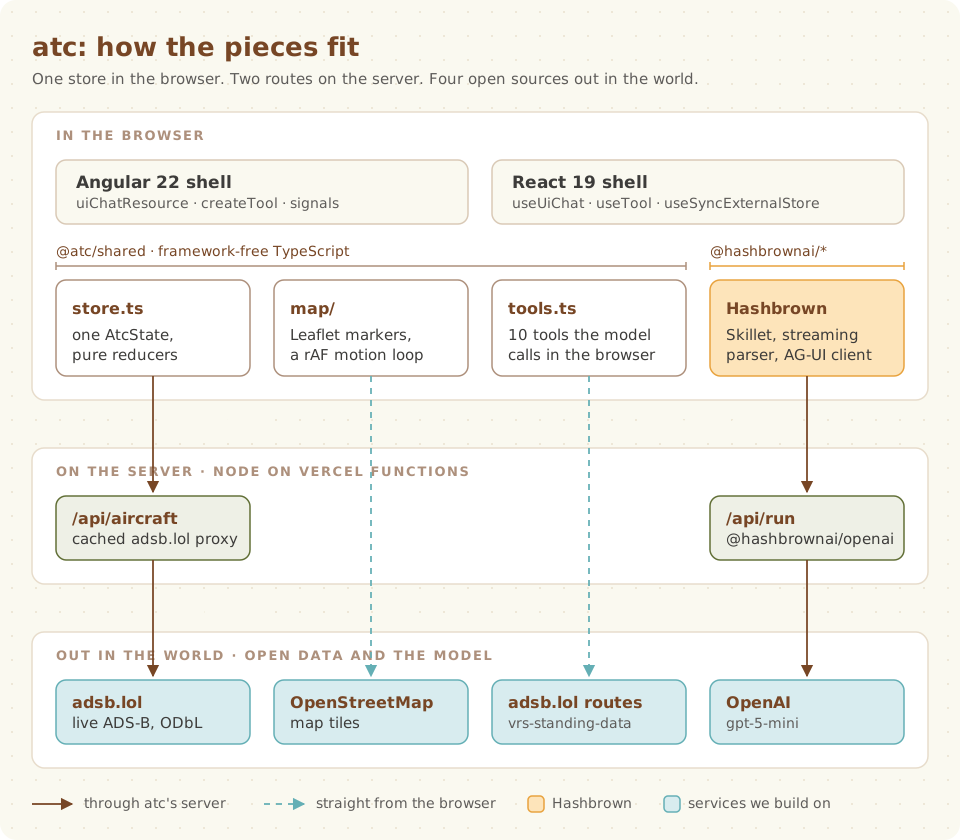
Let's review the diagram from the top down.
In the browser, there are two thin shells: one Angular and one React.
They do very little on their own.
Almost everything lives in @atc/shared, a package of plain TypeScript with no framework in it:
store.tsholds one immutableAtcStateand the pure reducers that change it.map/draws the Leaflet map and animates the planes.tools.tsdefines the 10 tools the model can call.
Hashbrown sits beside the shared core. It parses the model's streaming output with Skillet schemas, renders your components, and runs your tools.
On the server, there are exactly two routes:
/api/aircraftis a cached proxy in front of adsb.lol./api/runstreams the model's answer back to the browser, using@hashbrownai/openai.
Out in the world, atc talks to adsb.lol and OpenAI through its server. The browser fetches map tiles and scheduled routes directly.
If you only remember three things about this architecture, make them these:
- One store. The map, the tools, and the components all read the same
AtcState. Nothing keeps its own copy of the planes. - Shared code stays framework-free. If it doesn't need Angular or React, it lives in
shared/, and it gets a unit test. - The shells stay thin, and they mirror each other. Read
angular/src/app/assistant.tsnext toreact/src/assistant.tsxand they line up, step for step.
Here is the layout on disk:
atc/
  shared/        Framework-free TypeScript used by both apps and the server
    src/aircraft.ts      adsb.lol to Aircraft (validation, privacy whitelist)
    src/store.ts         AtcState and pure reducers; the one source of truth
    src/tools.ts         The browser-side tools the model calls
    src/find-aircraft.ts The query behind the findAircraft tool
    src/contracts.ts     Component contracts (Skillet schemas) and the system prompt
    src/views.ts         Pure view models for the UI
    src/map/             Leaflet map, detail card, follow pill (no framework)
  angular/  react/       Thin shells: components and the core file
  server/                /api/run and /api/aircraft
  e2e/                   Playwright against both apps with a mocked model
Part 1: From Transponder to Pixel
Before the model can answer a single question, we need airplanes on a map.
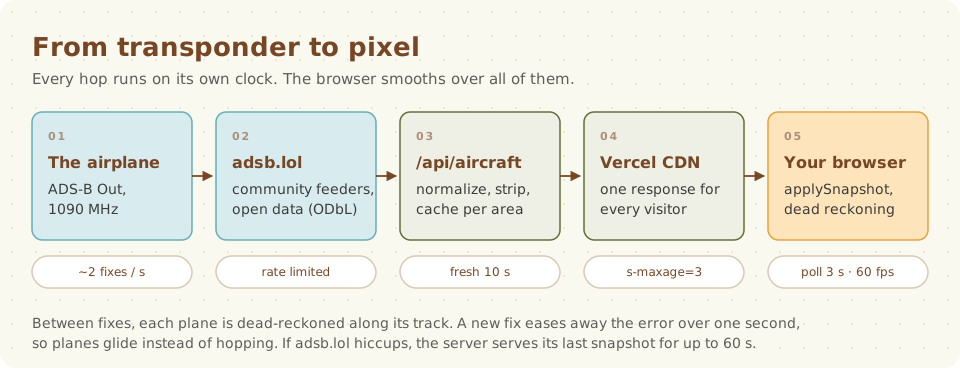
Most airliners, and a lot of general aviation aircraft, carry an ADS-B Out transponder. It broadcasts the aircraft's position, altitude, speed and track a couple of times a second on 1090 MHz. Volunteers all over the world run little receivers that hear those broadcasts and feed them to aggregators like adsb.lol.
That's step one and two, and they're someone else's (amazing) work. Steps three through five are ours.
A polite proxy
adsb.lol is a free, community-run service.
I want to be a good neighbor to it.
So the browser never calls adsb.lol for positions.
It calls our /api/aircraft route, which shares one upstream call across every visitor.
/**
 * How long a fetched snapshot is served without calling adsb.lol again.
 * adsb.lol answers 429 to a 250 nm query every 3-5 s from one IP; every 10 s
 * is sustainable.
 */
const FRESH_MS = 10_000;
/** How old a snapshot may be and still stand in when adsb.lol fails. */
const STALE_LIMIT_MS = 60_000;
/** How long to leave adsb.lol alone after it answers 429. */
const COOLDOWN_MS = 15_000;
const CACHE_CONTROL = 'public, s-maxage=3, stale-while-revalidate=5';

/** What the handler remembers about one area. Replaced, never mutated. */
interface AreaCache {
  readonly last: {
    readonly snapshot: AircraftSnapshot;
    readonly at: number;
  } | null;
  readonly inFlight: Promise<AircraftSnapshot> | null;
  readonly coolUntil: number;
}
Let's review the code above:
FRESH_MSmeans we call adsb.lol at most once every 10 seconds per area.inFlightlets concurrent requests join one upstream call instead of each starting their own.- When adsb.lol answers 429 (too many requests), we back off for 15 seconds.
- When adsb.lol fails, we serve the last good snapshot for up to 60 seconds and mark it with an
X-Atc-Stale: 1header. CACHE_CONTROLlets the Vercel CDN share each response for 3 seconds, so most polls never reach our function at all.
Here's the heart of it, the load function:
const load = async (
  area: AreaId,
): Promise<{ snapshot: AircraftSnapshot; stale: boolean } | null> => {
  const { last, coolUntil } = cacheFor(area);
  if (last && now() - last.at < FRESH_MS) {
    return { snapshot: last.snapshot, stale: false };
  }
  if (now() >= coolUntil) {
    try {
      return { snapshot: await refresh(area), stale: false };
    } catch {
      // Fall back to the last good snapshot below.
    }
  }
  const fallback = cacheFor(area).last;

  return fallback && now() - fallback.at <= STALE_LIMIT_MS
    ? { snapshot: fallback.snapshot, stale: true }
    : null;
};
Fresh? Serve it.
Allowed to call upstream? Try it.
Upstream broken? Fall back to something recent.
Nothing recent? Return null, and the handler answers with a 502.
Notice that the cache is never mutated in place.
Each AreaCache is replaced with a new object.
That's a theme you'll see all over atc.
Trust nothing from the feed
ADS-B data is broadcast over the air by anyone with a transponder. I treat it like user input, because it is.
The normalizeAdsbLol function turns adsb.lol's JSON into our own Aircraft type.
It copies whitelisted fields only.
It never spreads an upstream entry.
// SECURITY INVARIANT: hex codes, labels and kinds are interpolated into
// marker innerHTML (map/plane-marker.ts planeIconHtml). Widening HEX or LABEL,
// or interpolating typeCode, description or registration there, is an XSS bug.
const HEX = /^[0-9a-f]{6}$/;
const AIRLINE_CALLSIGN = /^[A-Z]{3}\d[A-Z0-9]{0,4}$/;
const LABEL = /^[A-Z0-9]{1,8}$/;
const REGISTRATION = /^[A-Z0-9](?:[A-Z0-9-]{0,8}[A-Z0-9])?$/;

function normalizeEntry(entry: unknown): Aircraft | null {
  if (!isRecord(entry)) {
    return null;
  }
  const hex =
    typeof entry['hex'] === 'string' ? entry['hex'].toLowerCase() : '';
  const flight = upper(entry['flight']);
  const callsign = isLabel(flight) ? flight : null;
  const r = upper(entry['r']);
  const registration = isRegistration(r) ? r : null;
  const lat = numberOrNull(entry['lat']);
  const lon = numberOrNull(entry['lon']);
  if (!HEX.test(hex) || lat === null || lon === null) {
    return null;
  }
  // ...

  return {
    hex,
    label: displayLabel({ hex, callsign, registration }),
    callsign,
    registration,
    typeCode,
    category,
    kind: aircraftKind({ typeCode, category }),
    lat,
    lon,
    altitudeFt: typeof altitude === 'number' ? Math.round(altitude) : null,
    onGround: altitude === 'ground',
    groundSpeedKt: numberWhere(entry['gs'], isSpeed),
    trackDeg: numberWhere(entry['track'], isDegrees),
    // ...
  };
}
There are two good reasons for this whitelist.
The first is security.
The plane markers on the map are HTML strings handed to Leaflet's divIcon.
So only fields that pass a strict pattern (the hex code, the label, a closed set of aircraft kinds, and numbers) ever go into that HTML.
Everything else is rendered as text.
The second is privacy. adsb.lol includes owner and operator fields for some aircraft. atc drops them on the server. They never reach the browser, and they never reach the model. You can see a Cessna's registration, but not the name of the person flying it.
Polling, gently
On the client, feed.ts polls /api/aircraft every 3 seconds, one request at a time.
const tick = async () => {
  try {
    const { snapshot, stale } = await load();
    if (stopped) {
      return;
    }
    store.applySnapshot(snapshot);
    if (!stale) {
      lastSuccessAt = now();
    }
    store.setFeedStatus(stale ? 'delayed' : 'live');
  } catch {
    if (stopped) {
      return;
    }
    const silentFor = now() - (lastSuccessAt ?? startedAt);
    if (silentFor >= stalledAfterMs) {
      store.setFeedStatus('stalled');
    } else if (silentFor >= delayedAfterMs) {
      store.setFeedStatus('delayed');
    }
  }
  if (!stopped) {
    timer = setTimeout(() => void tick(), intervalMs);
  }
};
Why setTimeout instead of setInterval?
Because the next poll only starts once the last one has finished.
A slow network never stacks up a queue of requests.
And if the feed goes quiet, the UI says so honestly: "Traffic data delayed". Planes keep their last known positions rather than vanishing.
Part 2: One Store to Rule Them All
If you've read my old NgRx posts, this part will feel familiar. 😉
Everything atc knows lives in one immutable object:
/** Everything the map, tools and components read. Treat as immutable. */
export interface AtcState {
  readonly aircraft: ReadonlyMap<string, Aircraft>;
  /** Aircraft that left the area in the last {@link DEPARTED_TTL_MS}. */
  readonly departed: ReadonlyMap<string, DepartedAircraft>;
  readonly routes: ReadonlyMap<string, Route | null>;
  readonly selectedHex: string | null;
  readonly highlighted: ReadonlySet<string>;
  readonly followingHex: string | null;
  readonly pulse: { readonly hex: string; readonly at: number } | null;
  readonly feedStatus: FeedStatus;
  readonly updatedAt: number | null;
  /** The area the map outlines, or null. */
  readonly shownArea: ShownArea | null;
  /** The newest map move, or null when there is nothing to do. */
  readonly viewRequest: ViewRequest | null;
  /** The last `seq` handed out. */
  readonly viewSeq: number;
}
Every change is a pure function that takes a state and returns a new one. Here's the reducer that applies a new snapshot from the feed:
export function applySnapshot(
  state: AtcState,
  snapshot: AircraftSnapshot,
): AtcState {
  if (state.updatedAt !== null && snapshot.at <= state.updatedAt) {
    return state;
  }
  const aircraft = new Map(
    snapshot.aircraft.map((entry) => [entry.hex, entry] as const),
  );
  const departed = new Map(
    [...state.departed].filter(
      ([hex, gone]) =>
        !aircraft.has(hex) && gone.lastSeenAt >= snapshot.at - DEPARTED_TTL_MS,
    ),
  );
  for (const [hex, previous] of state.aircraft) {
    if (!aircraft.has(hex)) {
      departed.set(hex, {
        aircraft: previous,
        lastSeenAt: state.updatedAt ?? snapshot.at,
      });
    }
  }

  return { ...state, aircraft, departed, updatedAt: snapshot.at };
}
Two details are worth calling out.
First, a snapshot that is no newer than the one we have returns the same state object. A cached repeat from the CDN, or an older copy from another server instance, changes nothing. Planes never move backwards in time.
Second, departed.
When a plane leaves the area, we don't forget it right away.
We keep it, frozen, for 30 minutes.
Why?
Because the model may have shown you a FlightCard for that plane ten minutes ago, and that card is still sitting in your chat transcript.
Instead of breaking, the card says "Out of range · last seen 09:41".
Who gets to move the map?
This was the trickiest piece of state in the app. The model can move the map (show an area, fit some highlighted planes). You can move the map (drag, zoom, click a row in a board). And follow mode wants to keep the map centered on one plane forever.
So, who wins?
/**
 * A pending map move: a highlight fit, an area, a reset to the home view,
 * or bringing one aircraft into view. Precedence: (1) follow mode always wins
 * and drops requests; (2) the newest request (highest `seq`) wins; (3) a user
 * drag or zoom cancels a pending one; (4) highlight and aircraft requests
 * wait for their markers to be drawn. The map applies each `seq` once.
 */
export type ViewRequest =
  | { readonly seq: number; readonly kind: 'highlight' }
  | { readonly seq: number; readonly kind: 'area'; readonly area: ShownArea }
  | { readonly seq: number; readonly kind: 'reset' }
  | { readonly seq: number; readonly kind: 'aircraft'; readonly hex: string };
Rather than letting the tools poke at Leaflet directly, they request a view. The map applies each request once, by its sequence number. The rules are written down in one place, and the unit tests pin them.
This is the same idea as an air traffic controller issuing a clearance: one voice on frequency, and the newest instruction wins.
The same store, two frameworks
The store itself is a tiny getState / subscribe object with no framework in it.
Each shell adapts it in a handful of lines.
In Angular, the store becomes a single app-wide signal:
export const ATC_STATE = new InjectionToken<Signal<AtcState>>('ATC_STATE', {
  providedIn: 'root',
  factory: () => {
    const store = inject(ATC_STORE);
    const state = signal(store.getState());
    inject(DestroyRef).onDestroy(
      store.subscribe(() => state.set(store.getState())),
    );

    return state.asReadonly();
  },
});

/** The current atc state as a signal. Call in an injection context. */
export function injectAtcState(): Signal<AtcState> {
  return inject(ATC_STATE);
}
In React, it's useSyncExternalStore, which was built for exactly this:
/** The current atc state; re-renders on every store change. */
export function useAtcState(): AtcState {
  const store = useAtcStore();

  return useSyncExternalStore(store.subscribe, store.getState);
}
That's it. Every component, in either framework, reads state through one of those two functions.
Part 3: Making Planes Glide
Here's a fun problem.
Positions arrive every 3 seconds at best, and every 10 seconds from adsb.lol. If you just move each marker to its new position, planes hop. It looks broken.
Real radar scopes have the same problem, and the answer is old: dead reckoning. If you know where a plane was, which way it's going, and how fast, you know roughly where it is now.
/**
 * Where a plane at `from` would be after `seconds` along `trackDeg` at
 * `speedKt`, on a flat-earth approximation that is exact enough for the few
 * nautical miles between snapshots.
 */
export function deadReckon(
  from: LatLon,
  trackDeg: number,
  speedKt: number,
  seconds: number,
): LatLon {
  const nm = (speedKt * seconds) / 3600;
  if (nm === 0) {
    return { lat: from.lat, lon: from.lon };
  }
  const track = (trackDeg * Math.PI) / 180;
  const lat = from.lat + (nm * Math.cos(track)) / 60;
  const lon =
    from.lon +
    (nm * Math.sin(track)) / (60 * Math.cos((from.lat * Math.PI) / 180));

  return { lat, lon };
}
If you've ever done flight planning with an E6B, this should look like an old friend. One degree of latitude is 60 nautical miles. A degree of longitude shrinks by the cosine of your latitude as you head toward the pole. Knots times hours is nautical miles. That's the whole formula. ✈️
Of course, the guess is never perfect.
When the next real fix arrives, the plane is drawn a little off from where it should be.
If we snapped it, it would hop again.
So instead, each plane's motion carries an offset that eases away over one second:
/** How much of a correction started at `since` remains: 1, easing to 0. */
function remaining(since: number, now: number): number {
  const t = clamp((now - since) / CORRECTION_MS, 0, 1);

  return (1 - t) ** 3;
}

/** Where to draw the plane at `now`. */
export function motionPosition(motion: Motion, now: number): LatLon {
  const { base, velocity, offset } = motion;
  const seconds = clamp((now - motion.baseAt) / 1000, 0, MAX_DEAD_RECKON_S);
  const reckoned =
    velocity === null
      ? base
      : deadReckon(base, velocity.trackDeg, velocity.speedKt, seconds);
  const k = remaining(motion.offsetAt, now);

  return {
    lat: reckoned.lat + offset.lat * k,
    lon: reckoned.lon + offset.lon * k,
  };
}
Let's review:
reckonedis where the plane should be, dead-reckoned from its last fix.offsetis the gap between where we drew it and where the new fix says it is.remainingeases that gap from 1 down to 0 with a cubic ease-out.- Turns work the same way: the heading eases the short way round over the same second.
- Dead reckoning stops after 30 seconds, so a plane that stops reporting doesn't fly off into Idaho.
And all of these are pure functions of time, so they're easy to unit test.
The sub-pixel bug
This one bit me, and I think it's worth sharing.
The first version of the motion loop called Leaflet's marker.setLatLng() every frame.
And the planes... jittered.
Not a lot.
Just enough to be annoying.
The cause: Leaflet rounds marker positions to whole pixels. At regional zoom levels, an airliner moves well under one pixel per frame. So each plane would stand still for a few frames, then hop one pixel, each plane at a slightly different moment.
The fix was to compute the position ourselves, without rounding, and write the transform directly:
/**
 * Where `position` falls in the map's layer, in unrounded pixels. Leaflet's
 * own `latLngToLayerPoint` rounds to whole pixels; at regional zooms a plane
 * moves well under a pixel a frame, so rounding makes it stand still and
 * then hop, each plane at a different moment.
 */
export function exactLayerPoint(map: LeafletMap, position: LatLon): Point {
  return map
    .project([position.lat, position.lon], map.getZoom())
    .subtract(map.getPixelOrigin());
}

/** Writes one plane's position and heading; transforms only, no reads. */
const draw = (hex: string, position: LatLon, heading: number | null) => {
  drawn.set(hex, position);
  const icon = markers.get(hex)?.getElement();
  if (!icon) {
    return;
  }
  L.DomUtil.setPosition(icon, exactLayerPoint(map, position));
  const body = bodyOf(icon);
  const rotation = heading === null ? null : planeRotation(heading);
  if (body && rotation !== null && body.style.transform !== rotation) {
    body.style.transform = rotation;
  }
};
One requestAnimationFrame loop draws every moving plane in the same frame, writing transforms only, never reading layout.
Leaflet's markers still handle hover, click and hit testing.
We only sync their (rounded) lat/lon back to Leaflet right before Leaflet needs it, like at the start of a zoom.
The loop also respects prefers-reduced-motion.
If you've asked your OS for less motion, planes jump straight to each fix.
Part 4: Hashbrown, in Three Steps
Ok, now for the part I'm most excited about.
Everything so far is an ordinary, if slightly obsessive, web app. Hashbrown is what lets you talk to it.
Here's what happens when you ask, "What's flying near Bend?":
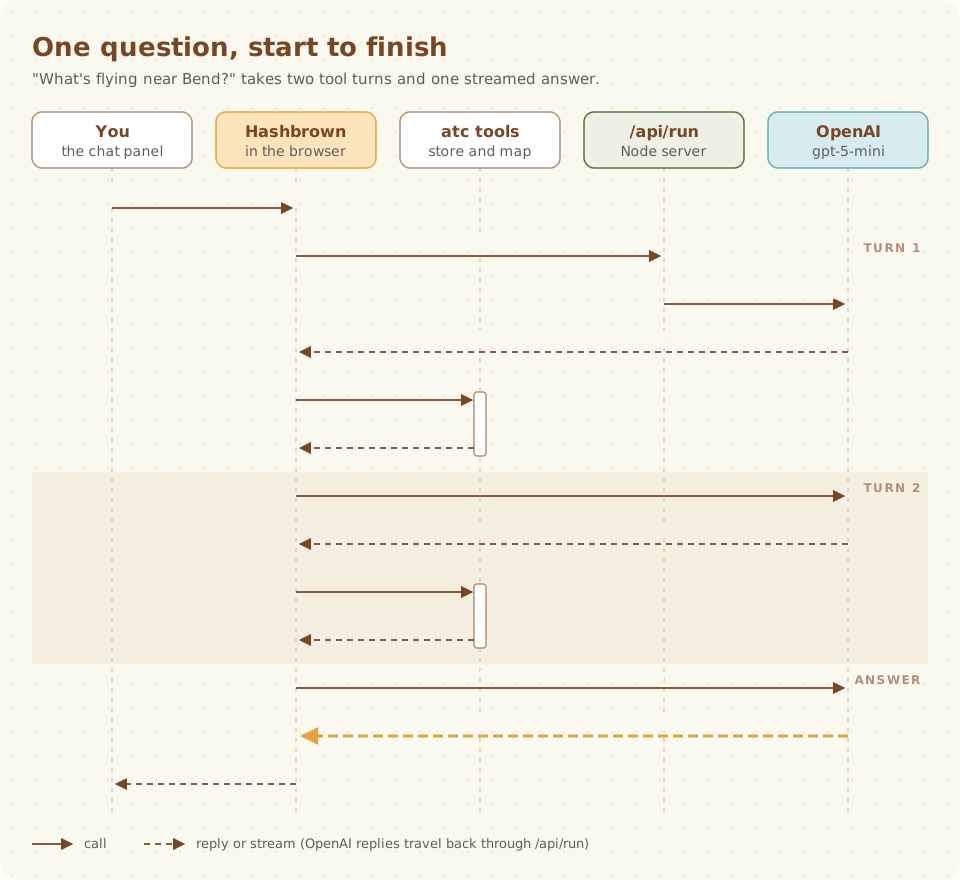
Let's walk through it:
- Hashbrown sends your message, the names of the tools, and the schema of the UI it can render to
/api/run. - The server swaps in its own system prompt and tool definitions, then calls OpenAI.
- The model asks to call
lookupPlace('Bend'). Hashbrown runs that tool in your browser and sends back{ code: 'KBDN' }. - The model calls
findAircraftnear KBDN andhighlightAircraft. Those also run in the browser. The map outlines a circle around Bend, fits it, and dims every other plane. - The model streams its answer: a short Markdown sentence and an
ArrivalsBoard. The board renders row by row as each aircraft ID arrives.
Notice what never happens: the server never sees the list of planes. The tools read the same store the map does, right there in the browser.
Both core files, angular/src/app/assistant.ts and react/src/assistant.tsx, are organized into the same three steps.
Let's go through them.
Step 1: Expose your components
The model can only render the components you expose, and Skillet validates every prop.
I start with a contract in the shared package: a name, a description, and the props as a Skillet schema.
// Hold-back: streamed props (s.streaming.*) render as they arrive; plain
// props (hex, airport) appear only once complete, and Hashbrown shows the
// fallback until then. Keep IDs non-streaming so a half-streamed "a1c" never
// resolves to another plane.

export const flightCardContract = {
  name: 'FlightCard',
  description:
    'One aircraft on the map, with live altitude, speed, heading and its scheduled route if looked up.',
  props: {
    note: s.streaming.string(
      'One or two sentences for the user about this flight',
    ),
    hex: s.string(
      'The aircraft hex code from a tool result. Never invent or shorten one.',
    ),
  },
};

export const arrivalsBoardContract = {
  name: 'ArrivalsBoard',
  description:
    'A live table of aircraft approaching or near an airport, nearest first.',
  props: {
    title: s.streaming.string(
      'A short label with no dashes, such as "Arrivals at Seattle" or "Near Bend"',
    ),
    airport: s.enumeration(
      'ICAO code of the airport the aircraft are approaching or near',
      [...AIRPORT_CODES],
    ),
    // The array streams row by row, but each s.string item is held back until
    // whole, so a row never points at a partial hex.
    hexes: s.streaming.array(
      'Aircraft hex codes from findAircraft, nearest first',
      s.string('Aircraft hex code'),
    ),
  },
};
This is my favorite detail in the whole app, so let's slow down.
An aircraft's hex code is six characters, like a1c00b.
Now imagine the model is streaming that ID and it has only sent a1c so far.
If the card tried to look up a1c, it might match a different airplane for a moment.
That's a bad look for an air traffic app. 😬
Skillet handles this for you:
s.streaming.string()renders as it arrives. Thenotetypes itself out, word by word.- Plain
s.string()is held back until it is complete. Thehexshows up all at once, or not at all. s.streaming.array()of plain strings streams row by row, and each row's ID arrives whole.
Until a held-back prop arrives, Hashbrown renders the component's fallback.
In atc, that's a skeleton card that shows the streaming note as soon as it has one.
The end-to-end tests even check this. They watch every card that appears on the page and fail if one ever renders with an incomplete or unknown ID.
With the contract in hand, the Angular shell exposes the component:
// 1. Expose your components. The model can only render these, and Skillet
//    validates every input. IDs never stream, so a card never shows the wrong plane.
const components = [
  exposeMarkdown({ className: 'atc-prose' }),
  exposeComponent(FlightCard, {
    name: flightCardContract.name,
    description: flightCardContract.description,
    input: flightCardContract.props,
    fallback: FlightCardFallback,
    children: false,
  }),
  exposeComponent(ArrivalsBoard, {
    name: arrivalsBoardContract.name,
    description: arrivalsBoardContract.description,
    input: arrivalsBoardContract.props,
    fallback: ArrivalsBoardFallback,
    children: false,
  }),
  exposeComponent(AircraftCompare, {
    name: aircraftCompareContract.name,
    description: aircraftCompareContract.description,
    input: aircraftCompareContract.props,
    fallback: AircraftCompareFallback,
    children: false,
  }),
];
And the React shell does the same, with props in place of input:
const components = [
  exposeMarkdown({ className: 'atc-prose' }),
  exposeComponent(FlightCard, {
    name: flightCardContract.name,
    description: flightCardContract.description,
    props: flightCardContract.props,
    fallback: FlightCardFallback,
    children: false,
  }),
  // ...ArrivalsBoard and AircraftCompare
];
exposeMarkdown lets the model write short prose around the components.
Now, here's the thing about these components: the model only gives them an ID.
It never gives them altitudes, speeds, or headings.
The component looks those up in the store itself, which means a FlightCard keeps updating after the answer has finished streaming.
Ask about a plane, and watch its altitude tick down as it descends into Portland.
Here's the Angular FlightCard:
@Component({
  selector: 'atc-flight-card',
  changeDetection: ChangeDetectionStrategy.OnPush,
  template: `
    @let card = view();
    @if (card.status === 'unknown') {
      <article class="atc-card" data-testid="flight-card">
        <p class="atc-card-title">Unknown aircraft</p>
        <p class="atc-card-note">{{ note() }}</p>
      </article>
    } @else {
      <article class="atc-card" data-testid="flight-card">
        <header>
          <button
            type="button"
            class="atc-pick"
            [class.is-selected]="card.selected"
            [disabled]="card.status !== 'live'"
            (click)="store.revealAircraft(card.hex)"
          >
            <strong class="atc-callsign">{{ card.label }}</strong>
            @if (card.subtitle) {
              <span class="atc-card-muted">{{ card.subtitle }}</span>
            }
          </button>
        </header>
        <!-- type, route, altitude, speed, heading... -->
        <p class="atc-card-note">{{ note() }}</p>
      </article>
    }
  `,
})
export class FlightCard implements OnInit {
  readonly note = input.required<string>();
  readonly hex = input.required<string>();
  protected readonly store = inject(ATC_STORE);
  private readonly state = injectAtcState();
  protected readonly view = computed(() =>
    flightCardView(this.state(), this.hex()),
  );

  ngOnInit(): void {
    this.store.pulse(this.hex());
  }
}
And here's the React one:
export function FlightCard({ note, hex }: FlightCardProps) {
  const store = useAtcStore();
  const view = flightCardView(useAtcState(), hex);
  useEffect(() => store.pulse(hex), [store, hex]);

  if (view.status === 'unknown') {
    return (
      <article className="atc-card" data-testid="flight-card">
        <p className="atc-card-title">Unknown aircraft</p>
        <p className="atc-card-note">{note}</p>
      </article>
    );
  }

  return (
    <article className="atc-card" data-testid="flight-card">
      <header>
        <button
          type="button"
          className={`atc-pick${view.selected ? ' is-selected' : ''}`}
          disabled={view.status !== 'live'}
          onClick={() => store.revealAircraft(view.hex)}
        >
          <strong className="atc-callsign">{view.label}</strong>
          {view.subtitle ? (
            <span className="atc-card-muted">{view.subtitle}</span>
          ) : null}
        </button>
      </header>
      {/* type, route, altitude, speed, heading... */}
      <p className="atc-card-note">{note}</p>
    </article>
  );
}
See how little is in either one?
All the real logic lives in flightCardView, a pure function in the shared package:
export function flightCardView(
  state: AtcState,
  hex: string,
  timeZone?: string,
): FlightCardView {
  const found = lookupAircraft(state, hex);
  if (found.status === 'unknown') {
    return { status: 'unknown', hex };
  }
  const { aircraft } = found;

  return {
    status: found.status,
    hex: normalizeHex(hex),
    label: aircraft.label,
    subtitle: aircraftSubtitle(aircraft),
    aircraftType: aircraftTypeName(aircraft.typeCode),
    altitude: formatAltitude(aircraft),
    speed: formatSpeed(aircraft.groundSpeedKt),
    heading: formatHeading(aircraft.trackDeg),
    route:
      aircraft.callsign === null
        ? null
        : routeText(state.routes, aircraft.callsign),
    lastSeen:
      found.status === 'out-of-range'
        ? formatClock(found.lastSeenAt, timeZone)
        : null,
    selected: state.selectedHex === aircraft.hex,
  };
}
The view model is tested once. Both components are just templates over it. This is how we keep two apps in two frameworks at parity without losing our minds.
Step 2: Give the model tools
Tools are how the model reads the world and acts on it. In atc, every tool runs in the browser.
I split each tool into two halves.
The definition (name, description, Skillet schema) lives in one table, ATC_TOOL_DEFINITIONS:
export const ATC_TOOL_DEFINITIONS = {
  findAircraft: {
    name: 'findAircraft' as const,
    description:
      'Find aircraft on the map by airline, type, kind, altitude, approach or distance from an airport. With near, the map also shows and outlines that area. Returns compact rows.',
    schema: findAircraftInput,
  },
  lookupPlace: {
    name: 'lookupPlace' as const,
    description:
      'Find a Pacific Northwest airport by ICAO, IATA or FAA code, name or city. Returns its ICAO code, or found false.',
    schema: s.object('Place lookup', {
      query: s.string('What the user called the place, such as Bend or KBDN'),
    }),
  },
  followAircraft: {
    name: 'followAircraft' as const,
    description: 'Keep the map centred on one aircraft.',
    schema: s.object('Aircraft to follow', {
      hex: s.string('Aircraft hex code from a tool result'),
    }),
  },
  // ...seven more
};
Why split them?
Because the server needs the definitions too, as we'll see in a minute.
The handlers only make sense in the browser, so they're added by createAtcTools:
export function createAtcTools(context: AtcToolContext) {
  const { store } = context;

  return {
    lookupPlace: {
      ...ATC_TOOL_DEFINITIONS.lookupPlace,
      handler: async ({ query }: { query: string }) => {
        const airport = lookupPlace(query);

        return airport === null
          ? unknownPlace(query)
          : {
              found: true as const,
              code: airport.code,
              faa: airport.faa,
              name: airport.name,
              city: `${airport.city}, ${airport.state}`,
            };
      },
    },
    followAircraft: {
      ...ATC_TOOL_DEFINITIONS.followAircraft,
      handler: async ({ hex }: { hex: string }) => {
        if (!store.getState().aircraft.has(normalizeHex(hex))) {
          return {
            following: false,
            reason: `No aircraft with hex ${normalizeHex(hex)} is on the map.`,
          };
        }
        store.follow(hex);

        return { following: true };
      },
    },
    // ...
  } satisfies Record<AtcToolName, unknown>;
}
A few patterns here that I'd steal for your own app:
- Return small JSON, never whole state.
findAircraftreturns compact rows, at most 20 of them. The model doesn't need the squawk code of every plane in Oregon. - Refuse with a reason. Every refusal has the same shape,
{ <verb>: false, reason: '<sentence>' }. The model reads the sentence and recovers, usually by telling you something useful. satisfies Record<AtcToolName, unknown>. If someone adds a definition and forgets its handler, the compiler complains. Same for the tool chip labels in the transcript.
The findAircraft input schema is a nice example of designing a schema for a model:
/** Input schema for `findAircraft`. Every field is required; null means "any". */
export const findAircraftInput = s.object(
  'Filters for aircraft currently on the map',
  {
    airline: s.anyOf([
      s.string('Airline ICAO code such as UAL, or a name such as United'),
      s.nullish(),
    ]),
    kind: s.anyOf([
      s.enumeration(
        'Only this kind of aircraft: jet, twin (twin-engine prop), single (single-engine prop) or rotor (helicopter)',
        [...KINDS],
      ),
      s.nullish(),
    ]),
    minAltitudeFt: s.anyOf([s.number('Minimum altitude in feet'), s.nullish()]),
    near: s.anyOf([
      s.object('Only aircraft within radiusNm of an airport', {
        airport: s.string('ICAO code from lookupPlace, such as KBDN'),
        radiusNm: s.number('Radius in nautical miles, 5 to 150'),
      }),
      s.nullish(),
    ]),
    sortBy: s.enumeration('Sort order', ['altitude', 'speed', 'distance']),
    limit: s.integer('Maximum rows, 1 to 20'),
    // ...typeCode, maxAltitudeFt, approaching
  },
);

/** The parsed input of `findAircraft`. */
export type FindAircraftInput = s.Infer<typeof findAircraftInput>;
Every field is required, and null means "any".
That keeps the schema strict enough for structured outputs, while staying easy for the model to fill in.
And s.Infer gives us the TypeScript type for free.
Then each shell registers the tools.
In Angular, with createTool:
private readonly atc = createAtcTools({
  store: inject(ATC_STORE),
  fetchRoute,
});

// 2. Give the model tools. They run here in the browser, against the aircraft
//    already on the map; no plane list goes to the server.
private readonly tools = [
  createTool(this.atc.findAircraft),
  createTool(this.atc.getSelectedAircraft),
  createTool(this.atc.lookupRoute),
  createTool(this.atc.highlightAircraft),
  createTool(this.atc.clearHighlight),
  createTool(this.atc.followAircraft),
  createTool(this.atc.stopFollowing),
  createTool(this.atc.lookupPlace),
  createTool(this.atc.showArea),
  createTool(this.atc.resetMap),
];
In React, with useTool:
const store = useAtcStore();
const atc = useMemo(() => createAtcTools({ store, fetchRoute }), [store]);

// 2. Give the model tools. They run here in the browser, against the aircraft
//    already on the map; no plane list goes to the server.
const tools = [
  useTool({ ...atc.findAircraft, deps: [atc] }),
  useTool({ ...atc.getSelectedAircraft, deps: [atc] }),
  useTool({ ...atc.lookupRoute, deps: [atc] }),
  // ...
];
My favorite tool is getSelectedAircraft.
Click a plane on the map, then ask "What's the plane I selected?"
The model has no idea what you clicked.
So it asks the browser.
That's the kind of thing that's really hard to do when your tools live on a server, and it's trivial when they live next to your UI.
Step 3: Render the stream
The last step is the shortest.
// 3. Render the stream.
protected readonly chat = uiChatResource({
  // Required by Hashbrown; the server replaces it with SYSTEM_PROMPT
  // (server/src/run-handler.ts), so the browser cannot change the rules.
  system: 'Provided by the server.',
  components,
  tools: this.tools,
});// 3. Render the stream.
const chat = useUiChat({
// Required by Hashbrown; the server replaces it with SYSTEM_PROMPT
// (server/src/run-handler.ts), so the browser cannot change the rules.
system: 'Provided by the server.',
components,
tools,
});uiChatResource in Angular and useUiChat in React give you the messages, a loading flag, an error, and functions like sendMessage, reload and resendMessages.
Each assistant message carries its rendered UI.
The transcript turns the raw messages into rows with a pure function, transcriptItems.
Hashbrown sends each tool call as its own assistant message, so consecutive calls fold into one quiet activity line, in plain words, that you can expand to see every step.
Then the answer is rendered:
@case ('answer') {
<li class="atc-answer">
  <hb-render-message [message]="item.message" />
</li>
}<li key={index} className="atc-answer">
{item.message.ui}
</li>That's all three steps. Components, tools, stream.
Part 5: Locking Down a Public Endpoint
/api/run is a public URL that spends real money on every call.
Left alone, someone could point it at their own system prompt and use atc as a free OpenAI proxy.
Let's not do that.
So the server pins everything that matters:
/** Each atc tool as the model sees it, built from the shared definitions. */
const PINNED_TOOLS: ReadonlyMap<string, Tool> = new Map(
  Object.values(ATC_TOOL_DEFINITIONS).map(
    ({ name, description, schema }): [AtcToolName, Tool] => [
      name,
      // The same conversion Hashbrown's client applies to a tool's schema.
      { name, description, parameters: s.toJsonSchema(schema) },
    ],
  ),
);

/**
 * The tools the client asked for, each replaced with the server's own
 * definition (description and JSON Schema). Unknown tools and repeats are
 * dropped, so the model only ever sees atc's tools as atc wrote them.
 */
export function pinTools(tools: readonly Tool[]): Tool[] {
  const names = new Set(tools.map((tool) => tool.name));

  return [...names].flatMap((name) => {
    const pinned = PINNED_TOOLS.get(name);

    return pinned === undefined ? [] : [pinned];
  });
}

/**
 * Drops client system and developer messages and puts the server's prompt
 * first. Hashbrown clients always send a system message; dropping it here
 * means the browser can never change the rules.
 */
export function pinSystemPrompt(
  input: RunAgentInput,
  prompt: string,
): RunAgentInput {
  return {
    ...input,
    messages: [
      { id: 'atc-system', role: 'system', content: prompt },
      ...input.messages.filter(
        (message) => message.role !== 'system' && message.role !== 'developer',
      ),
    ],
  };
}
This is why the tool definitions live in their own table.
The server imports the exact same ATC_TOOL_DEFINITIONS the browser uses, and sends its own copy to the model.
The client's descriptions are ignored.
Unknown tools are dropped.
The handler then streams the answer with HashbrownOpenAI.stream.text, encoding each event as AG-UI server-sent events:
const encoder = new EventEncoder();
const stream = HashbrownOpenAI.stream.text({
  apiKey: options.apiKey,
  baseURL: options.baseURL,
  model: options.model,
  input: pinSystemPrompt(
    { ...input, tools: pinTools(input.tools ?? []) },
    SYSTEM_PROMPT,
  ),
  signal: abortController.signal,
  transformRequestOptions: (request) =>
    limitRequest(request, {
      // Undefined means the default; null means none.
      reasoningEffort:
        options.reasoningEffort === undefined ? 'low' : options.reasoningEffort,
    }),
});
res.writeHead(200, {
  'Content-Type': encoder.getContentType(),
  'Cache-Control': 'no-cache, no-store, must-revalidate, no-transform',
  'X-Accel-Buffering': 'no',
});
for await (const event of stream) {
  res.write(encoder.encodeSSE(event));
}
limitRequest caps the output at 4,096 tokens and asks reasoning models for low effort.
Low effort roughly halves the time to the first token for this tool-heavy prompt, and for "what's flying near Bend?" you really don't need the model to ponder the meaning of flight.
The handler also rejects oversized requests (more than 100 messages, or any message over 16,000 characters) and aborts the upstream call when you close the tab.
In production, there's also a hard monthly budget on the OpenAI key and a Vercel Firewall rate limit on /api/run.
Belt and suspenders.
And want a different model provider?
Swap HashbrownOpenAI for HashbrownAnthropic (or Google, Azure, Bedrock, Ollama...), rewrite limitRequest for that provider's request shape, and you're done.
The browser doesn't change at all.
Part 6: The System Prompt Is Product Design
I spent more time on the system prompt than I'd like to admit. Here's a taste:
export const SYSTEM_PROMPT = `You are the assistant in atc, a live map of air traffic over the Pacific Northwest. Answer questions about the aircraft on the map.

Rules:
- Use tools for every fact and number. Never estimate altitudes, speeds, distances or times yourself.
- Only use aircraft hex codes that appear in a tool result. Never invent or shorten one.
- For "this plane" or "the selected plane", call getSelectedAircraft. If it returns null, ask the user to tap or click a plane on the map.
- For a list of aircraft, show one ArrivalsBoard and no FlightCards. For two or three aircraft side by side, show an AircraftCompare.
- When you show aircraft, call highlightAircraft with their hex codes so the map matches your answer.
- Keep prose to one or two short Markdown sentences. Do not repeat what the components already show: numbers, routes, types or airlines.
- Start with the answer. No lead-ins such as "Here are", "Here's", "Sure" or "Let me".
- Routes are scheduled routes from public data and can be wrong. Call them scheduled.
...`;
A few lessons here:
- "Use tools for every fact and number." A model will happily guess an altitude. In aviation, a guessed altitude is worse than no altitude.
- "Do not repeat what the components already show." If the card shows 34,000 ft, the prose shouldn't say "cruising at 34,000 feet". The components carry the data. The prose carries the insight.
- "When you show aircraft, call highlightAircraft." This one keeps the map and the answer in sync. When the model lists five planes, those five planes light up and everything else dims.
- Be honest about the data. Scheduled routes come from public data and can be stale, so the model calls them scheduled.
The prompt lives in the shared package next to the component contracts, because they're two halves of the same design.
Part 7: Testing Without a Model
How do you write deterministic end-to-end tests for an app whose answers come from an LLM and whose data comes from the sky?
You fake both.
The Playwright suite starts the real atc server, pointed at aimock instead of OpenAI. The mock answers by the user's message with scripted tool calls and streamed UI:
mock = new LLMock({ port: 0, chunkSize: 8 });

mock.onMessage(STARTER_PROMPTS[1], {
  toolCalls: [
    {
      id: 'arrivals-find',
      name: 'findAircraft',
      arguments: {
        ...ANY,
        approaching: 'KSEA',
        sortBy: 'distance',
        limit: 10,
      },
    },
    {
      id: 'arrivals-highlight',
      name: 'highlightAircraft',
      arguments: { hexes: arrivals.map((r) => r.hex) },
    },
  ],
});
chunkSize: 8 is important.
It streams the answer in tiny chunks, so the tests really exercise partial JSON, held-back IDs and fallbacks.
The sky is faked too.
/api/aircraft is answered with synthetic frames: three airliners descending into Seattle, a regional jet climbing out of Bend, a Cessna 182 and a Robinson R44 puttering around central Oregon, and one mystery aircraft with no callsign or registration at all.
Map tiles and route lookups are blocked.
Then the tests read like a story:
test('shows Seattle arrivals and highlights them on the map', async ({
  page,
}, testInfo) => {
  await open(page, testInfo.project.name);

  await page.getByRole('button', { name: STARTER_PROMPTS[1] }).click();

  await expect(page.getByTestId('arrivals-row')).toHaveCount(arrivals.length);
  await expect(page.locator('.atc-plane.is-dimmed').first()).toBeAttached();
  for (const row of arrivals) {
    await expect(
      page.locator(`.atc-plane[data-hex="${row.hex}"]`),
    ).not.toHaveClass(/is-dimmed/);
  }
  await expectOnlyCompleteIds(page);
});
The same suite runs against both the Angular app and the React app. That's how we know they're at parity, not just that we hope they are.
There's one more test I really like: design-rules.test.ts.
It scans the stylesheets and both apps' source for the design rules that a script can check: only the two allowed fonts, no uppercase or wide letter-spacing, no shadows or glass, one gradient (the "Thinking…" shimmer) and not a single em dash.
Design systems tend to drift one "just this once" at a time.
This test says no. 🙅
Part 8: Built for Your Agents, Too
I said at the top that this post is for you and your coding agent. I meant it.
atc ships with an AGENTS.md written for coding agents.
It has a file map, the commands to run before finishing, and, most importantly, a list of invariants not to break:
## Invariants not to break

- Only fields validated in `shared/src/aircraft.ts` (hex, label, kind, numbers) go into
  marker HTML. Everything else is rendered as text.
- `normalizeAdsbLol` copies whitelisted fields only; never spread adsb.lol entries.
- The system prompt, the tool definitions and the output cap are fixed on the server;
  clients cannot change them.
- The map moves only through store view requests: the newest wins, follow mode wins over
  all, a user drag or zoom cancels.
- Markers update in place (`updatePlane`); never rebuild them on a snapshot.
- Component IDs (`hex`, `airport`) never stream, so a card never resolves a partial ID.
- Shared code stays framework-free; the two apps stay thin and mirror each other.
Every one of those lines is a bug I (or an agent) wrote at some point, and then fixed. Writing them down means the next agent doesn't have to rediscover them.
The extension points are documented right in the code, too.
Here's the doc block on createAtcTools:
/**
 * To add a tool: (1) add its definition to `ATC_TOOL_DEFINITIONS` and its
 * handler here; (2) register it in
 * `angular/src/app/assistant.ts` and `react/src/assistant.tsx`; (3) add its
 * RUNNING and DONE labels in `tool-chips.ts` (the compiler asks for them);
 * (4) tell the model when to use it in `SYSTEM_PROMPT` (`contracts.ts`);
 * (5) script it in `e2e/src/atc.spec.ts`.
 */
So you can hand your agent a prompt like this and expect it to land somewhere sensible:
Read examples/atc/AGENTS.md. Add a findEmergencies tool that returns any
aircraft squawking 7500, 7600 or 7700, following the "add a tool" steps in
shared/src/tools.ts. Write the failing tests first, then make them pass, then
run the atc build, test and lint targets.
Clone the repo and give it a try. I'd love to see what you and your agents add.
Run It Locally
You'll need Node 20.19 or later, and an OPENAI_API_KEY in the repository's .env file.
Then run each of these in its own terminal:
npx nx serve atc-servernpx nx serve atc-angularnpx nx serve atc-reactOpen http://127.0.0.1:4341/angular/ for Angular, or http://127.0.0.1:4342/react/ for React.
To run everything the CI runs:
npx nx run-many -t build,test,lint -p atc-shared atc-server atc-angular atc-react atc-e2e atcnpx nx e2e atc-e2eWhat's Next?
A few things on my list:
- Chart overlays. I want atc to feel more like a sectional chart, starting with airports drawn the way pilots expect to see them.
- Hosting the React app. It's built and tested on every commit; hosting it is a one-line change in
tools/build-vercel-output.mts. - More regions. The Pacific Northwest is where I started, but the area is just a center point and a radius.
If you build something with atc, or find a bug, open an issue or come find us.
Blue Skies
I set out to build something I'd want to use, on top of open source and open data that other people generously share, with a framework that we're building ourselves. That's my favorite kind of project.
Go fly atc. Ask it what's overhead. Then go outside and look up. ☀️✈️
Blue skies and tailwinds.