
This is my November 2026 update on web LLMs, based on what we learned building local model support in Hashbrown.
Hashbrown is our open source framework for generative UI in React and Angular. The model selects from components you expose, and Hashbrown validates their props and renders your code. Supporting local models means carrying that same contract through browser APIs, model runtimes and local servers.
We built the adapters, tested real models, and kept the failing cases. Here's what I'd use today, how to wire it up, and the failures I'd test before shipping.
TL;DR
- Start with a small schema or a single trusted component. Our tests established useful bounded workflows with Chrome and WebLLM.
- Use Chrome's Prompt API when browser-managed models fit your users. Use WebLLM when your application needs to choose and own the model, runtime and worker.
- For a known tool workflow, let the application select the phases. Hashbrown validates generated arguments before dispatch, then streams the final schema or component UI.
- A valid schema doesn't prove a correct answer. Nested Chrome UI failed our complete gates, and the tested Ollama configuration failed required-call, receipt and completion checks.
- Hashbrown 0.8.3 includes the WebLLM image and structured-tool APIs without adding WebLLM as a dependency. Image input and text-only tool phases are separate opt-ins. Combining them is not qualified.
- Test your exact configuration. Availability, session creation, correct tool execution and final output are separate checks. Audio integration and cross-hardware qualification remain deferred.
November 2026 edition. Research reviewed October 30; real-model qualification ran October 24–26.
Where is the model running?
First, decide where inference should run.
| Approach | Who owns the model? | Where inference runs |
|---|---|---|
| Chrome or Edge built-in API | The browser manages preparation and model updates. | The supported user's device, subject to browser eligibility. |
| WebLLM or another application-supplied browser runtime | The application chooses the runtime, model files and workers. | Inside the browser through the runtime's supported backend. |
| Ollama, LM Studio or a llama.cpp server | A separately installed service manages the model. | Wherever that service is running. |
Watch the last row.
localhost in your application server refers to the server's environment.
It doesn't automatically refer to the person using your website.
Ollama also has cloud models, so using an Ollama client alone doesn't prove that inference stayed on-device. Ollama documents those different routes.
Chrome manages its models, including updates and purging. Its model-management documentation explains why JavaScript cannot pin the browser's model version the way an application can pin an asset.
WebLLM gives the application more responsibility. You choose the model and compatible runtime libraries, show download progress, manage workers, and unload the engine. Hashbrown accepts an application-owned engine and adds no WebLLM dependency of its own. The image and structured-tool APIs shipped in Hashbrown 0.8.3.
Local generation also doesn't make the whole application offline. Model downloads, image resolvers, tool handlers and analytics can still send network requests. A hosted fallback needs its own application decision and permission to send the request off-device.
How do you use local models in Hashbrown?
The transport connects Hashbrown to the model. Your schema, tool handlers and exposed components remain application code. You can keep the same schema and components when you change transports, subject to each adapter's supported capabilities.
I'll use React for the examples.
Angular uses the same core transports; the Angular local-model guide shows its framework wiring.
The APIs prefixed with experimental_ are experimental, even when the underlying browser API has shipped.
First, extract structured data with Chrome
Start with a model that has been explicitly prepared from a user action. The complete preparation example checks availability, displays download progress, supports cancellation and destroys its temporary session. Run it on HTTPS or localhost in an eligible browser. A browser version check alone isn't sufficient.
Once preparation succeeds, this is the generation wiring:
import { experimental_chrome, s } from '@hashbrownai/core';
import { useStructuredChat } from '@hashbrownai/react';

const transport = experimental_chrome({
  outputLanguage: 'en',
  events: {
    downloadRequired() {
      throw new Error('Select Prepare model before generating.');
    },
  },
});

const tripSchema = s.object('Trip brief', {
  destination: s.string('Destination city'),
  days: s.integer('Trip length from 1 through 14 days'),
});

export function TripBrief() {
  const chat = useStructuredChat({
    transport,
    schema: tripSchema,
    system:
      'Extract the destination and trip length. Return only the trip brief.',
  });

  return (
    <section>
      <button
        disabled={chat.isLoading}
        onClick={() =>
          chat.sendMessage({ role: 'user', content: 'Three days in Lisbon.' })
        }
      >
        Extract trip
      </button>
      <button disabled={!chat.isLoading} onClick={() => chat.stop()}>
        Stop
      </button>
      {chat.error ? <p>Generation failed. Please try again.</p> : null}
      <pre>{JSON.stringify(chat.lastAssistantMessage?.content, null, 2)}</pre>
    </section>
  );
}
experimental_chrome uses the browser's model.
Hashbrown turns the Skillet schema into the native response constraint and parses the streamed JSON into typed content.
Your component observes that content through useStructuredChat.
No hosted inference key is involved.
The <pre> displays a draft while it streams.
Accepting that draft needs a separate check.
A description saying "1 through 14" is an instruction, not an enforced range check.
Before accepting the result, check that this request completed successfully, wasn't cancelled, has a nonempty destination, and contains an integer day count within your bounds.
The full guide includes those acceptance checks and guards against stale results from an earlier request.
Follow a complete turn in the workbench
The trip snippet shows the SDK wiring. Our conversation workbench shows what happens around it, including preparation, the request and the application write. The local-model lesson asks Chrome for a two-step plan, previews the result, and waits for Accept plan.
Prepare the native model, generate a typed plan locally, and explicitly accept each proposal.
Actual native Chrome inference through the Hashbrown React structured-chat API and experimental_chrome transport. The existing dedicated test profile had a model available under requested v4 browser configuration; that configuration does not identify the loaded model or establish availability elsewhere. No new download, scripted model answer or hosted model request. Actual-speed footage with reading pauses; no narration. Native EOF, JSON validation and application acceptance are distinct. Replay opens no sessions, sends no prompts, downloads no models and writes no application state. Test-only native API fixtures are excluded from published footage. Read the text walkthrough.
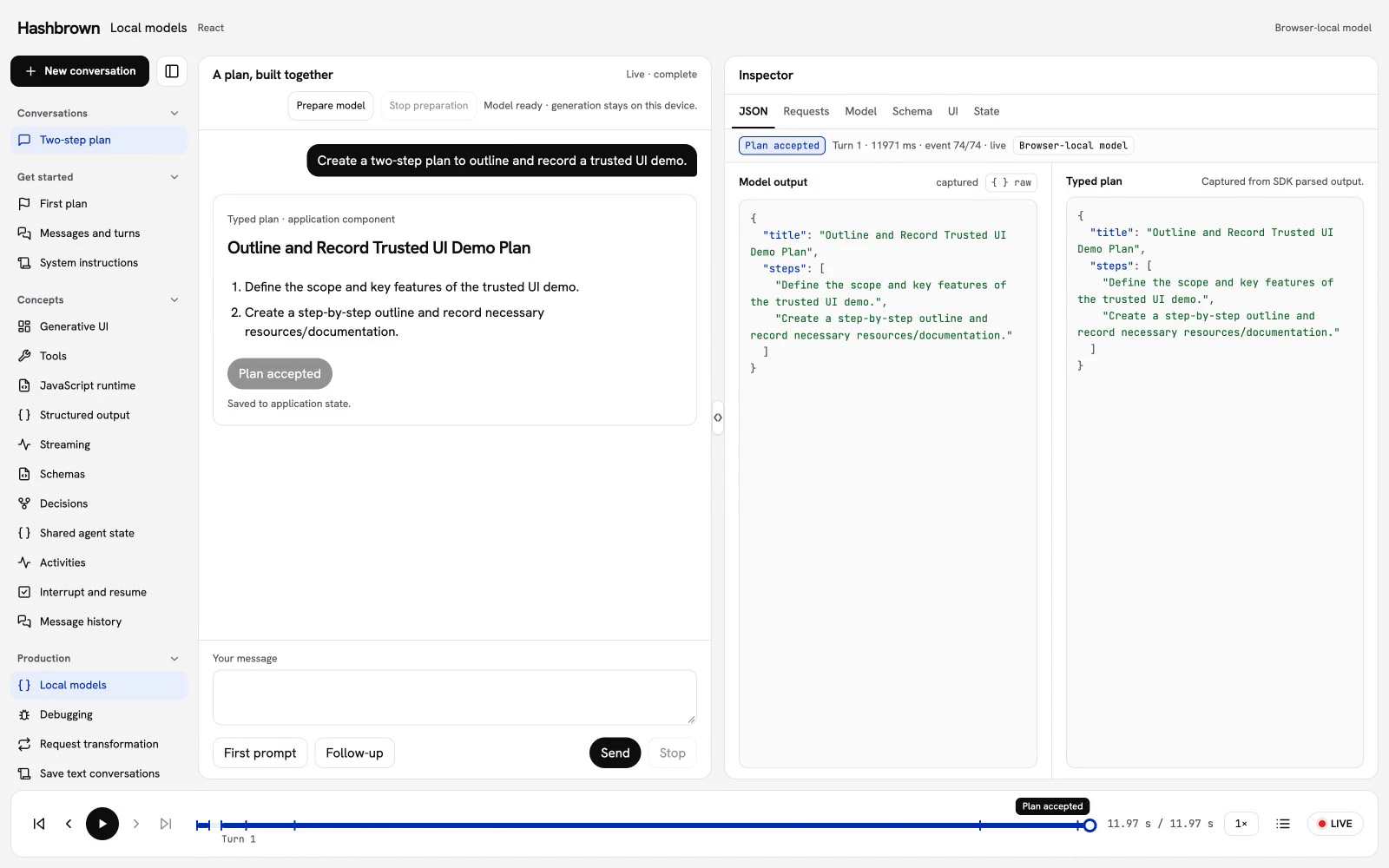
This is a recording of the actual React client using Chrome's model. Replay lets you inspect the captured turn without loading a model or executing the request again. The Angular lesson has its own recording.
Here is what to follow:
- In Requests, inspect the row labeled LOCAL Chrome Prompt API. It contains the effective SDK input and the decoded SDK stream events.
- In JSON and UI, follow the streamed fields into the typed plan preview.
- Find Accept plan, then check State. The application revision advances only after acceptance.
- Inspect the follow-up request. It includes the accepted plan and revision, so the model can propose a shorter second step against current state.
Acceptance checks the original JSON document as well as the parsed fields. It requires exactly two bounded steps, successful current completion, and a matching application revision. A stopped or stale proposal can remain visible without becoming an application write.
Open Source for the lesson's client, preparation controller and transport wrapper. To try a fresh request, use Live on a supported desktop Chrome browser and choose Prepare model. Live preparation may download the browser-managed model; the replay doesn't.
The local lesson uses structured chat with an application-rendered preview. The next examples add an application-owned engine and tools followed by model-selected component UI.
Next, choose an application-owned WebLLM engine
WebLLM is a different ownership model.
Install @mlc-ai/web-llm in your application; Hashbrown doesn't require it as a dependency or peer dependency.
Our measured configuration used WebLLM 0.2.86 with Phi-3.5-vision-instruct-q4f16_1-MLC.
The same model supported our text-only tool tests and our separate image tests.
Create the worker entry point:
// local-worker.ts
import { WebWorkerMLCEngineHandler } from '@mlc-ai/web-llm';

const handler = new WebWorkerMLCEngineHandler();
self.onmessage = (event: MessageEvent) => handler.onmessage(event);
Then load the engine from an explicit Prepare action, outside component render:
// local-engine.ts
import { CreateWebWorkerMLCEngine } from '@mlc-ai/web-llm';
import { experimental_webllm } from '@hashbrownai/core';

export async function prepareEngine() {
  const worker = new Worker(new URL('./local-worker.ts', import.meta.url), {
    type: 'module',
  });
  try {
    const engine = await CreateWebWorkerMLCEngine(
      worker,
      'Phi-3.5-vision-instruct-q4f16_1-MLC',
      { initProgressCallback: (progress) => console.log(progress.text) },
    );
    return { worker, engine, transport: experimental_webllm({ engine }) };
  } catch (error) {
    worker.terminate();
    throw error;
  }
}
Retain the returned resources in your application controller.
Pass transport to the same structured-chat hook instead of the Chrome transport.
This preparation excerpt logs progress; your application should display it and manage preparation cancellation and late completion.
For structured output, Hashbrown sends WebLLM a json_object response format with a JSON-encoded schema string.
It doesn't forward an OpenAI json_schema wrapper.
If generation hits the token limit, the transport raises WEBLLM_OUTPUT_TRUNCATED instead of accepting partial JSON as a completed answer.
Pin the runtime, weights and compatible WASM library together when you need reproducibility.
A model ID pointing to mutable catalog URLs doesn't identify immutable artifacts.
Then, gather data and generate a trusted component
For a counter screen, the application already knows it needs a counter lookup. We select that tool, let the model generate its arguments, and then request the UI.
Given the prepared engine above, select phases with the core transport:
// counter-transport.ts
import {
  experimental_webllm_tools,
  type WebLlmEngine,
} from '@hashbrownai/core';

export function createCounterTransport(engine: WebLlmEngine) {
  return experimental_webllm_tools({
    engine,
    toolPhase({ completedCalls }) {
      if (completedCalls.some((call) => call.result.type === 'error')) {
        throw new Error('The counter lookup failed.');
      }
      return completedCalls.length === 0
        ? { type: 'tool', name: 'read_counter' }
        : { type: 'finalize' };
    },
  });
}
The selector receives the completed calls for the current user turn.
It selects read_counter first and finalization after success.
It doesn't execute the handler itself.
Keep this function pure and keep authorization in the handler.
Now expose a component and declare the tool through the normal React APIs:
// CounterChat.tsx
import { s } from '@hashbrownai/core';
import { exposeComponent, useTool, useUiChat } from '@hashbrownai/react';
import type { createCounterTransport } from './counter-transport';

function CounterCard({ value }: { value: number }) {
  return <output>Current count: {value}</output>;
}

const counterComponent = exposeComponent(CounterCard, {
  name: 'counter',
  description: 'Display the exact counter value returned by read_counter.',
  props: { value: s.number('Current counter value') },
  children: false,
});

export function CounterChat({
  transport,
  readCounter,
}: {
  transport: ReturnType<typeof createCounterTransport>;
  readCounter: (key: string, signal: AbortSignal) => Promise<number>;
}) {
  const lookup = useTool({
    name: 'read_counter',
    description: 'Read a named counter from application state.',
    schema: s.object('Counter lookup', { key: s.string('Counter key') }),
    handler: async ({ key }, signal) => ({
      value: await readCounter(key, signal),
    }),
    deps: [readCounter],
  });
  const chat = useUiChat({
    transport,
    tools: [lookup],
    components: [counterComponent],
    system:
      'Read the requested counter. Render exactly one counter component with the exact returned value.',
  });

  return (
    <section>
      <button
        disabled={chat.isLoading}
        onClick={() =>
          chat.sendMessage({
            role: 'user',
            content: 'Show the orders counter.',
          })
        }
      >
        Show counter
      </button>
      <button disabled={!chat.isLoading} onClick={() => chat.stop()}>
        Stop
      </button>
      {chat.error ? <p>Counter generation failed.</p> : null}
      {chat.messages.map((message, index) =>
        message.role === 'assistant' ? (
          <div key={index}>{message.ui}</div>
        ) : null,
      )}
    </section>
  );
}
Create the transport once from the prepared engine, then supply it and your readCounter implementation to CounterChat.
readCounter should check the key and the user's permissions, and honor the abort signal.
Here is the sequence:
- The application selects
read_counter. - The model generates the argument object, such as
{"key":"orders"}. - Hashbrown buffers the complete arguments and validates them before dispatching the handler.
- The handler reads application state and returns the result.
- The application selects finalization. The model generates component JSON using the tool result.
- Hashbrown parses that JSON and renders your exposed
CounterCardwith validated props.
Tool argument schemas have a stricter supported subset: closed objects with every property required, supported primitives, arrays, enums and anyOf shapes.
Optional object fields, references, format annotations and reserved property names are rejected before inference.
The argument buffer is bounded to 1 MiB of UTF-8.
Invalid, oversized, truncated or cancelled argument generation doesn't dispatch a completed call.
There is no automatic argument repair.
The model never supplies the component's implementation.
The component catalog supplies the final response schema.
You don't turn components into executable tools or provide a second UI schema.
For a data result instead, use useStructuredChat with the same transport and an explicit final schema.
The counter code is a walkthrough of the API. The measured cases below used a Status component and typed results, including dependent lookups.
WebLLM's native tool mode has different restrictions, including supported models and caller-supplied system messages and response formats. Hashbrown's structured-phase transport uses JSON argument generation to preserve those application contracts. Phi-3.5 Vision uses this structured protocol, not WebLLM's native tool mode.
Chrome has a separate experimental native-tool path. For the same application-selected sequence, the transport configuration is:
import { experimental_chrome_tools } from '@hashbrownai/core';

const transport = experimental_chrome_tools({
  schemaFinalization: 'after-tool-planning',
  toolPhase({ completedCalls }) {
    if (completedCalls.some((call) => call.result.type === 'error')) {
      throw new Error('The counter lookup failed.');
    }
    return completedCalls.length === 0
      ? { type: 'tool', name: 'read_counter' }
      : { type: 'finalize' };
  },
});
This requires a browser/model configuration that can actually create a native tool session.
experimental_chrome() alone doesn't enable tools.
Don't treat the experimental tool path as a capability of every stable Prompt API installation.
The Chrome tool guide explains typed history and the finalization policy.
What about images?
Image input is a separate WebLLM opt-in. For an already loaded image-capable engine, your application supplies a resolver:
import {
  experimental_webllm,
  type ExperimentalWebLlmImageTransportOptions,
  type WebLlmImageResolver,
} from '@hashbrownai/core';

export function createImageTransport(
  engine: ExperimentalWebLlmImageTransportOptions['engine'],
  resolveImage: WebLlmImageResolver,
) {
  return experimental_webllm({
    engine,
    media: {
      images: { maxImages: 1, maxBytes: 5 * 1024 * 1024 },
      resolve: resolveImage,
    },
  });
}
The resolver receives each image part and an abort signal, and returns { blob, dispose? }.
It owns access to uploaded files, inline data or permitted network sources.
Hashbrown doesn't fetch arbitrary image URLs implicitly.
The input layout is images followed by trailing text in a user message. Interleaved text/image layouts, audio, documents and media tool results are rejected. The defaults allow 10 MiB and 16 million decoded pixels per image, eight images per run, and 20 MiB of encoded images across the complete history. The example lowers two of those limits. Budget for model context and GPU memory separately.
The image transport and experimental_webllm_tools are separate factories.
The tool-phase factory currently accepts text only.
We haven't qualified a combined image-to-tools-to-UI workflow.
What did we actually test?
Our October 24–26 qualification used an M1 Max with 32 GB RAM and Chrome 155.0.8059.85 on macOS 26.5, as applicable. We tested Angular and React. All counts below come from fixed fixtures on that machine. We haven't measured accuracy across devices or arbitrary prompts.
| Configuration | Observed result | Limit |
|---|---|---|
| Chrome v4 / Gemma 2B with application-controlled phases | Single-component cases passed 16/16 across two fixed samples. | Each full sample passed only 8/10. Nested workflows failed. |
| Chrome default Nano | No-tool smoke passed 6/6; generated image/synthetic audio fixtures passed 4/4. | Native tool-session creation failed. |
| Chrome Gemma E4B | No-tool text/UI smoke passed 6/6. | Tool-session creation failed in Stable and Canary. |
| WebLLM 0.2.86 / Phi-3.5 Vision image input | Two framework cases passed, covering four image requests. | Small generated images; no arbitrary-vision or media-conditioned UI claim. |
| The same WebLLM/model, text-only tool phases | Six cases passed: 14 model requests, eight handlers and six exact final outputs. | Application-selected tools, schemas and single-component UI. |
| Ollama 0.40.11 / qwen2.5:14b Q4_K_M | Provider/compatibility tests passed 7/10; framework tests passed 12/20. | Required calls, exact dependent receipts and terminal-status checks failed. |
The Chrome phase report, WebLLM vision report, WebLLM tool report and Ollama report retain the exact assertions and failures.
For vision, the images contained two red or blue squares. We required the exact color and count in raw JSON, then checked the rendered result and cleanup. We still need photographs and image-conditioned UI cases before recommending those workflows.
The tool tests used fresh values supplied by application handlers, including values absent from the original prompt.
The retained WebLLM tool run used temperature: 0, seed: 1 and max_tokens: 256, with retries disabled.
We checked exact arguments, dependent receipts, canonical history and final component props.
We also checked that readers, sessions and workers settled correctly.
We use aimock and controlled workers for deterministic adapter tests: cancellation, validation, history and cleanup. Real-model suites check the generated answers separately and remain opt-in and local-only. We also inspect published npm packages to verify that the APIs we document actually shipped.
Vision first-token times were 14.57–16.52 seconds in the retained run. The text-only tool requests were 1.23–3.03 seconds. The image and text workloads differ, so these timings aren't a speed comparison. Catalog VRAM estimates and process RSS also don't establish peak GPU allocation.
Where are the gaps and gotchas?
A schema can be valid and still be wrong
Our nested Chrome cases failed in two different ways. One fixed sample failed inside Chrome before a handler ran. Another produced the requested children but chose the wrong panel heading. The renderer displayed what the model returned. A valid tree can still be the wrong answer.
Model identity and availability need their own checks
Our Chrome v4 experiment's manifest identified gemma4-2b-it.
The separately selected E4B experiment identified gemma-4-E4B-it.
The default route identified v3Nano without a parameter count.
Neither a flag named v4 nor a roughly four-gigabyte download establishes a selectable Gemini Nano 4B model. The manifest findings document that distinction.
Nano and E4B reported availability, then failed to create a tool session. The working v4 path emitted empty native call IDs; Hashbrown permits canonical ID synthesis only for a single unambiguous completed call and rejects ambiguous batches before execution. We reported the empty IDs to Chromium; the tracker status wasn't publicly verifiable in this research pass.
Local server compatibility needs real conformance tests
The tested Ollama 0.40.11/model combination failed our complete gates. The structured-tool grammar proposal and Responses truncation proposal were both still open on October 30. The newer 0.40.13 release has not been run through those same gates here. After a protocol fix, we still need to check that the model copies the returned receipt exactly.
Stop, cleanup and privacy belong to the application
The application retains ownership of its WebLLM engine. Only one Hashbrown run can reserve an engine at a time, even across transport instances. Don't call the engine directly while Hashbrown owns a run.
Stop can settle the UI before an interrupted engine stream finishes draining.
An immediate replacement request can briefly fail with MODEL_BUSY.
Handle that state explicitly; don't start a second competing request or unload the engine underneath active work.
Stop active runs and wait for engine generation to drain before calling engine.unload(), then terminate the worker.
Cancelled requests remain in subsequent input with an explicit cancellation marker. The marker tells the model to leave that request alone unless the user asks again. Test Stop followed immediately by another request and assert that an old result cannot update application state.
Inspect every network path. A local model can still call a remote tool, load a remote image or send telemetry. A hosted inference fallback changes where the prompt goes and should be an explicit application decision.
Audio availability and integration are separate
I also had to correct an earlier audio assumption. WebLLM 0.2.86 already contained Gemma E2B audio prebuilds; our earlier audit missed them. We haven't implemented or qualified a Hashbrown WebLLM audio transport. That work remains deferred.
Image-conditioned tools/UI, larger component catalogs and arbitrary nested tool UI still need qualification. Cross-hardware testing also remains deferred.
What changed over the last six months?
From May through October, browser APIs expanded and runtime releases addressed problems we encounter in applications.
- Chrome 148, released May 5, brought the Prompt API to the web with text, image and audio input and constrained text output. Experimental native tools remain a separate capability.
- wllama 3.0 added multimodal input and tools on May 8. 3.1 added WebGPU on May 11. Describing today's wllama as CPU-only misses that work.
- Edge's June 2 announcement introduced the CPU-capable Aion preview. Its requirements and capabilities differ from Edge's Phi default and from Chrome.
- WebLLM 0.2.85 included cache and worker-recovery work in September. Transformers.js 4.3 added experimental constrained generation that month, alongside Safari WebGPU work.
- WebLLM 0.2.86 added Gemma E2B text/audio prebuilds and a Phi-3.5 Vision prefill fix in October. Ollama 0.40.12 and 0.40.13 added LFM3 multimodal/runtime support later in the month.
While researching this post, npm published WebLLM 0.2.87 on October 30. It includes a Qwen3.5 JSON-termination fix. An incorrect stop-token configuration could end generation inside a JSON string. Record the runtime and model configuration together when investigating malformed JSON. Our retained measurements use 0.2.86; 0.2.87 still needs the same qualification gates.
Transformers.js uses ONNX Runtime, whose browser backends have different operator coverage. LM Studio offers a local server with model-dependent structured output and tool support. We haven't qualified either integration in Hashbrown. An OpenAI-shaped endpoint doesn't establish correct history, tool identity or completion behavior.
Cross-browser adoption is still unsettled. The October 27 Prompt API document is a Draft Community Group Report, not a W3C Standard. WebKit recorded opposition in May, including concerns about portability and model-dependent behavior. Application-supplied browser runtimes and a browser-managed Prompt API remain separate approaches.
What might the next six months look like?
For November 2026 through April 2027, I think broader hardware access is a reasonable direction to watch. Chrome's documented CPU path, Edge's Aion preview and smaller task-specific models give that expectation some basis.
I expect runtime authors to keep working on constrained output and recovery. A generation that stops halfway through a JSON string breaks the application, even when the model understood the request. The Qwen fix above is one example of the work still needed.
For Hashbrown, I would prioritize complex UI reliability and image-conditioned workflows before making broader support claims. The qualification should retain exact receipts, raw output and cleanup checks. An upstream release or a larger model should go through the same gates.
I wouldn't plan a product launch around stable native tools or equivalent behavior across browsers by April. Those dates are still anyone's guess.
Conclusion
Local LLMs can power bounded web-application workflows today. Our passing cases include structured extraction, a selected lookup followed by typed output, and a lookup followed by one trusted component.
Start with the smallest workflow your application needs. Choose the runtime and model deliberately, then test the exact behavior before widening the component catalog or adding another phase.
The updated React and Angular guides include the current support matrix and recommendations. The source audit records the primary sources and dated findings behind this post.
If you're building with local models, I'd be interested in your exact browser, model, hardware and workflow. Please share what passed, and what didn't.